Abacus
+
Service Manual
rev 1.09
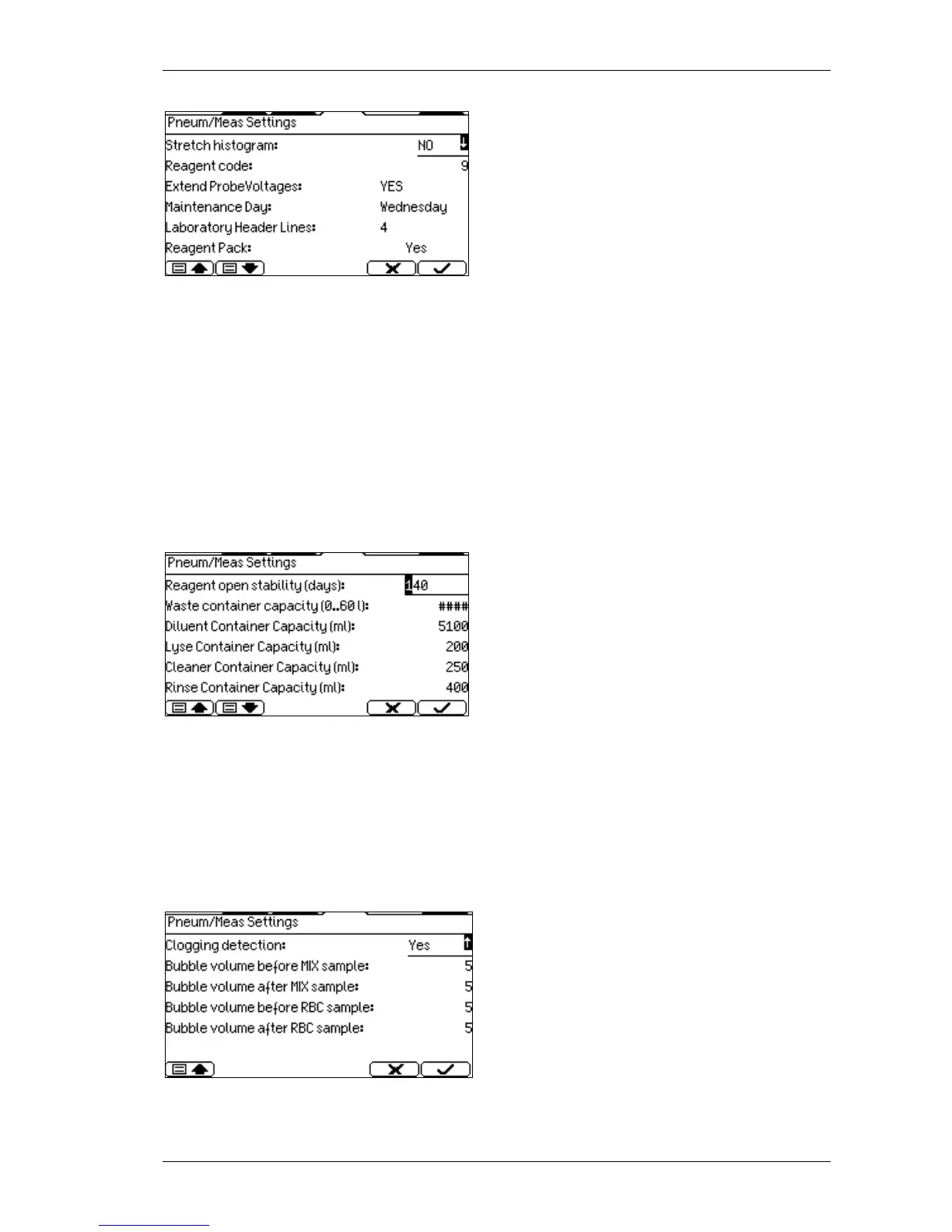
Stretch histogram: setting this option to Yes
will modify the WBC histogram range from 0-
300 fl instead of 0-400 fl (this is recommended
for Veterinary mode).
Reagent code: This code can be used to
modify the offset of the HGB function. Enter a
value between 0 and 30 (default is 9).
Extended Probe Voltages: This option is ON by default. It makes the instrument accept the
physically highest probe voltages to allow operation at lower operating temperature range.
Maintenance day: You can select from week days. According to this setting, the instrument
will ask the user to do weekly maintenance during shut down.
Laboratory header lines: you can choose how many lines to contain the header of the
blood result.
Reagent pack: Using packed reagent in Reagent status menu system displays the reagent
pack installation day and the Reagent open stability period. User can change reagents only
is ignored.
Waste container capacity: it essential to set
the correct volume of the waste container for
proper usage of the softw,
code: 5006. Set this value two liters less than
the total volume of waste container.
Lyse container capacity: Enter here volume of lyse container.
Cleaner container capacity: Enter here volume of cleaner container.
Rinse container capacity: For future development. Enter here 0.
It is possible, but not recommended ignoring the reagent volume check entering 0 as volume
of containers.
Clogging detections, bubble volumes for
development, do not touch them!



 To Next Page