DVR Server Manual
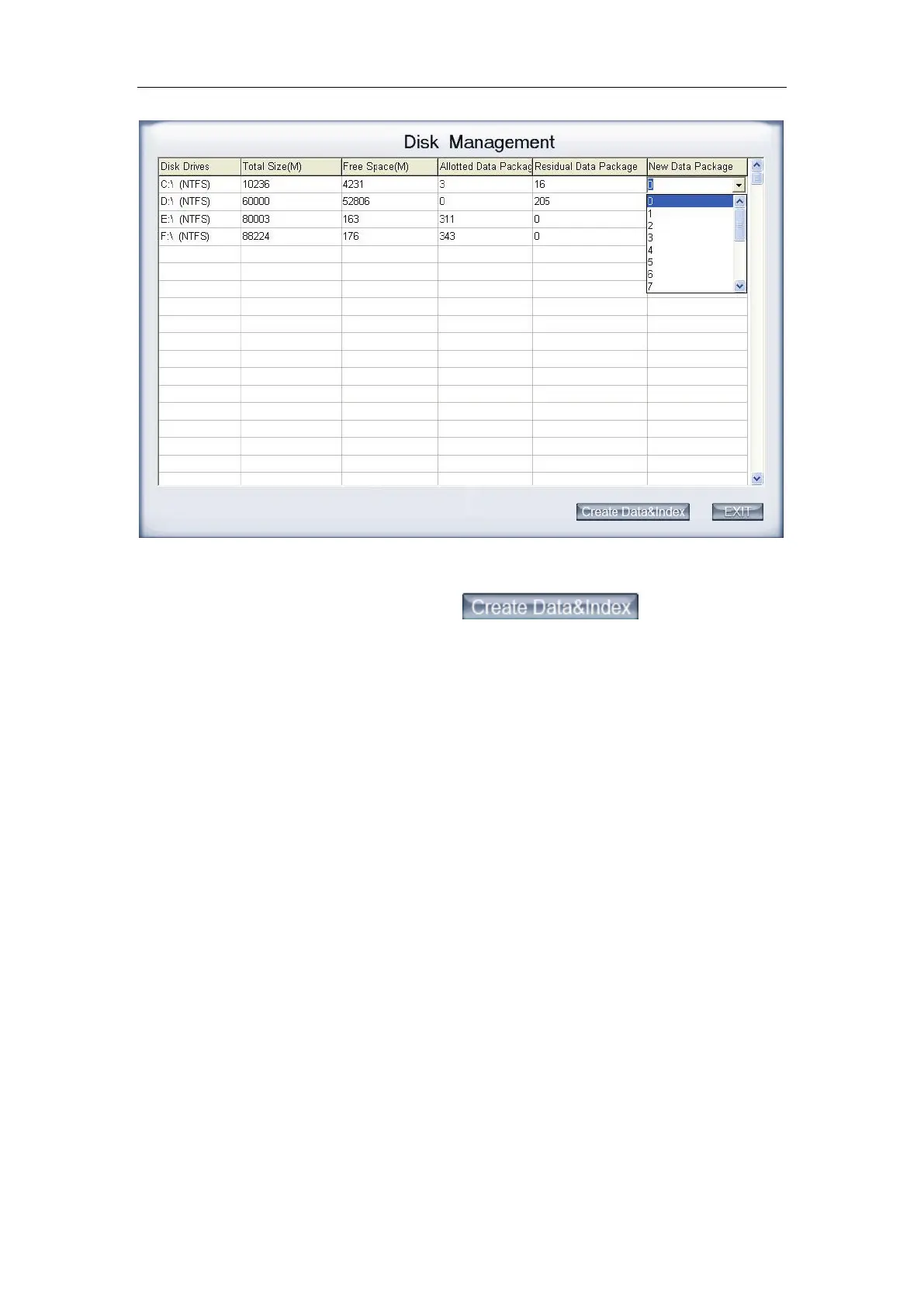
User can select the number of data package for each disk in the
drop-down list. Then user can press
button to create
data package and index for recording. After that, software could calculate the
rest space automatically.
Note:
1) Please format the whole disk thoroughly before using it to be
recorded.
2) Each package for recording (Recdata****.mp4) is 256MB, and it is
associated with its index file (RecIndex****.inx). They must work
together, or user can’t playback recording data correctly. Also, user
can’t modify them unless deleting them together manually.
3) By default, disk C and Disk D are used for system application, so our
software will not use it (default: 【New Data Package】= 0) unless you
change it.
4) Since windows will pop up information to warn when the disk has low
space, by default, our software will leave 3 packages (about
256*3=768 MB) for disks (except C and D) to avoid that information.
That is to say, the default value of disks (except C and D):
【
New Data Package
】
=
【
Residual Data Package
】
-3
5) Software will cost much more time to create data package and index
for FAT32 system than that for NTSC.
6) After the data package created, user can’t delete the data package
through disk manager, user just can delete them manually, and it is



 To Next Page