DVR Server Manual
Press or button to see the recorded data of other cameras,
The red bar means the exact time when system is playing back now.
4.3 Play file and related operations
Press this button to set partition mode of Window, I there are 1,4,
9and 16 splits. To reduce the load of CPU and get best effect, you should
select the partition mode according to the record channels amount and
resolution. There is a referenced configuration sample as below:
Computer configuration:
CPU: Intel Pentium 4 2.4GHz
Motherboard: ECS 848P-A
Graphic Card: ATI 9550 128MB
Memory: 512MB
HDD: 120G (IDE)
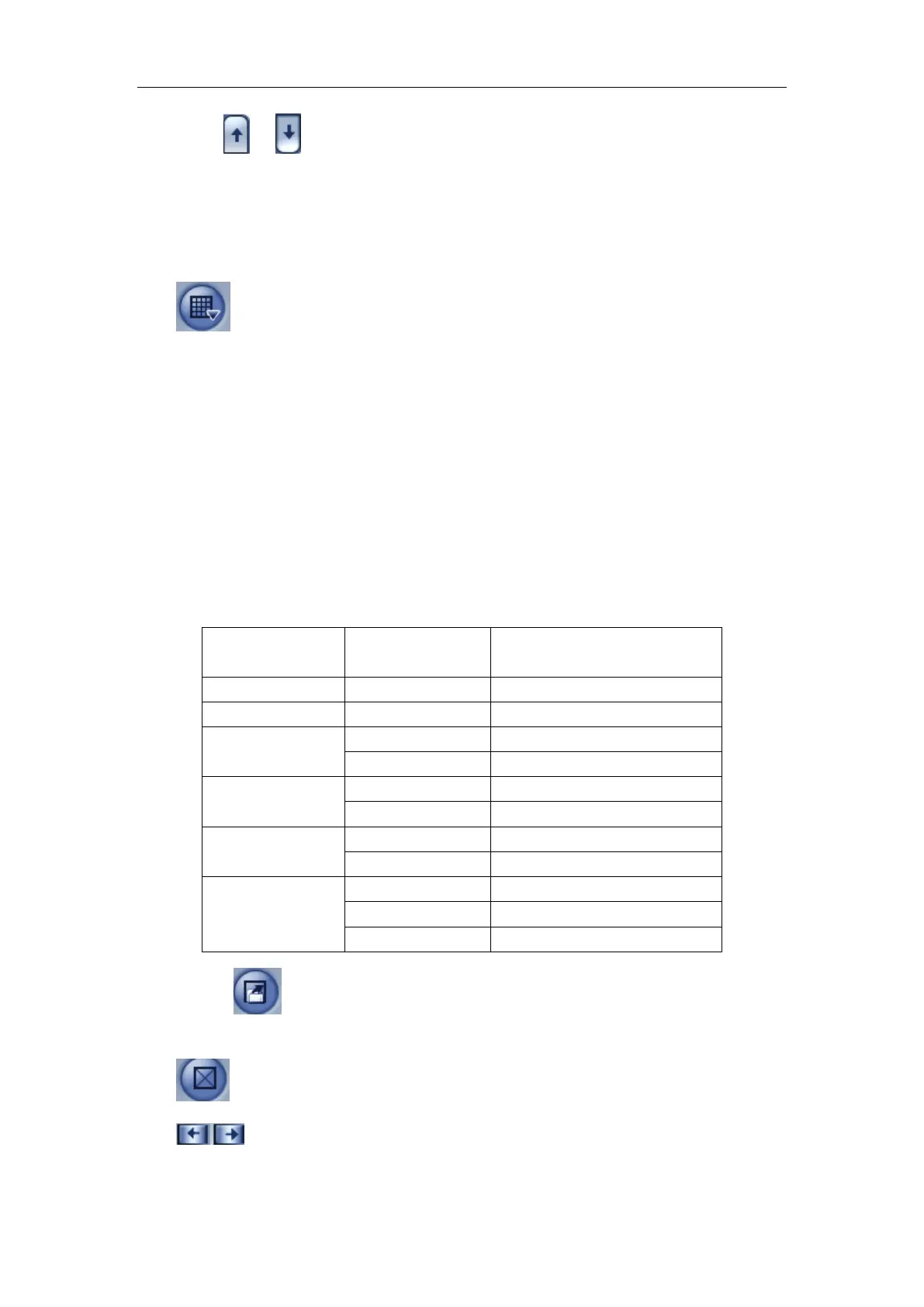
Recommended channel configuration for playback:
DVR Board
Channels
Record
Resolution
Recommended Playback
Channels
64 CIF 4
48 CIF 4
40
DCIF 4
CIF 4
32
DCIF 4
CIF 9
24
DCIF 9
CIF 16
Less or Equal
to16
4CIF 4
DCIF 9
CIF 16
Press button to open all playback windows in sequence according
to the order of the cameras.
Press this button to close all playback windows.
Previous / Next Minute: press this two buttons to look previous or
next minute.



 To Next Page