DINO 210XT
29
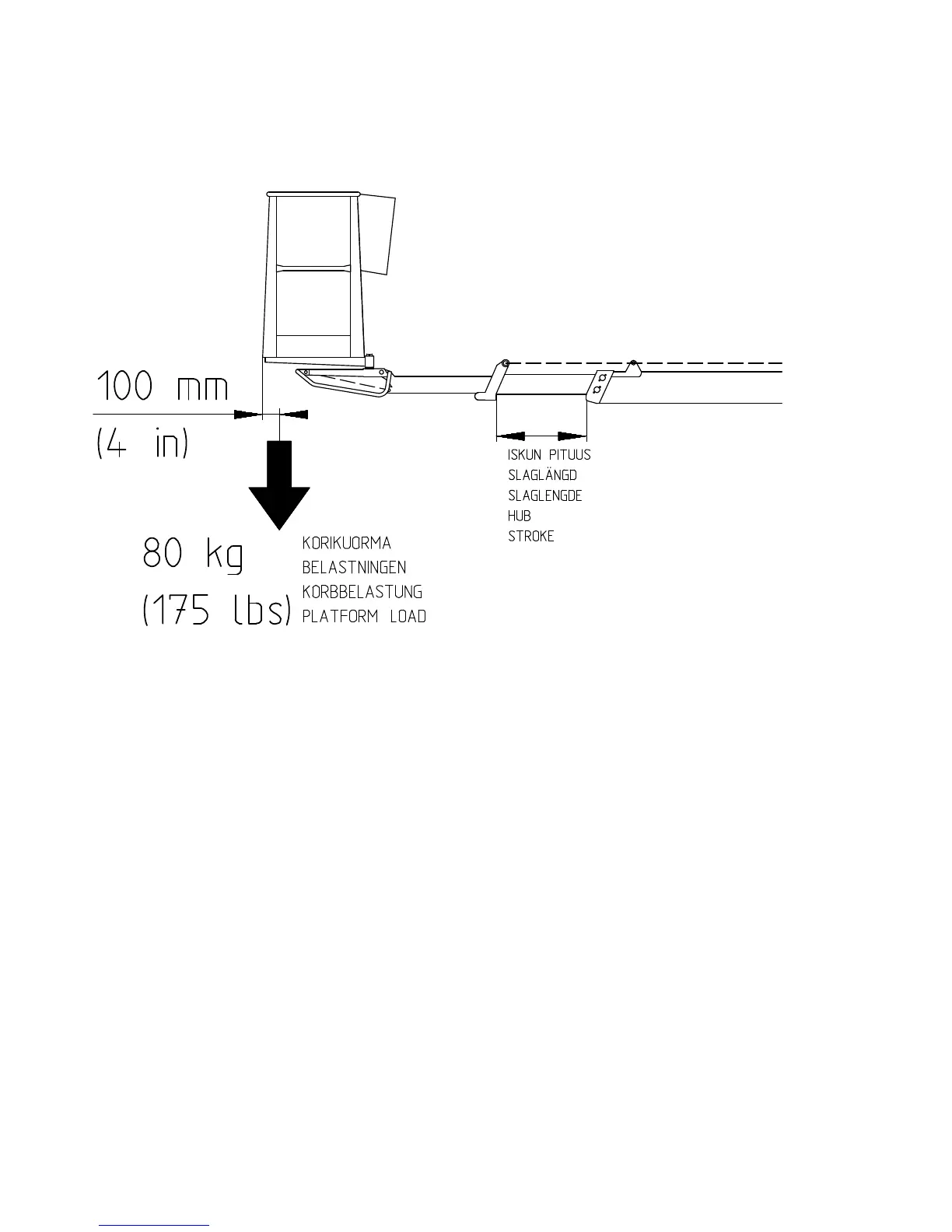
12. Test the operation of the overload limit switch RK4
- platform load about 80 kg
- drive the boom to a horizontal position
- extend the telescope
As the movement stops the red overload light (18) must light up.
- compare the outreach with the figures in the reach diagram (page 59) in this manual.
12A. Measures to be taken after overloading has occurred
- (The overload limit switch RK5 switches off the electric circuit of the operating controls
and switches on the buzzer on the platform)
- retract the platform to inside the operating range of the RK4 by pushing the ”telescope
in” -button (31 or 36) (the green light lights up)
- after this the lift may be operated normally
WARNING!
Do not add load (e.g. another person) onto the platform while the red overload light (18) is lit.
Example: A person, who is working alone on the platform, extends the telescope, or an empty
platform is driven from the chassis control panel to the maximum reach keeping it close to the
ground. If the overload signal light now lights up, the telescope must be retracted before loading the
platform further.
IF THE SAFETY DEVICES OR THE EMERGENCY DESCENT SYSTEM ARE NOT
WORKING, HAVE THEM REPAIRED BEFORE OPERATING THE LIFT!
13. Refer to the item "Daily inspections" in the task list for servicing


 To Next Page