MTG200 Trunk Gateway User Manual | Dinstar
9
2.3 Cabling of E1/T1 Port
If there is a need to deploy multiple cables, it had better to make a mark on each cable and
write down IP address and destination port in order to simplify the follow-up connection,
debugging and maintenance.
2.3.1 How to make RJ-48 joint for E1/T1 Cable
1. Prepare a twisted-pair cable with a length of at least 0.6 meters, and then remove the shuck
of the cable as follows:
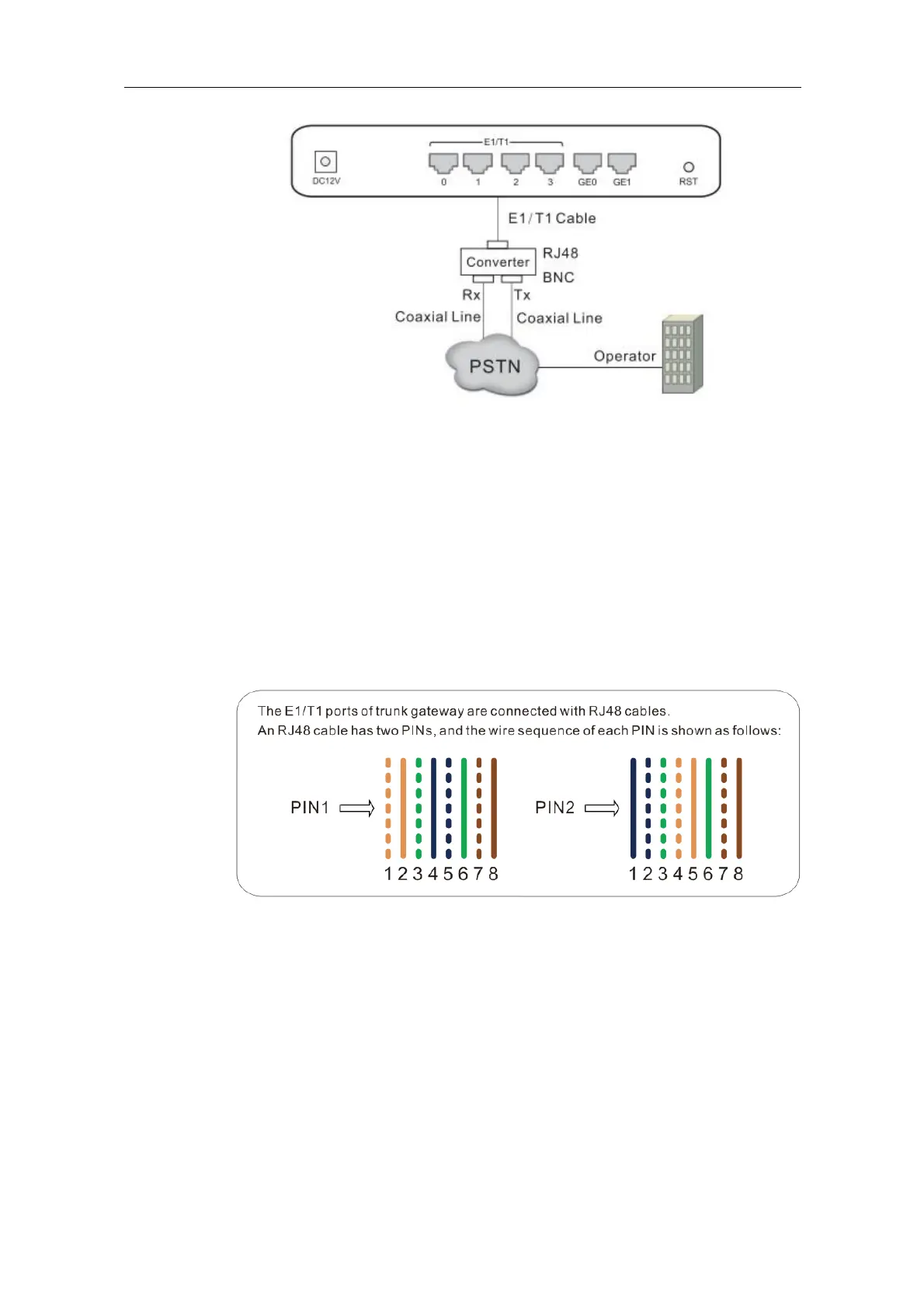
2. Sequence the lines of the cable according to the following figure.
PIN1: orange & white, orange, green & white, blue, blue & white, green, brown &
white, brown.
PIN2: blue, blue & white, green & white, orange & white, orange, green, brown &
white, brown.
3. Put the lines into two pins of RJ-48 joint according to the mentioned sequence of the lines.
4. Use a RJ-48 wire crimper to crimp the RJ-48 joint.















 To Next Page