Entrematic Canada Inc.
Toll Free: 1-877-348-6837
info.ditec.ca@entrematic.com
www.ditecentrematic.ca
Entrematic USA Inc.
Toll Free: 1-866-901-4284
info.ditec.us@entrematic.com
www.ditecentrematic.us
8.2 Header Cover Installation
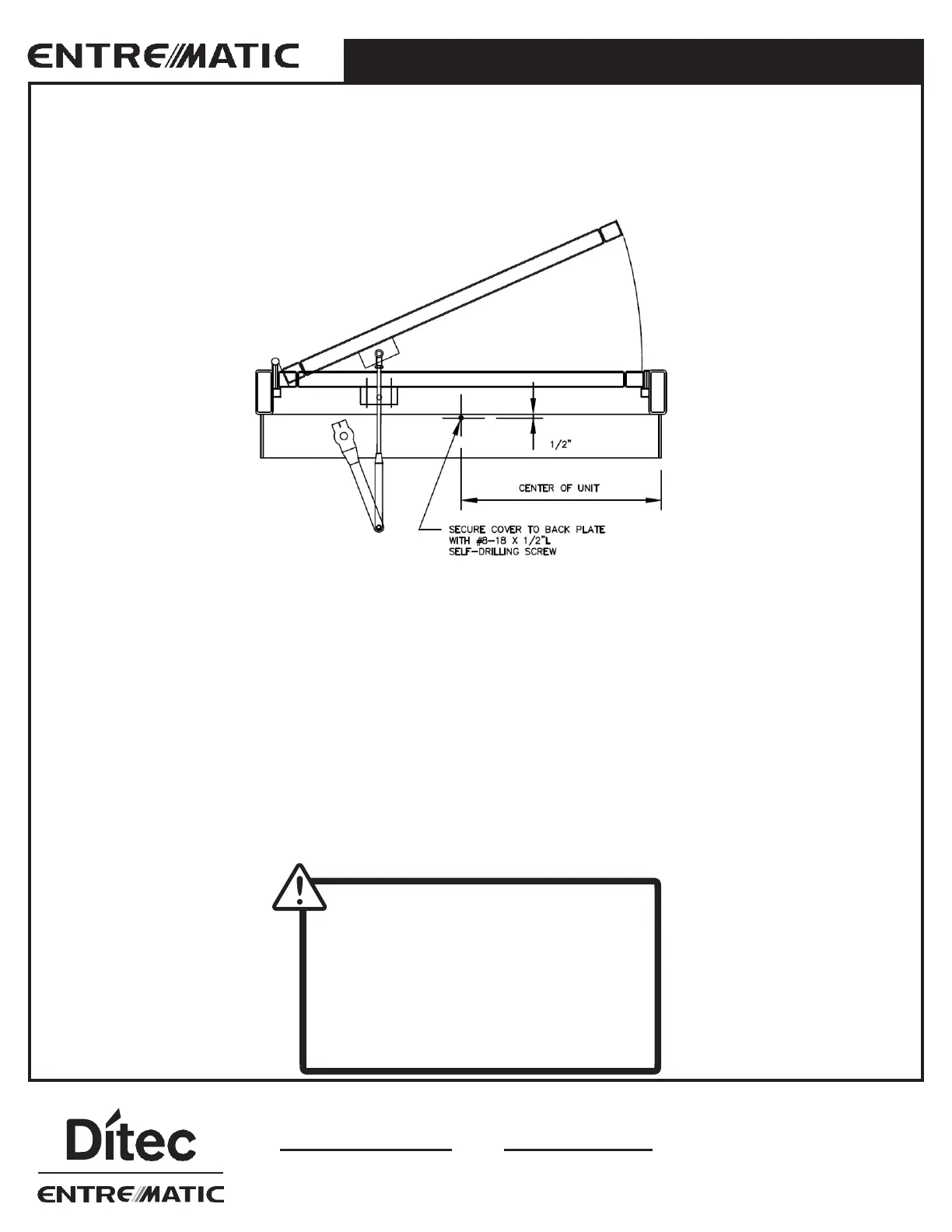
After all adjustments have been finished, the face cover must be installed to the header box. Align cover over header back
plate. Make sure side caps on the cover are aligned with in caps on header back plate, then push on. The cover will snap
in place. Check for gaps all around to make sure cover is fully seated. To secure cover to back plate, use a #8-18 x ½” L
Self-Drilling Screw on the underside of the cover located ½” (1mm) from the back edge, at center of the unit, see below.
Bottom View
8.3 Safety Decals
Install all safety, traffic control, and instruction decals to the door as required. This is very important. Failure to do this
leaves the installer LIABLE for any accident that might occur. This must be done!
A summary of the ANSI standard A156.19 requirements for safety decals is as follows:
Each decal shall be mounted on the door at a height of 50 ± 12" (1270 ± 305 mm) from the floor to the center line of
the sign. The sign chosen will depend on the classification of the door operator.
Clean the area well before applying the decal. Remove the upper portion of the backing and roll the decal onto the door in
a slow motion. Check to confirm the decal is straight. Use a fat edged soft spreader to smooth out the decal. Remove the
lower backing from the decal and smooth out any air pockets.
After all adjustments have been finished, the face cover must be installed to the back plate by snapping cover into position.
WARNING
!
Before leaving the job site,
•
Clean up the work area
•
Make sure all bolts are tight
•
Clean glass
•
Install safety decals




 To Next Page