Removing and Replacing the Cooling Fans
5-10 72A-2337-01 Rev. B 11/05
11. Replace the capture rail.
12. Attach the power cord and turn the instrument on.If the new board is a current amplifier,
verify that the healthy status indicator light on the left side of the board is ON.
Removing and Replacing the Cooling Fans
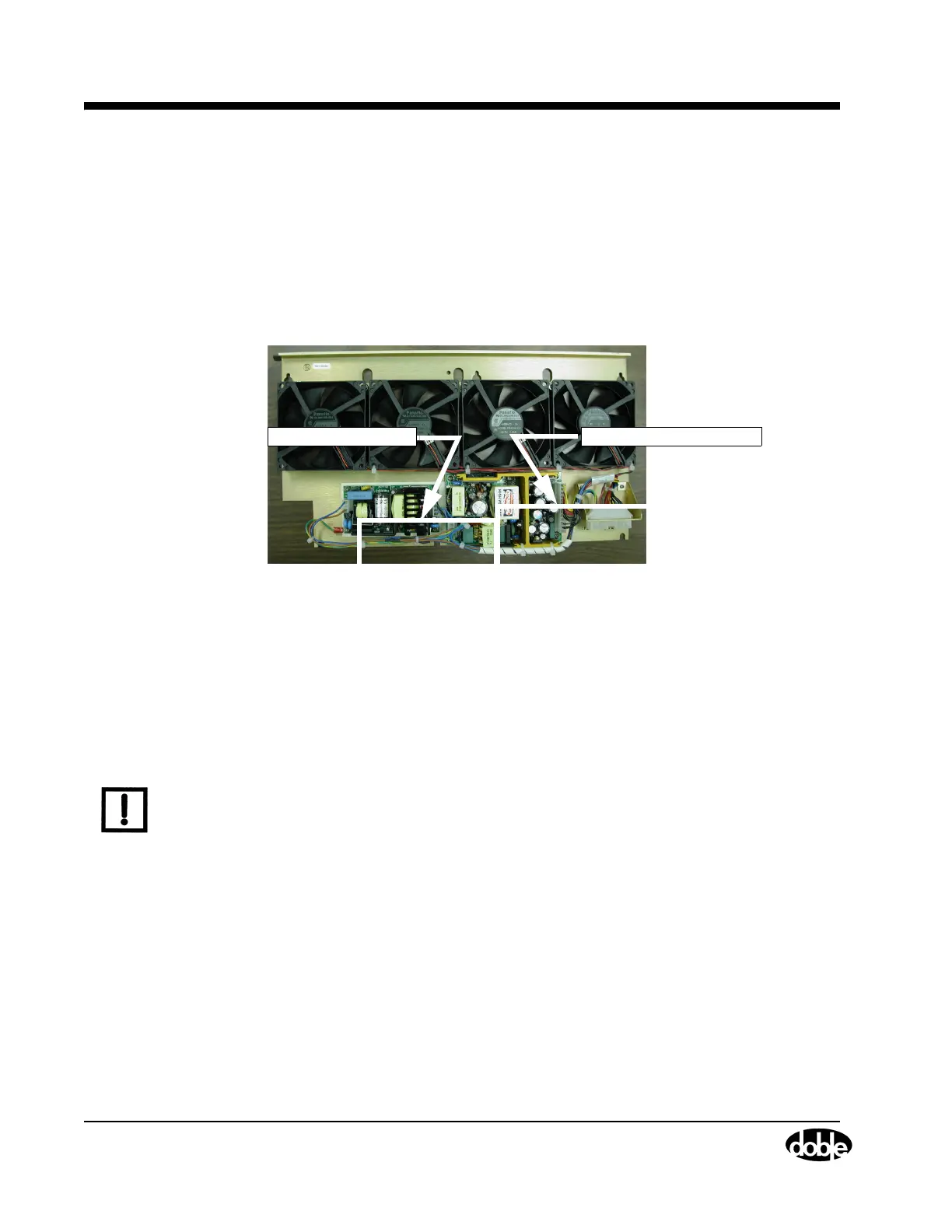
The fan assembly has an integral power supply with two power modules; one provides - 12 Vdc
and another provides +5 and +12
Vdc. They are located at the bottom of this unit (Figure 5.10).
.
Power Module [-12 Vdc]
Power Module [+12
&
+5 Vdc ]
Figure 5.10 Fan Assembly with Integral Power Supply
Unlike the initial style fan assembly, all the steps in the removal procedure for the new style are
performed inside the enclosure. Use these steps:
1. Turn the instrument off.
2. Remove the power cord.
3. Remove the instrument cover.
4. Remove the two Phillips head screws that hold the top retaining bracket (Figure 5.11)
NOTE The two screws that secure the retaining bracket are of different length. When the bracket is
replaced during reassembly, put each screw in its original position.



 To Next Page