CONTROLLER ANTILOCK BRAKE INPUTS
• Wheel speed sensors (four)
• Brake lamp switch
• Ignition switch
• System relay voltage
• Ground
• Diagnostic communication (PCI)
CONTROLLER ANTILOCK BRAKE OUTPUTS
• Amber ABS warning indicator lamp actuation
(through ABS relay in the PDC)
• Red BRAKE warning indicator lamp actuation
(through Brake Warning Lamp relay in the PDC)
• Diagnostic communication (PCI)
REMOVAL
(1) Disconnect battery negative (-) terminal.
(2) Raise vehicle. (Refer to LUBRICATION &
MAINTENANCE/HOISTING - STANDARD PROCE-
DURE)
(3) Remove left front tire and wheel assembly.
(Refer to 22 - TIRES/WHEELS - REMOVAL)
(4) Remove access panel in forward portion of left
front wheel well.
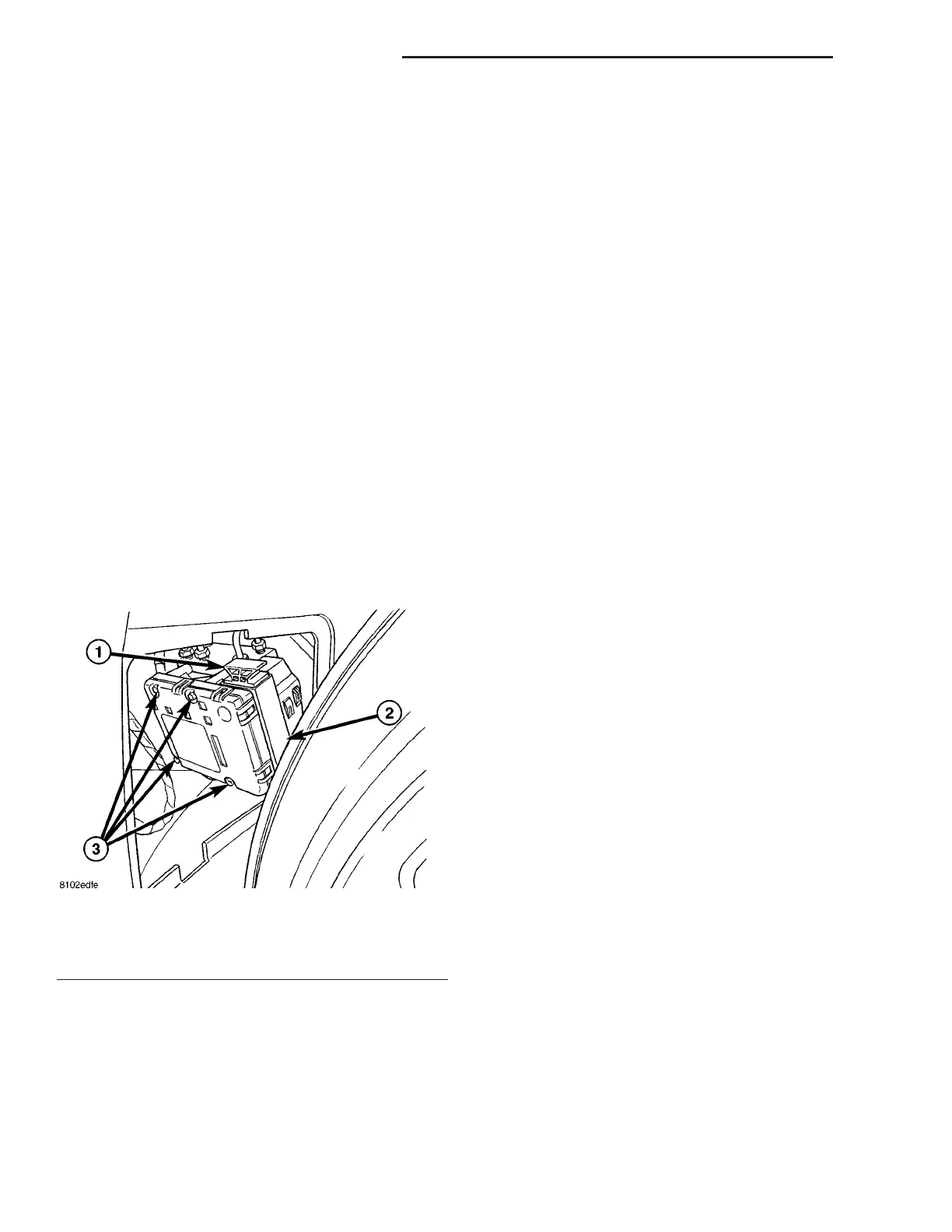
(5) Pull outward on connector lock and disconnect
24-way connector at CAB (Fig. 2).
(6) Disconnect pump/motor wiring harness connec-
tor at CAB (Fig. 1).
(7) Remove four CAB mounting bolts (Fig. 2).
(8) Slide CAB off HCU and remove.
INSTALLATION
(1) Install CAB onto HCU.
(2) Install four CAB mounting bolts and tighten to
2 N·m (17 in. lbs.) torque (Fig. 2).
(3) Connect pump/motor wiring connector (Fig. 1).
CAUTION: Before installing the 24-way connector in
the CAB, be sure the seal is properly installed in
the connector.
(4) Install 24-way connector into socket of CAB as
follows:
(a) Position 24-way connector in socket of CAB
and carefully push it down as far as possible.
(b) Once connector is fully seated into CAB
socket, push connector lock inward. This pulls con-
nector into socket of CAB and locks it in place.
(5) Install access panel in forward portion of left
front wheel well.
(6) Install tire and wheel assembly (Refer to 22 -
TIRES/WHEELS - INSTALLATION). Progressively
tighten the wheel mounting nuts in the proper
sequence to 122 N·m (90 ft. lbs.) torque.
(7) Lower vehicle.
(8) Reconnect battery negative (-) terminal.
(9) Connect DRBIIIt to data link connector below
steering column to initialize new CAB. Check for any
faults.
(10) Road test vehicle to ensure proper operation
of ABS.
DATA LINK CONNECTOR
DESCRIPTION
The data link connector is located inside the vehi-
cle, below the instrument panel.
OPERATION
The data link connector (diagnostic connector)
links the DRBIIIt scan tool with the On-Board Diag-
nostics (OBD) and allows the DRBIIIt to communi-
cate with the vehicle modules.
POWERTRAIN CONTROL
MODULE
DESCRIPTION
OPERATION - SENSOR RETURN - PCM INPUT
The sensor return circuit provides a low electrical
noise ground reference for all of the systems sensors.
The sensor return circuit connects to internal ground
circuits within the Powertrain Control Module
(PCM).
Fig. 2 CAB Mounting
1 - CONNECTOR LOCK
2 - 24-WAY CONNECTOR
3 - CAB MOUNTING SCREWS
8E - 4 ELECTRONIC CONTROL MODULES ZB
CONTROLLER ANTILOCK BRAKE (Continued)










 To Next Page