WIPER/WASHER SWITCH
REMOVAL
(1) Remove the Multi-Function Switch from the
vehicle. Refer to Electrical, Lamps/Lighting - Exte-
rior, Multi-Function Switch, Removal.
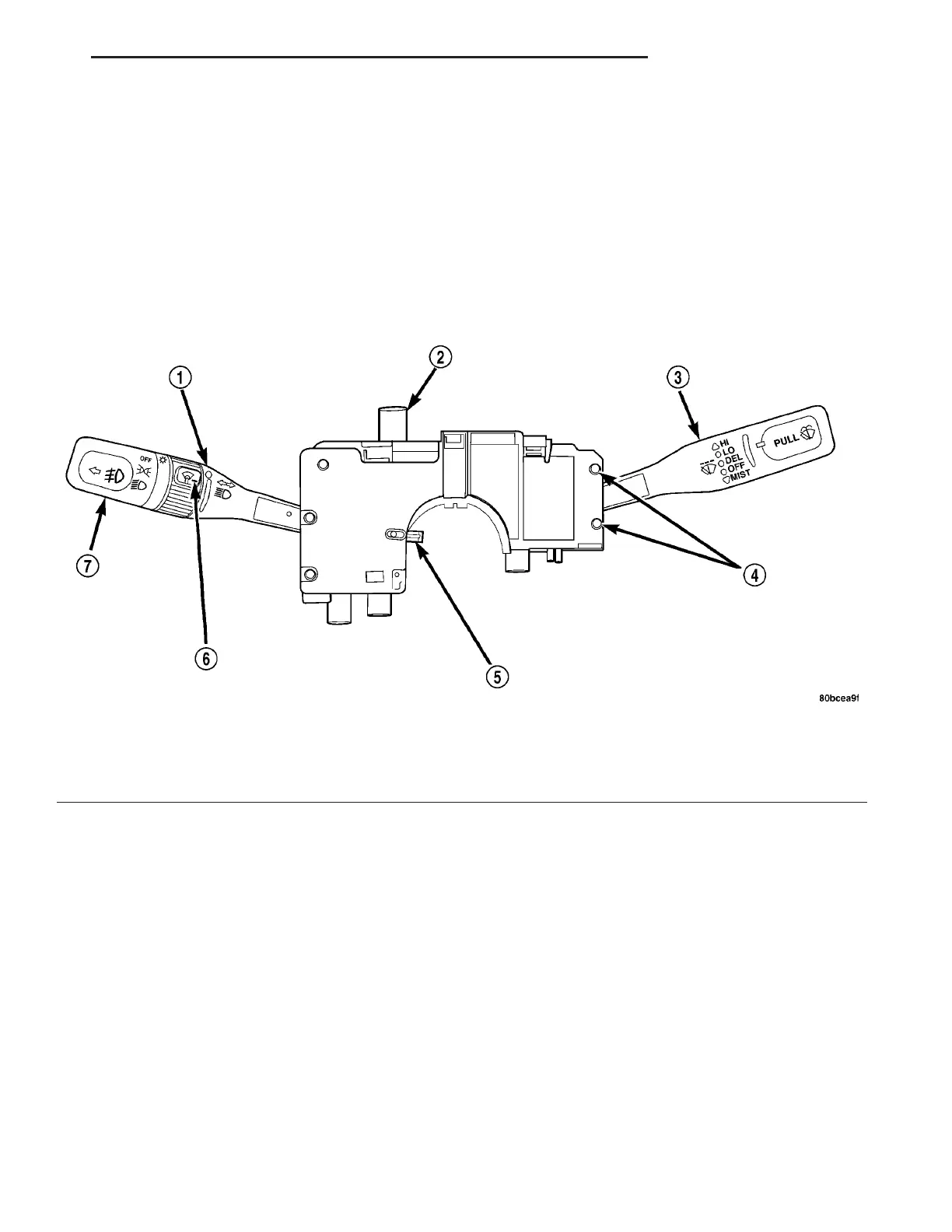
(2) Remove the two retaining screws to the Wiper/
Washer Switch (Fig. 7).
(3) Separate the two switches.
INSTALLATION
(1) Attach the two switches.
(2) Install the two retaining screws to the Wiper/
Washer Switch.
(3) Install the Multi-Function Switch from the
vehicle. Refer to Electrical, Lamps/Lighting - Exte-
rior, Multi-Function Switch, Installation.
Fig. 7 MULTI-FUNCTION SWITCH
1 - TURN SIGNAL CONTROL STALK 5 - CANCELLING CAM
2 - HAZARD WARNING SWITCH 6 - PANEL DIMMER/INTERIOR LIGHT SWITCH
3 - WINDSHIELD WIPER/WASHER CONTROL 7 - EXTERIOR LIGHTING CONTROL/FOG LAMP
4 - WINDSHIELD WIPER/WASHER SWITCH RETAINING SCREWS
ZB WIPERS/WASHERS 8R - 9














 To Next Page