15 | Examples of settings
D-ISC 100 x xx2
175
D‑ISC100 menu path:
Standard display (menu1) (menu4) [Channelsetup]
[Channelsetup] (menu4.1) (menu4.3.1)
e.g.
[Analogue output] (menu4.3.AO0 internal)
(menu4.3.AO0.1)
[Assign source measuring values] (menu4.3.AO0.2)
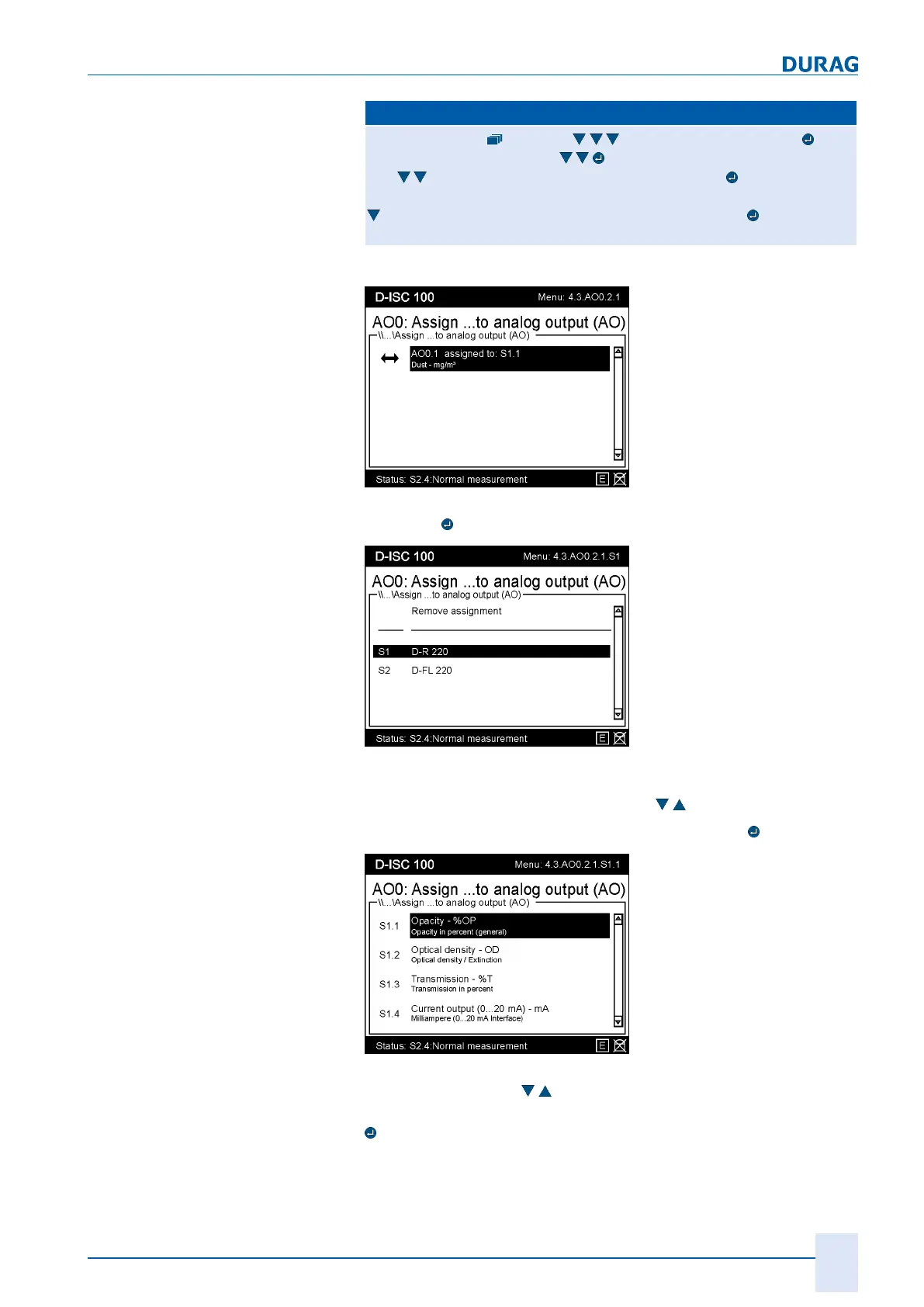
= AO0.1 assigned to …MENU4.3.AO0.2.1
Fig.15.32: AOx assignment I
Press the
key.
Fig.15.33: AOx assignment II
In this menu, a selection list is displayed, from which an entry
can be selected using the arrow keys (
).
The selected entry can be opened by pressing the
key:
Fig.15.34: AOx assignment III
Use the arrow keys (
) to select an entry from the list shown
above. The assignment of an entry is performed by pressing the
key. This
● Saves the setting,
● Updates the display and



 To Next Page
 Loading...