Eaton Static Transfer Switch 2000A 3-Pole Installation and Operation Manual 164001127—Rev 01 37
Only one user can be logged into the STS at a time. While logged in, a user’s access level applies to all actions
taken at the display.
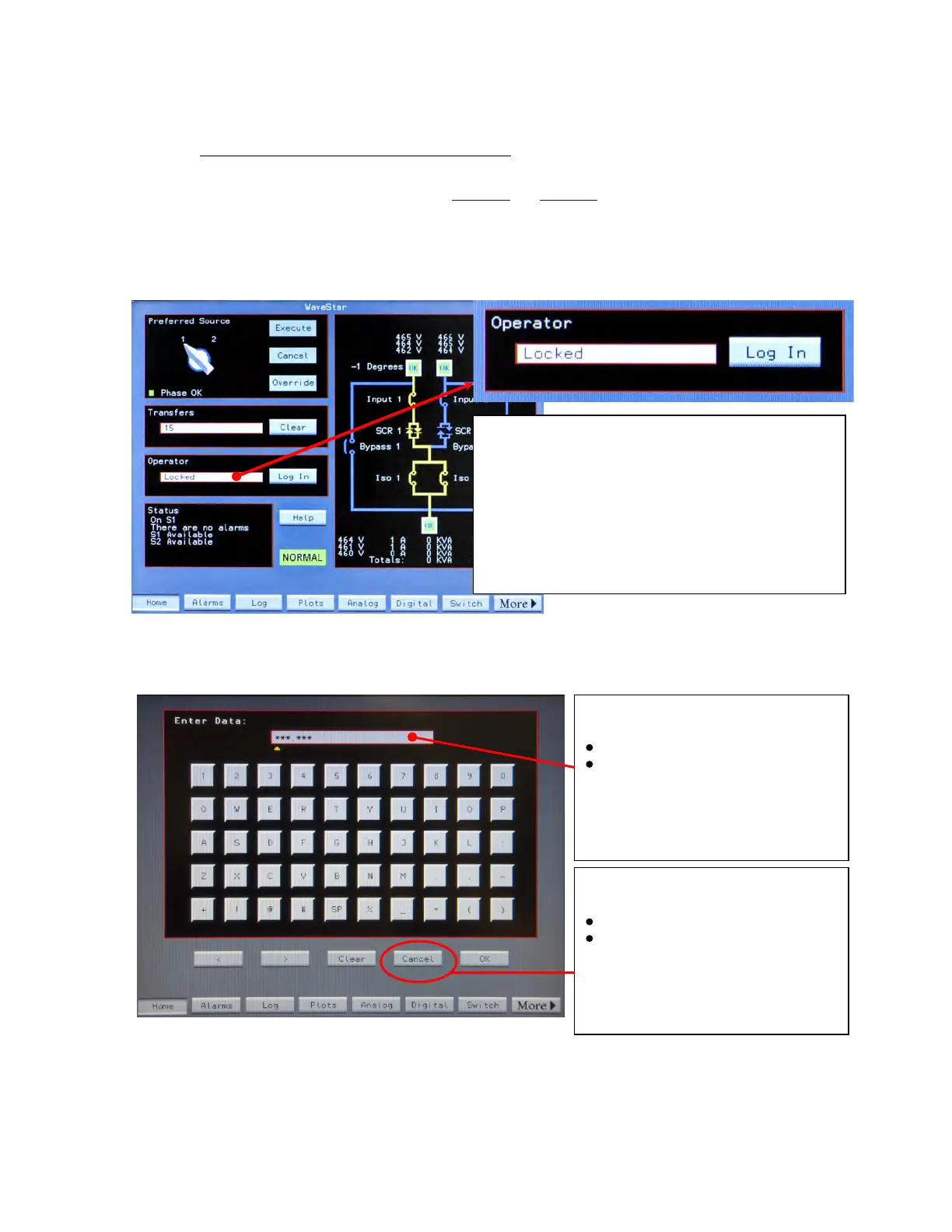
To log in or log out, follow instructions in Figure 14 and Figure 15. Every time a user logs in or out, the event is
recorded in the Event Log. After five (5) minutes of operator inactivity, the display reverts to the Home screen
and the active user is logged out to prevent inadvertent or non-authorized operator access.
Figure 14. Logging in from the Home Screen
Log in from the Operator box on Home.
When no-one is logged in, the Operator function is
Locked.
When a user is logged in, the user name appears in the
Operator box.
Only one user at a time can be logged into the STS.
Figure 15. Keyboard Screen
To Log in:
Touch Log In on Home screen
Enter PIN.Password on Keyboard
screen, then OK.
To Log out:
User name appears in Operator box on
Home screen.
Touch Log In on Home screen
Touch Cancel on Keyboard screen
The display returns to Home screen and
Operator box reads “Locked” on Home
screen.
Operational Interfaces














 To Next Page