137
Audio Operations
137
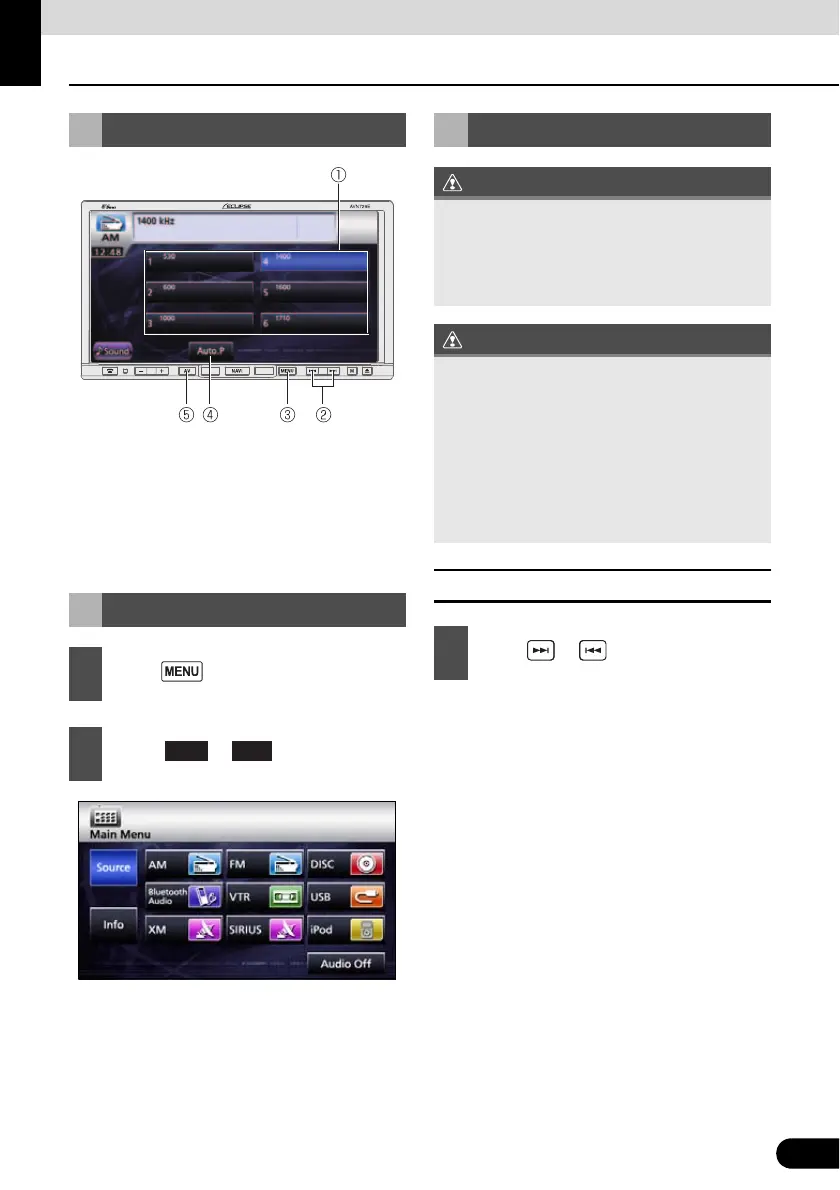
Using Radio
a Preset switch
b TUNE UP/DOWN button
c MENU button
d AUTO.P switch
e AV button
■ Manual Tuning
● To the right:
Move up one step.
To the left:
Move down one step.
Using Radio
Listening to Radio
1
Press .
2
Touch or .
AM FM
Tune a Desired Station.
If the vehicle's battery is disconnected (for
repairs to the vehicle or for removing the
main unit), all the stations held in the
memory will be lost. In such a case, set
stations in the memory again.
At times, it may be difficult to maintain
optimum reception because the antenna
affixed to your vehicle is in motion constantly
(relative to the broadcast antenna), and
encounters continuous variation in the
strength of received radio signals. Other
factors affecting reception include
interference from natural obstacles, sign
posts, etc.
1
Press or .



 To Next Page