140
140
Audio Operations
Using HD Radio
When the optional HD Radio tuner is
connected you can receive HD Radio.
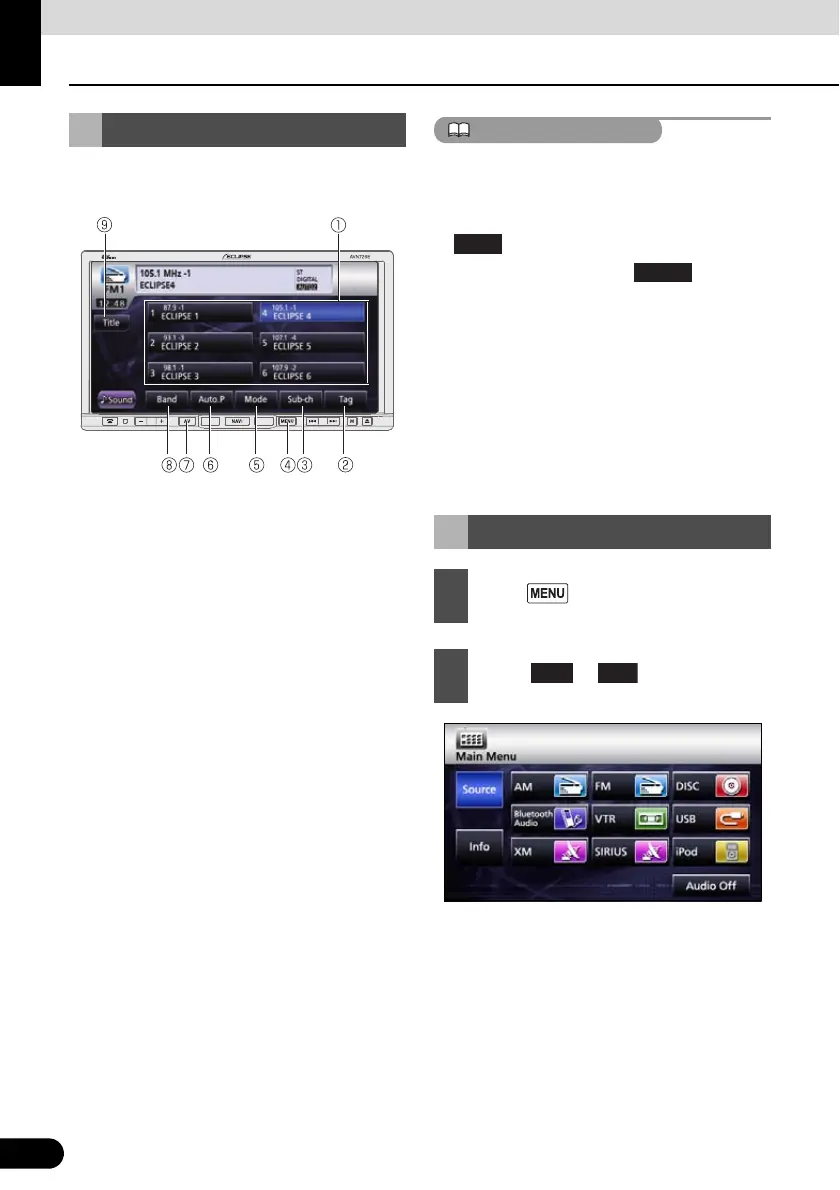
a Preset switch
b TAG switch
c Sub-ch switch
d MENU button
e Mode switch
f AUTO.P switch
g AV button
h Band switch
i Title switch
● When an HD Radio tuner is connected and
receiving a digital station, “DIGITAL”
appears.
● When an HD Radio tuner is connected,
is enabled.
● By repeatedly touching , you can
cycle through the receiving modes as
follows.
AUTO1 J AUTO2 J OFF J AUTO1 J …
● AUTO1: Receive while giving priority to
digital stations
AUTO2: Receive while giving priority to
digital stations, limit SEEK to digital stations.
OFF: Receive analog stations
● The HD Radio logo is a registered trademark
of iBiquity Digital Corp.
Using HD Radio
Listening to Radio
1
Press .
2
Touch or .
Mode
AM



 To Next Page