155
Audio Operations
155
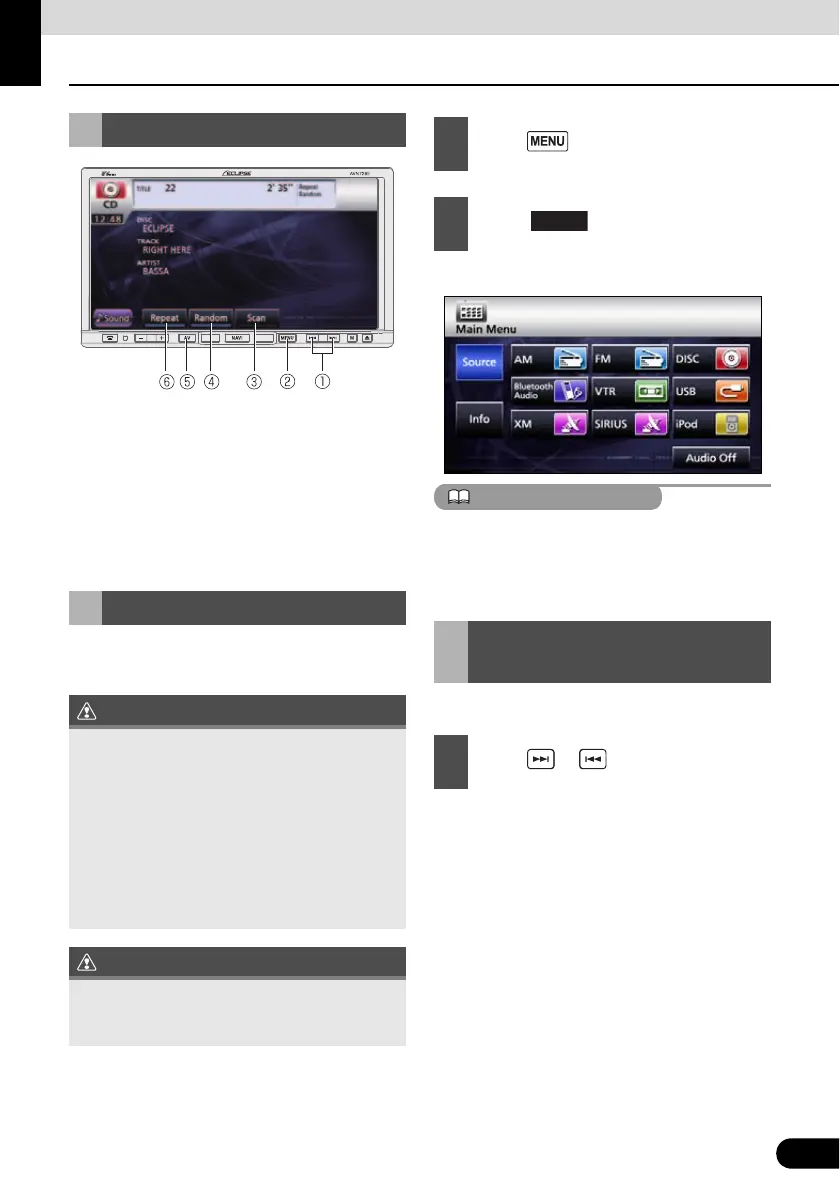
Using CD Player
a Track UP/DOWN, Fast UP/DOWN button
b MENU button
c Scan switch
d Random switch
e AV button
f Repeat switch
Insert a CD into the disc slot, and it will start
playing.
● The disc starts to play.
● If track titles and other data are recorded in
the CD-Text format, you can display them.
● Note that the CD-Text of a CD-R/RW disc
may not be displayed.
You can cue a desired track.
● Right: Advances to the next track.
Left (pressing once): Returns to the
beginning of the track being played.
Left (pressing more than two times):
Returns to the previous track.
Using CD Player
Listening to CD
● Do not press the [e(OPEN/EJECT)]
button when you are inserting a CD into
disc slot. This may cause a personal injury
or damage the front panel.
● Do not drive your vehicle while the front
panel of this receiver is open. The panel
may cause personal injury in the case of a
sudden stop or similar event.
● Do not attempt to close the front panel by
hand. Doing so may damage the panel.
Playback may be intermittent when there is a
scratch on a CD or when the recorded side is
dirty.
1
Press .
2
Touch .
Selecting Track to Listen
to
1
Press or .



 To Next Page