29
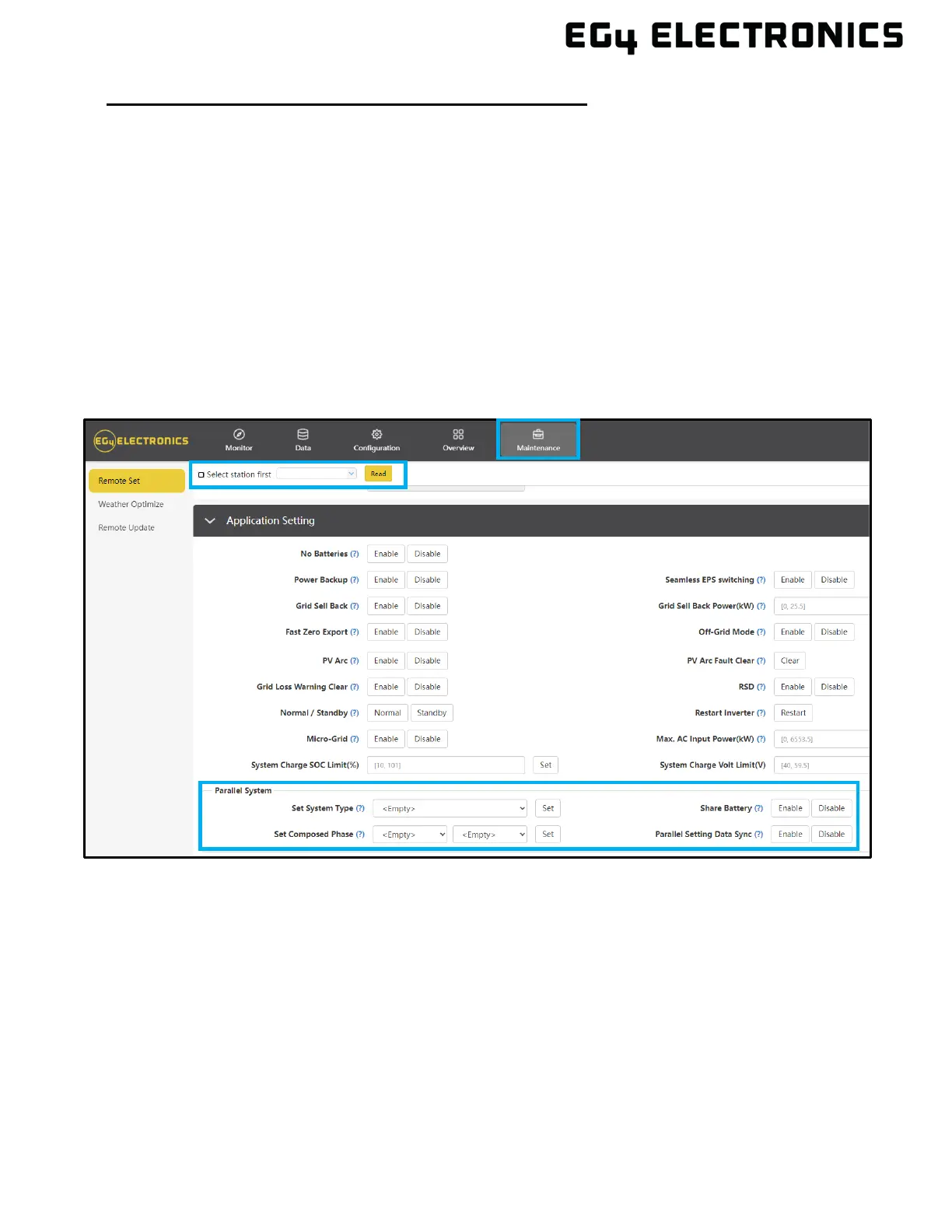
Commissioning Steps via the Monitor Center Website:
1. On the Monitor Center Website, select which unit to set as the Master in the drop-down menu
at the top of the page.
2. Select “Maintenance” and scroll to “Application Setting”.
3. Select “1 Phase” or “3 Phase Master” under “Set System Type” (a three-phase system must
have three or more inverters).
4. Select “U Phase” under “Set Composed Phase”.
5. Enable “Share Battery”.
6. Enable “Parallel Setting Data Sync”.
7. On all other inverters, select “Slave” under “Set System Type” and repeat steps 4 through 6
for single phase systems. Continue to the Finish Commissioning Steps below.
8. For three phase systems, the phasing will be set to “U Phase” for the master, “V Phase” for
the first slave, and “W Phase” for the next. The pattern will repeat for each subsequent
inverter, restarting at “U Phase”.
9. See Finish Commissioning Steps below:



 To Next Page