16
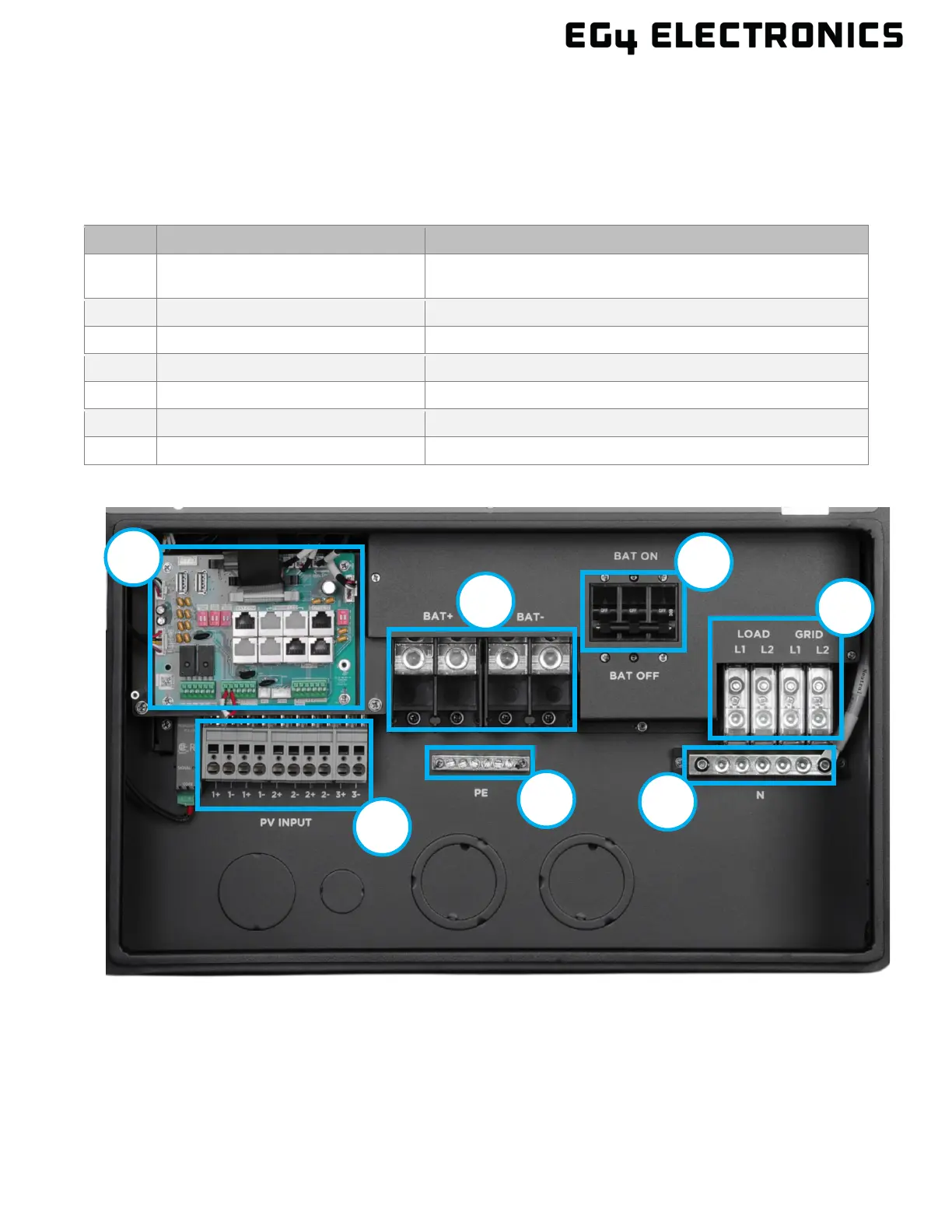
7.3 CONNECTION OVERVIEW
To expose the cable box area, open the bottom cover by opening the two clasps on the side of the
inverter. Once the cover is open, follow the sections below for connecting the wiring for PV, battery, AC,
parallelled inverters, and Rapid Shut Down. Before connecting any wiring to the inverter, verify each
wire is not carrying voltage using a multimeter.
The following information contains details and descriptions of the various connections to the inverter.
Label Component Description
A Communication Board
Used to connect communications cables, set DIP switches,
add CTs, and connect external RSD
Used to connect battery cables
Integrated Bonded Battery Breaker
Over current protection for connected batteries.
D AC Input/Output Used to connect AC power from the grid and to loads
E Neutral Bond Used for neutral wiring
Protected Earth (Ground Bond)
Used for wiring DC power from solar units to the inverter
Cable Box Overview



 To Next Page