30
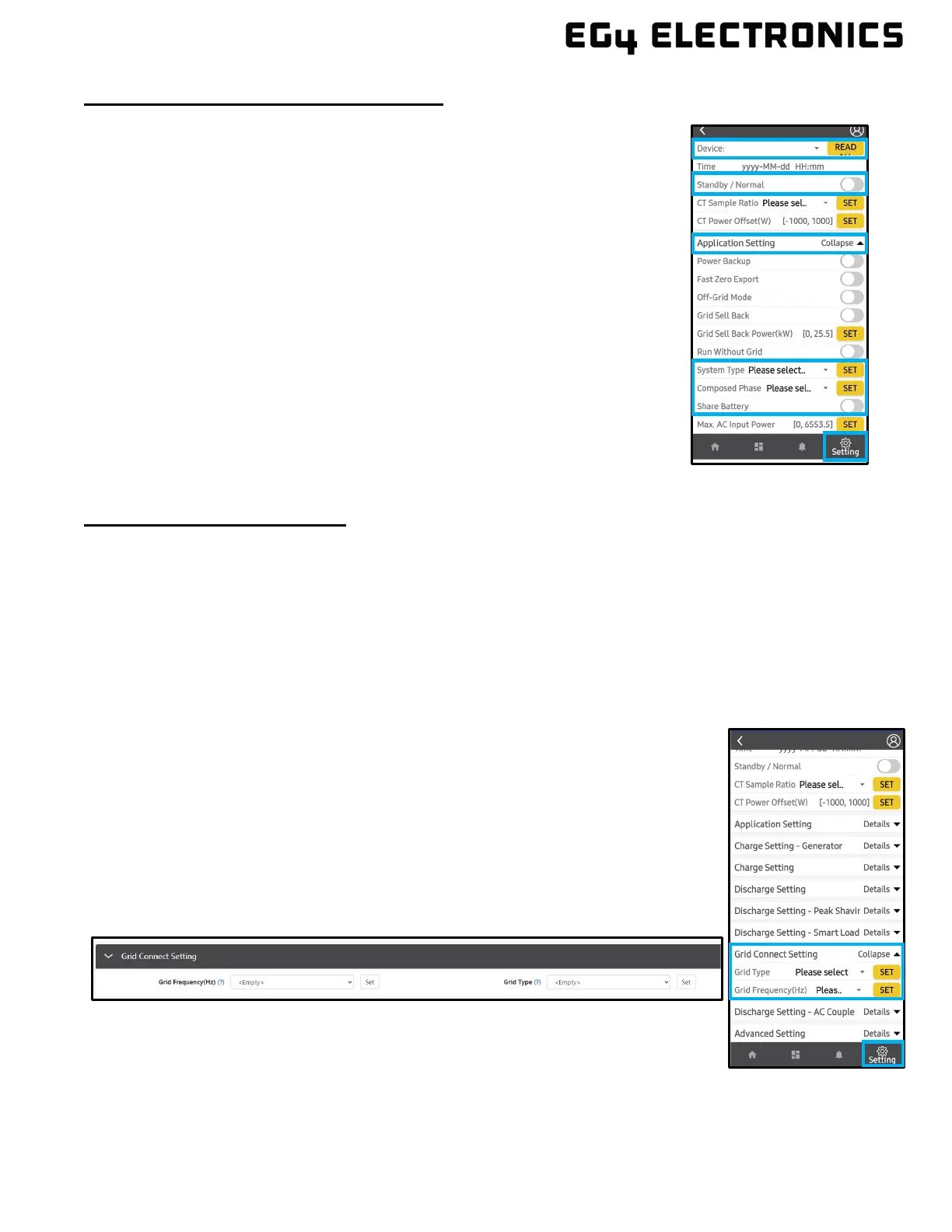
Commissioning Steps via the EG4
®
App:
1. On the EG4
®
Electronics App, select the settings icon.
2. At the top, select the device to set as the Master in the drop-down
menu.
3. Toggle the “Standby/Normal” setting off.
4. Select “Application Setting”.
5. Select “System Type” and set to either “1 Phase Master” or “3
Phase Master” (three phase must have three or more inverters).
6. Select “Composed Phase” and set to “U Phase”.
7. Toggle “Share Battery” on.
8. Select the inverters to set to “Slave” in the top drop-down menu and
select “Slave” in “System Type” setting. Repeat steps 6 and 7 for
single phase systems. Once finished with all inverters, continue to
the Finish Commissioning Steps below.
9. For three phase systems, the phasing will be set to “U Phase” for
the master, “V Phase” for the first slave, and “W Phase” for the
next. The pattern will repeat for each subsequent inverter, restarting
at “U Phase”.
10. See Finish Commissioning Steps below:
Finish Commissioning Steps:
1. Turn on the battery and make sure the communication works on all units.
2. Check the parallel info via the app or website.
3. Enable “Power Backup” under “Application Setting”.
4. Before connecting loads to the load output terminal, check the output of L1 and L2, and L1
and N with a multimeter.
5. Add small loads to the load output and verify power output.
6. Finish the commissioning by switching all inverters from “Standby” to “Normal”.
7.8 GRID, LOAD, AND AC INFORMATION
This inverter can be used in 120/240V or 120/208V phase systems. The default
setting is 120/240. This inverter has passed the main grid connection regulations
in the United States. Users can choose the different grid types and regulations
in the “Grid Connect Setting,” on either the app or the website. On the website,
this setting can be found under the Maintenance tab. On the app, this setting
can be found under the settings icon at the bottom of the page. For more
information on the app and website, see section 10.



 To Next Page