DATA FORMAT
EZ
-
Exponent Zero
-
output format.
ES
-
Exponent Scientific
-
output format.
DATA
OUTPUT
BR
-
Output both frequency and power readings. (See section on output data format.)
FR
-
Output frequency readings only. (See section on output data format.)
PR
-
Output power readings only. (See section on output data format.)
SERVICE REQUEST
SR
-
Service Request Enable
-
Enables the counter to send Service Request to the bus when
a
certain event has taken place in the counter. To enable the function, input SR fol-
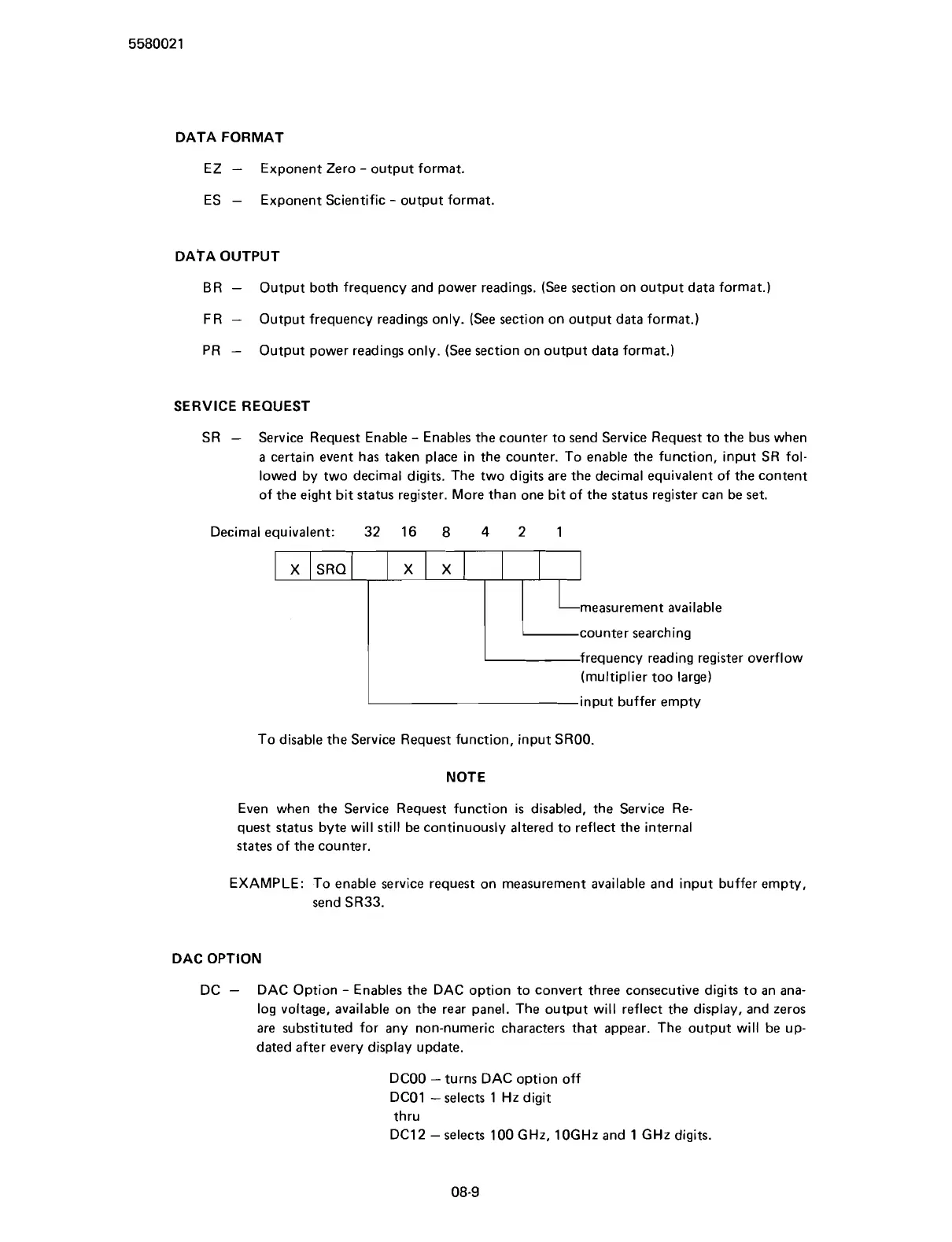
lowed by two decimal digits. The two digits are the decimal equivalent of the content
of the eight bit status register. More than one bit of the status register can be set.
Decimal equivalent: 32 16
8
4
2 1
(multiplier too large)
input buffer empty
To disable the Service Request function, input
SROO.
X
X
NOTE
measurement available
counter searching
frequency reading register overflow
Even when the Service Request function is disabled, the Service Re-
quest status byte will still be continuously altered to reflect the internal
states of the counter.
SRQ
EXAMPLE: To enable service request on measurement available and input buffer empty,
send
SR33.
X
DAC OPTION
DC
-
DAC Option
-
Enables the DAC option to convert three consecutive digits to an ana-
log voltage, available on the rear panel. The output will reflect the display, and zeros
are substituted for any non-numeric characters that appear. The output will be up-
dated after every display update.
DCOO -turns DAC option off
DCO1 -selects 1 Hz digit
thru
DC12 -selects 100
GHz, 10GHz and
1
GHz digits.
Scans by ArtekMedia © 2007



 To Next Page