E L A N H O M E S Y S T E M S S1616A AMPLIFIER MODE
© ELAN Home Systems 2012 | All rights reserved.
Consumer Menu Options
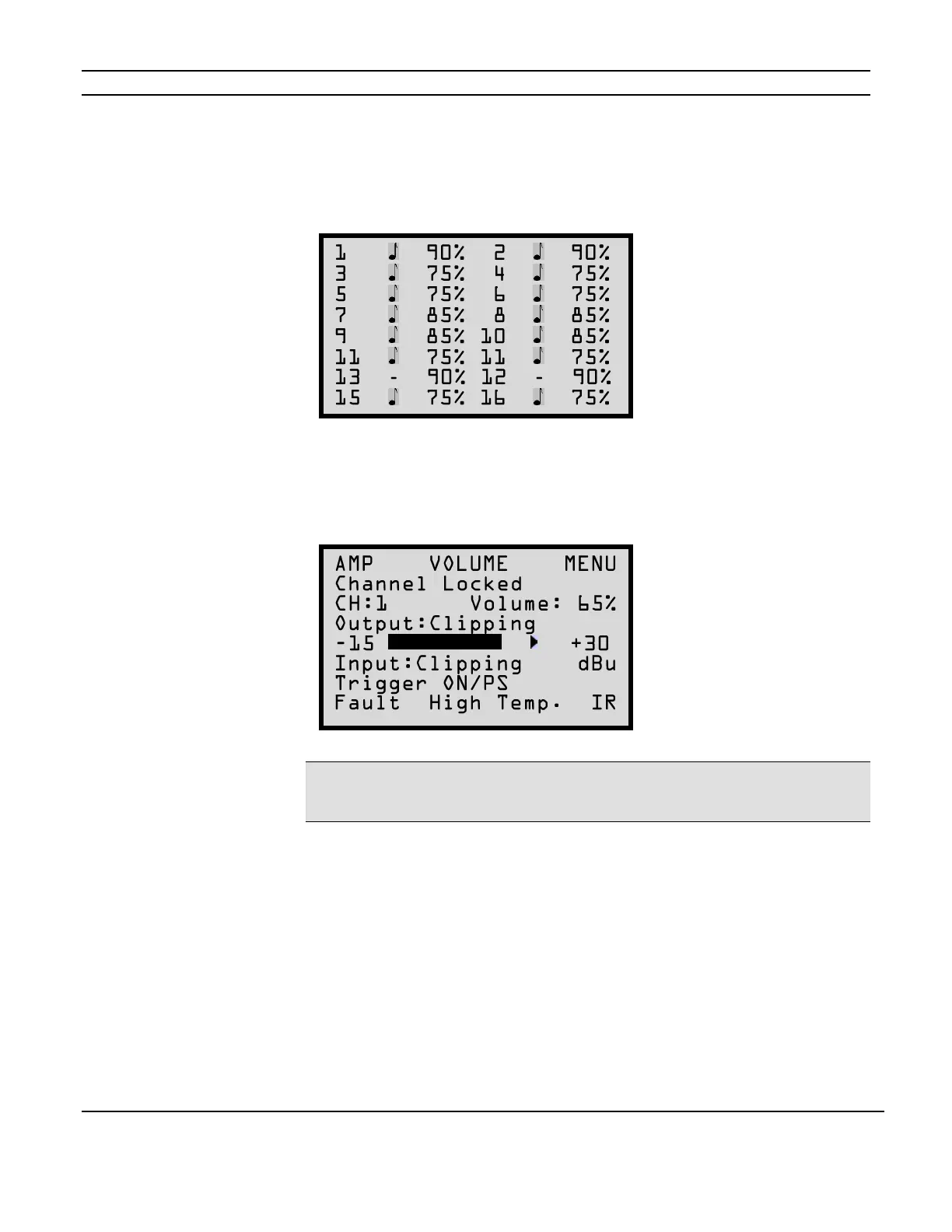
Current Volume Settings Display
The first press of the MENU button will bring up the following display showing all 16 channels’
current volume/gain settings and signal presence indicators.
Volume Adjustment Menu
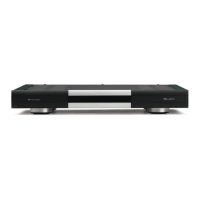
The next press of the MENU button will display the volume screen for the last selected channel as
shown below.
Note: “Channel Locked” - “Output Clipping” - “Input Clipping” and “Fault” status information will
only display if that condition is true. The “IR” indicator will display only when the S1616A is
receiving an ELAN formatted IR signal.
Volume Adjustment Menu (continued)
Use the CHANNEL button to select the desired channel and the up and down arrow buttons to
increment and decrement the gain setting.
A bar graph displays the current channel output (in dBu). The arrowhead indicates a recent output
peak level.
Current trigger status for the selected channel is shown as well as an indication if power saving
mode is engaged (PS). (See Power Saving Menu on page 26.)
The consumer menu does not allow selecting ALL channels at once. This feature is reserved for
installers.
Figure 2-2
Current Volume Settings
Figure 2-3
Volume Adjustment Display


 To Next Page