Aquastorm 200
9
9
Start-Up and Operation 3-9
Wash Tank High/
Operating/Low Level
Indicators
NOTE Only the Process Alarms
configured into the Process Alarms
screen with WARNING or SHUTDOWN
action selected will sound an audible
alarm.
Instructions provided here assume
WARNING or SHUTDOWN is selected
to sound an alarm.
Hardware configured alarms will always
sound when activated.
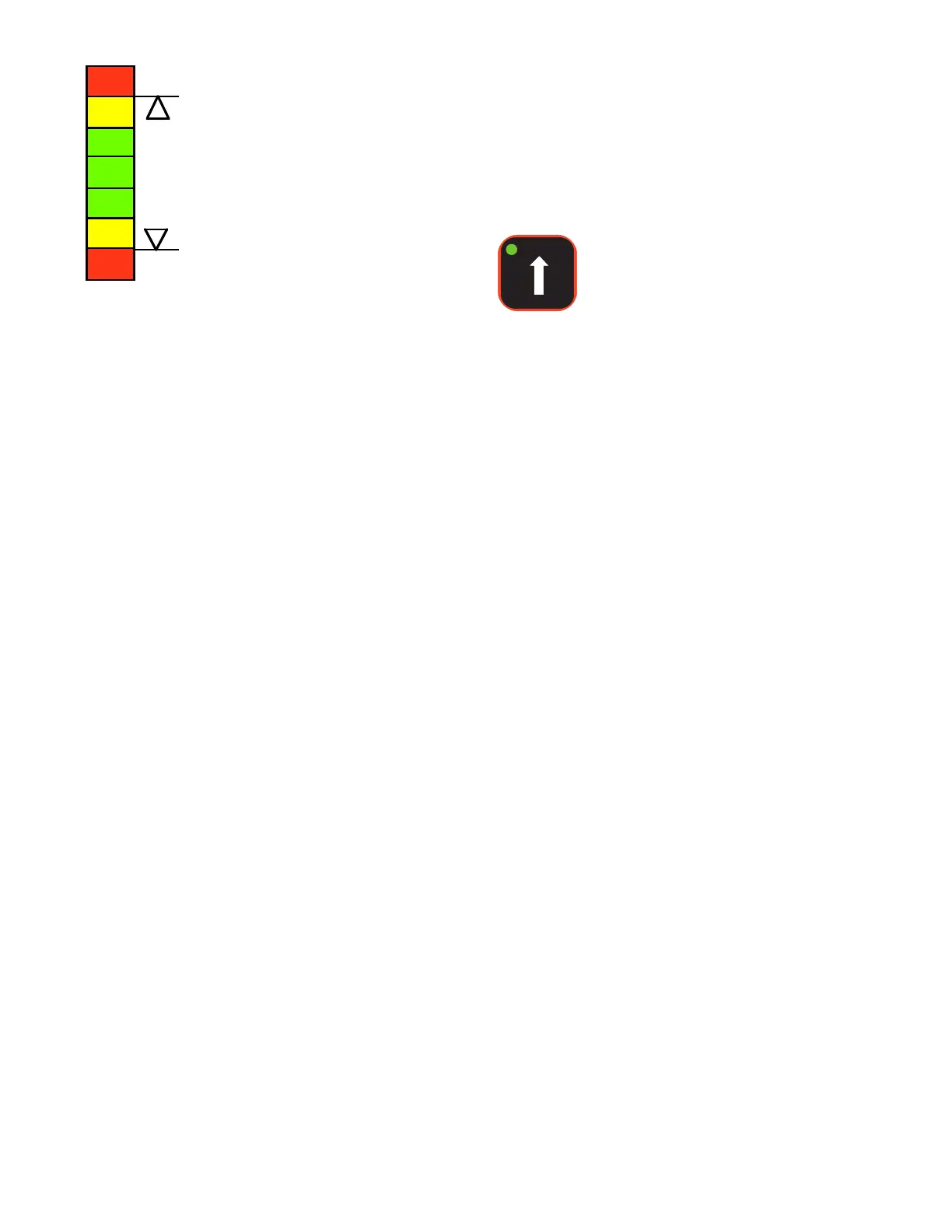
There are five (5) indications possible by this tank
liquid level indicator.
1 If the wash tank liquid level reaches high
level, the following will occur:
• Audible alarm sounds
• Alarm acknowledge indicator flashes
• Tank high level red indicator illuminates
• Optional status tower flashes red
• LCD displays "Wash High Level Alarm"
• Fill solenoid is disabled
2 The green Operating Level Indicator
illuminates to notify the operator that the
water level in the wash tank is at
operating level.
3 If the wash tank liquid level drops below
the operating level float switch, but has
not yet reached low level, the following
will occur:
• Tank low level amber indicator
illuminates
• The tank fill indicator flashes to indicate
the tank is filling, if the tank fill solenoid
has been left activated.
4 If the wash tank liquid level drops below
low level, the following will occur:
• Audible alarm sounds
• Alarm acknowledge indicator flashes
• Tank low level red indicator illuminates
• Optional status tower flashes red
• LCD displays "Wash Low Level Alarm"
• Tank heaters are disabled
• Wash pump is disabled
5 If a hardware conflict in the float switch
configuration occurs, such as several stuck
floats in the same tank, the following will
occur:
• All wash tank level indicators illuminate
Wash Tank Immersion
Heaters On Indicator/
Increase Temperature
Control
The green LED on this control is the Wash Tank
Immersion Heaters On indicator.
This LED illuminates to indicate the heaters are
on. This is an On indication only.
An asterik appears on the LCD in front of WASH
when the tank heaters are on. The asterik is not
visible when the heaters are off.
The On indicator turns off when the heaters are
not on, due to a high temperature or low level in
wash tank.
The immersion heaters cannot be enabled and
disabled via this control.
Press the Wash Increase Temperature control to
increase the wash tank temperature set point.
When pressed once and released, the wash tank
temperature set point is increased one (1) degree.
When the control is pressed and held, the wash
tank temperature set point is increased until the
control is released.
NOTE Actual temperature and
temperature set point are visible
on the LCD.


 To Next Page