Aquastorm 200
System Preparation 2-9
2.3 TO ENTER SETUP MODE
Read the following procedure in its entirety before
performing the procedure.
NOTE Before performing the following
steps, ensure the controller is
initially in Operator Mode with
normal display for more than 30
seconds.
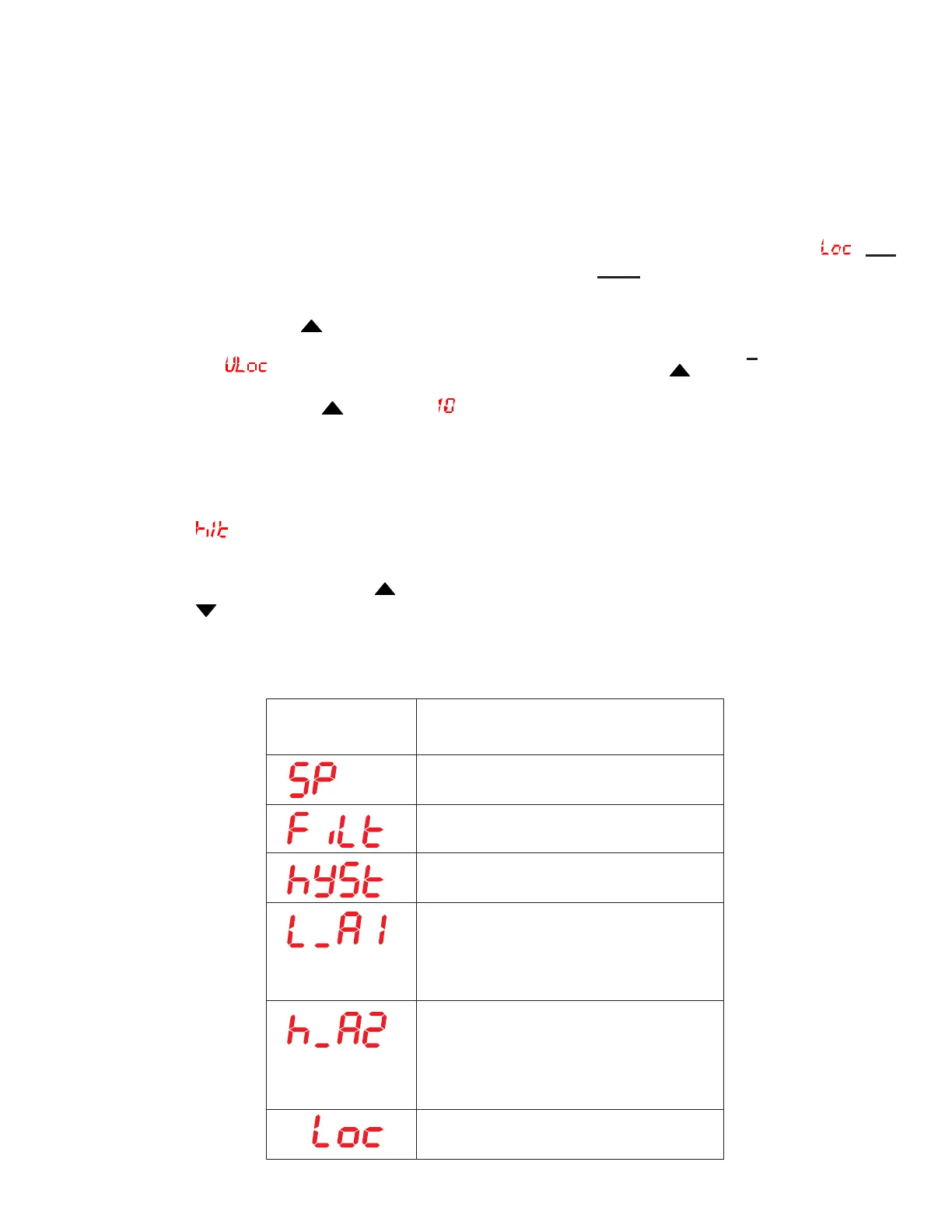
1 Press the Raise and Function F Keys
simultaneously until the lower display
reads
.
2 Press the Raise Key until is
displayed on the upper digital display
(ignore decimals at this point).
3 Press the Function F Key.
is displayed.
Refer to the Setup Mode Chart on this
page and use the Raise
and Lower
Keys to enter the values indicated on
the chart.
4 Press the Function F Key.
5 Follow steps 3 and 4 until all values listed
on the Setup Mode Chart have been
entered.
6 The last value to be entered is . DO
NOT change this value.
7 To exit the Setup Mode, press and hold
the Function F Key first, then while still
holding the Function
F Key press and hold
the Raise
Key.
NOTE Refer to the Manufacturer's Data
Manual for a description of the
Setup Mode Parameters for the
West 6700 Temperature
controller, page 4-1 - 4-3, Table
4-1, Setup Parameters.
Value
Set Up Mode
230
2.0
1
21. (F)
100 (C)
212 (F)
100 (C)
10
Menu Item


 To Next Page