Description of parameters (ToF Tool) Cerabar S/Deltabar S
138 Endress+Hauser
P01-xMx7xxxx-19-xx-xx-xx-040
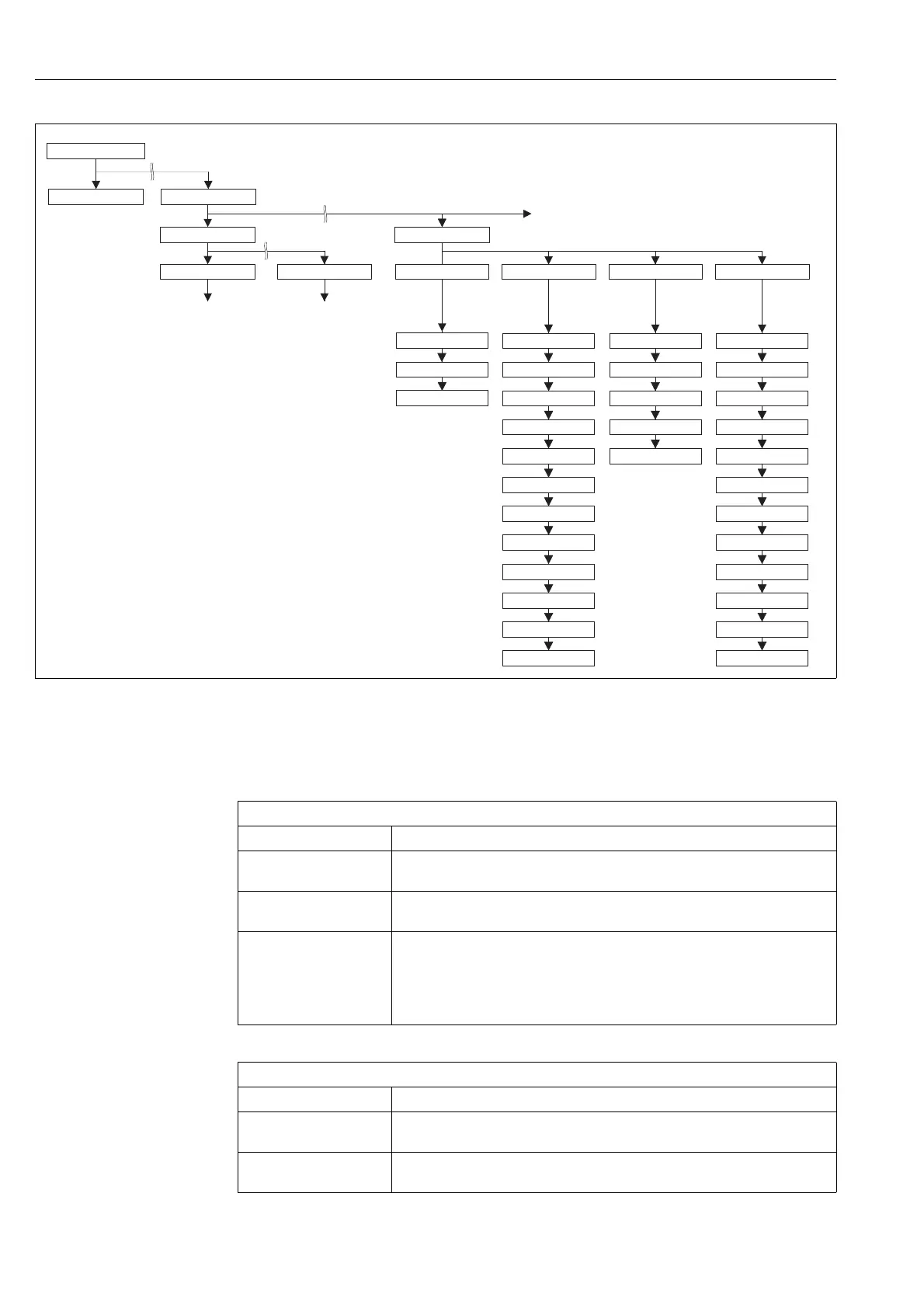
Fig. 34: TRANSMITTER INFO group
→ For the INFO function group, see Page 138, ToF Tool, table 17
→ For the TRANSMITTER DATA function group, see Page 138, ToF Tool, table 18
→ For the PROCESS CONNECTION function group, see Page 139, ToF Tool, table 19
→ For the SENSOR DATA function group, see Page 140, ToF Tool, table 20
Tmax SENSOR
SENSOR H/WARE REV.
Pmax SENS. DAMAGE
MAT. MEMBRANE
FILLING FLUID
Tmin SENSOR
Pmin SENS. DEMAGE
SENSOR MEAS. TYPE
PRESS. SENS LOLIM
PRESS. SEN. HILIM
MINIMUM SPAN
SENSOR SER. NO.
SEAL TYPE
PROC. CONN TYPE
MAT. PROC. CONN. +
MAT. PROC. CONN. –
Pmax PROC. CONN.
ALLOWED MIN. TEMP
ALLOWED MAX. TEMP
DIP STATUS
HARDWARE REV.
SOFTWARE VERSION
CONFIG RECORDER
PCB TEMPERATURE
ADDITIONAL INFO
DEVICE DESIGN
ELECTR. SERIAL No
TAG_DESC
DEVICE SERIAL No
MANUFACTURER ID
MESSAGE
DEVICE NAME STR.
TRANSMITTER DATA
PROCESS CONNECTION SENSOR DATAINFO
OPERATING MENU
MEASURED VALUE
QUICK SETUP
TRANSMITTERINFOSETTINGS
POSITION ADJUSTMENT TOTALIZER SETUP
ToF Tool, Table 17: OPERATING MENU → TRANSMITTER INFO → INFO
Parameter name Description
DEVICE NAME STR
Display
Displays the device designation.
Options: Cerabar S or Deltabar S
MANUFACTURER ID
Display
Displays the manufacturer number in a decimal numerical format.
Here: 17 Endress+Hauser
MESSAGE
Entry
Enter user-specific message, e.g. a description of the device within the application or
system (max. 32 alphanumeric characters).
Factory setting:
_ _ _ _ _ _ _ _ _ _ _ _ _ _ _ _ _ _ _ _ _ _ _ _ _ _ _ _ _ _ _ _
or as per order specifications
ToF Tool, Table 18: OPERATING MENU → TRANSMITTER INFO → TRANSMITTER DATA
Parameter name Description
DEVICE SERIAL No
Display
Displays the serial number of the device (11 alphanumeric characters).
ELECTR. SERIAL No
Display
Displays the serial number of the main electronics (11 alphanumeric characters).






 To Next Page