Level measurement (FF configuration program) Cerabar S/Deltabar S
8 Endress+Hauser
4. 2 "Linear" level type
4.2.1 Calibration without reference pressure – dry calibration
Example:
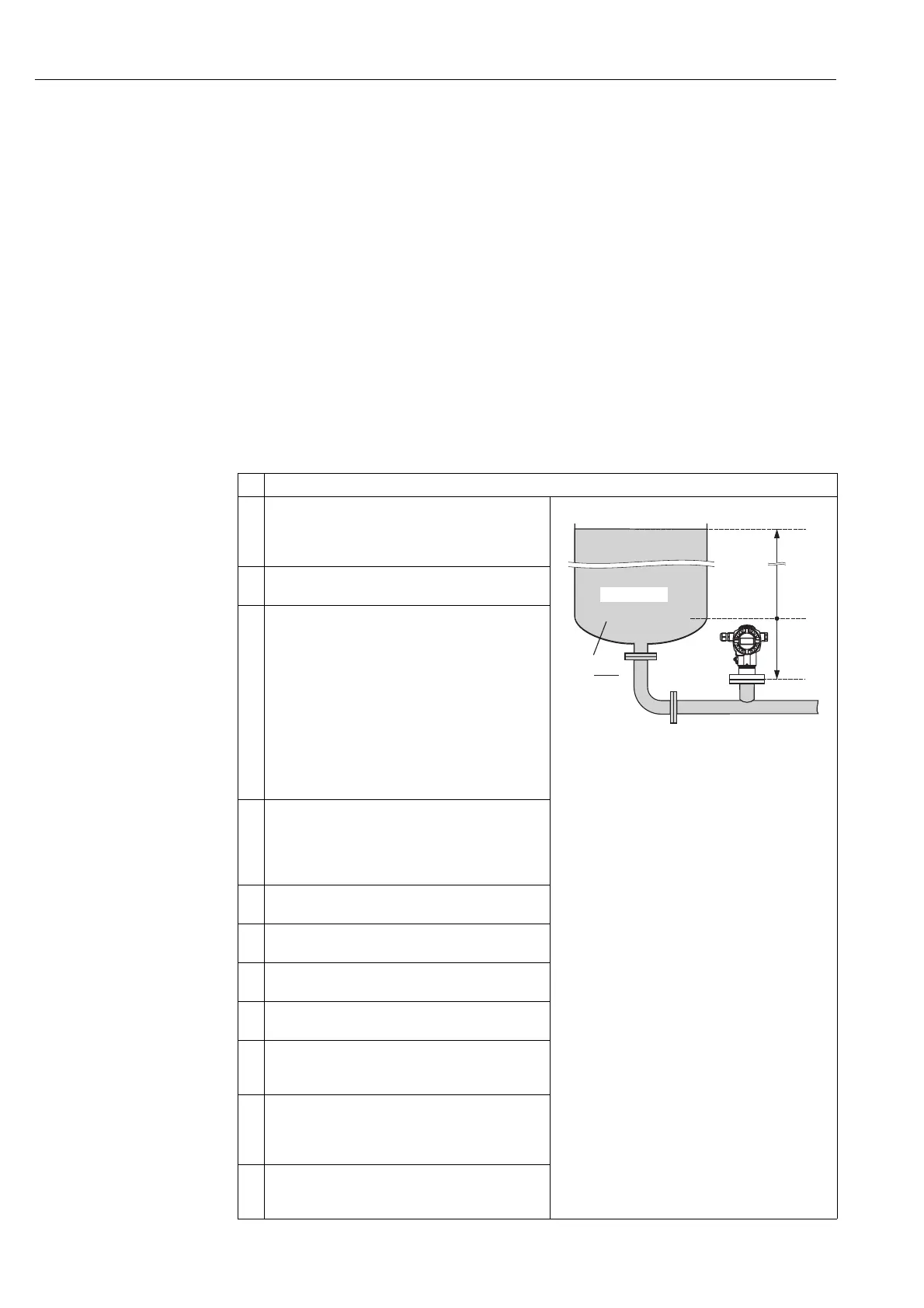
In this example, the volume in a tank should be measured in m
3
. The maximum volume is 5 m
3
and the maximum height is 4 m. The density of the fluid is 1 kg/dm
3
. The device is mounted below
the level lower range value.
Prerequisite:
• The measured variable is in direct proportion to the pressure.
• This is a theoretical calibration, i.e. the tank volume, tank height and density of the fluid are known.
!
Note!
• See also Operating Instructions BA301P Deltabar S or Operating Instructions BA302P Cerabar S,
Section 6.6 "Level measurement".
• For a description of the parameters mentioned, see
– Page 33, Pressure Transducer Block
– Page 65, Analog Input Block.
Description
1 Deltabar S: before configuring the device for your
application, the pressure piping must be cleaned and the
device filled with fluid. See Operating Instructions
BA301P, Section 6.6.1.
P01-PMP75xxx-19-xx-xx-xx-003
Fig. 1: Calibration without reference pressure –
dry calibration
1 See Table, Step 10.
2 See Table, Step 11.
3 See Table, Step 12.
4 See Table, Step 13.
2 Open the Pressure Transducer Block and set the block
mode to OOS.
3 You have the following ways of carrying out position
adjustment:
• By means of the "Pos. zero adjust" method, see
Operating Instructions BA301P or BA302P, Section
6.4.
• By means of the parameters
– PRESSURE_1_ACCEPT_ZERO_INSTALL_
OFFSET/POS. ZERO ADJUST (→ Page 38) or
– PRESSURE_1_ACCEPT_INSTALL_OFFSET/
POS. INPUT VALUE (→ Page 38) or
– PRESSURE_1_INSTALL_OFFSET/CALIB. OFFSET
(→ Page 38).
4 Select the measuring mode if necessary:
• Select the "No linearization" option by means of the
LINEARIZATION parameter.
• Select the "Volume" option by means of the
PRIMARY_VALUE_TYPE parameter.
5 Select a pressure unit via the CAL_UNIT parameter, here
mbar for example.
6 Select the "Linear" option by means of the
LEVEL_TYPE/LEVEL MODE parameter.
7 Select the "Volume" option by means of the
MEASURAND_LINEAR/LIN. MEASURAND parameter.
8 Select a volume unit via the VOLUME_UNIT/UNIT
VOLUME parameter, here m
3
for example.
9 Select the "Dry" option by means of the
LEVEL_ADJUST_MODE/CALIBRATION MODE
parameter. See also the following note, point 3.
10 Enter the value for density via the
LEVEL_ADJUST_DENSITY/ADJUST DENSITY and
DENSITY_UNIT parameters, here 1 kg/dm
3
for
example.
11 Enter the tank volume via the
LEVEL_TANK_VOLUME/TANK VOLUME parameter,
here 5 m
3
for example.
4 m
–0.5 m
➂
➃
➁
ρ = 1
kg
dm
3
V = 5 m
3
➀






 To Next Page