Level measurement (ToF Tool) Cerabar S/Deltabar S
80 Endress+Hauser
8.3 "Pressure linearized" level type
8.3.1 Semiautomatic entry of the linearisation table
Example:
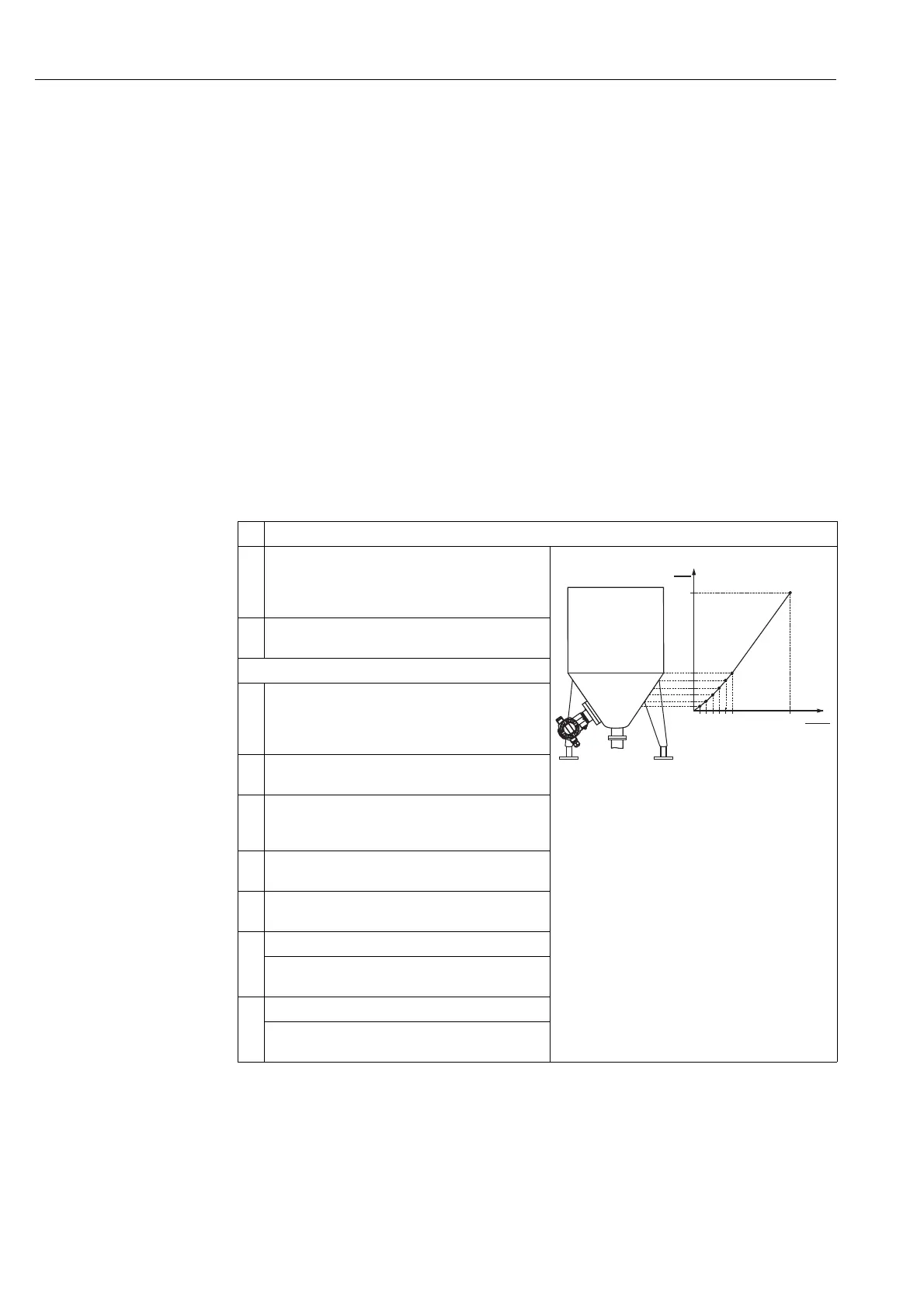
In this example, the volume in a tank with a conical outlet should be measured in m
3
.
Prerequisite:
• The tank can be filled. The linearisation characteristic must rise continuously.
!
Note!
• See also Operating Instructions BA301P Deltabar S or Operating Instructions BA302P Cerabar S,
Section 6.6 "Level measurement".
• For a description of the parameters mentioned, see
– Page 98, ToF Tool, table 4: POSITION ADJUSTMENT
– Page 101, ToF Tool, table 6: BASIC SETUP
– Page 112, ToF Tool, table 8: BASIC SETUP – "Pressure linearized" level type
– Page 132, ToF Tool, table 14: LINEARISATION
• For a description of further relevant parameters, see
– Page 129, ToF Tool, table 12: EXTENDED SETUP
– Page 143, ToF Tool, table 22: PROCESS VALUES.
Description
1 Deltabar S: before configuring the device for your
application, the pressure piping must be cleaned and the
device filled with fluid. See Operating Instructions
BA301P, Section 6.6.1.
P01-PMP75xxx-19-xx-xx-xx-002
2 Carry out position adjustment if necessary. See Page 98,
ToF Tool, table 4: POSITION ADJUSTMENT.
Carry out basic setup:
3 If necessary, select the "Level" measuring mode via the
MEASURING MODE parameter.
Menu path: OPERATING MENU → SETTINGS →
BASIC SETUP → MEASURING MODE
4 Select a pressure unit via the PRESS. ENG. UNIT
parameter, here mbar for example.
5 Select the "Pressure linearized" option by means of the
LEVEL MODE parameter. See also the following note,
point 3.
6 Select the "Volume" option by means of the LINd.
MEASURAND parameter.
7 Select a volume unit via the UNIT VOLUME parameter,
here m
3
for example.
8 Select HYDR. PRESS MIN. parameter.
Enter the minimum hydrostatic pressure to be expected,
here 0 mbar for example.
9 Select HYDR. PRESS MAX
.
Enter the maximum hydrostatic pressure to be expected,
here 350 mbar for example.
3.5
0
0 350
V
[m ]
3
p
[mbar]






 To Next Page