Cerabar S/Deltabar S Level measurement (ToF Tool)
Endress+Hauser 81
!
Note!
1. For this level type, the measured variables %, volume and mass are available.
→ See Page 112 ff.
2. You can also specify customer-specific units. See parameter description for PRESS. ENG. UNIT
(→ Page 102), UNIT VOLUME (→ Page 113) and MASS UNIT (→ Page 114).
Carry out linearisation:
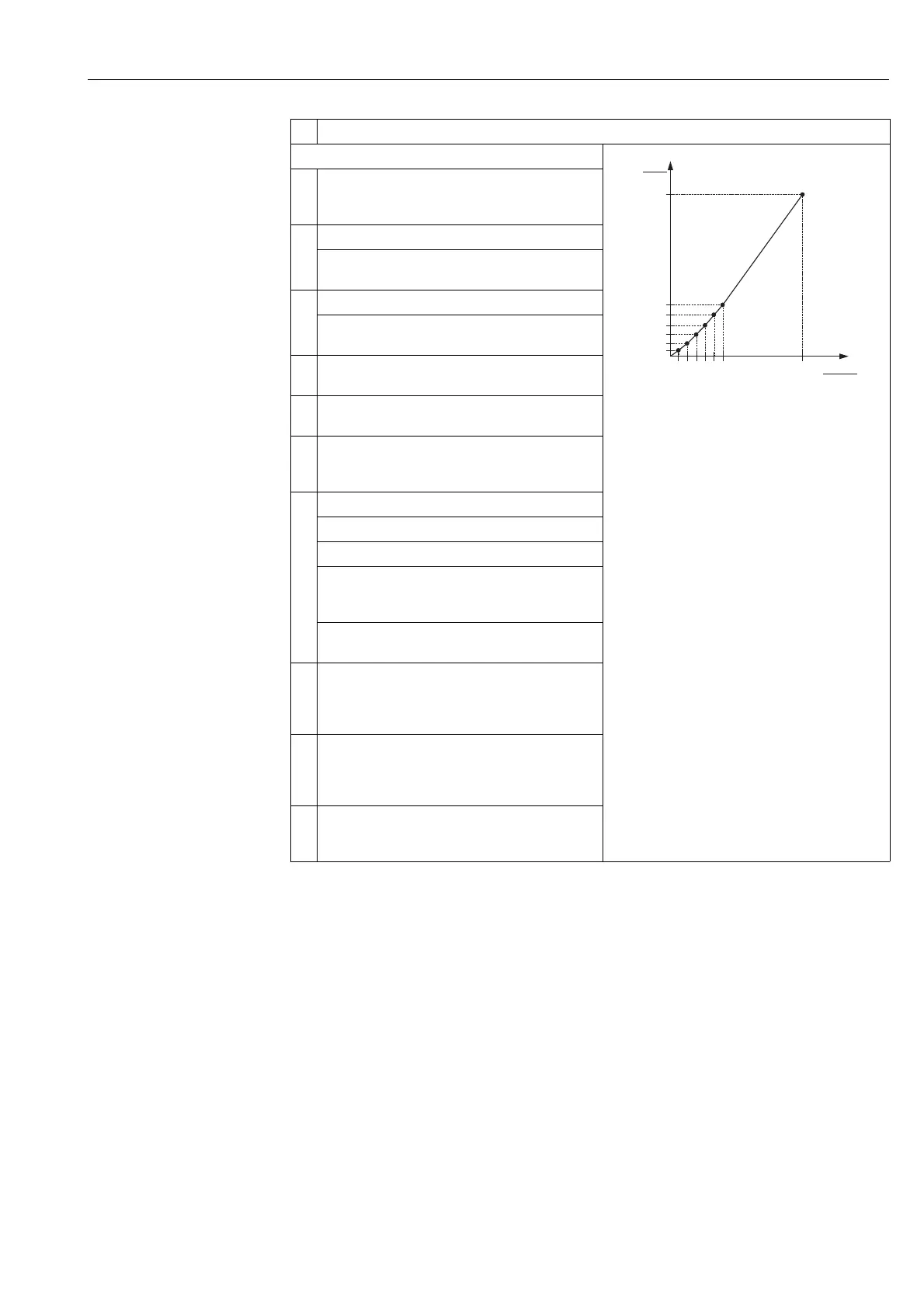
P01-xxxxxxxx-05-xx-xx-xx-015
Fig. 12: Semiautomatic entry of the linearisation
table
1 See table, step 8.
2 See table, step 9.
3 See table, step 11.
4 See table, step 12
5 See table, steps 13 to 17.
10 Change the function group:
Menu path: OPERATING MENU → SETTINGS →
LINEARISATION
11 Select TANK CONTENT MIN parameter.
Specify the minimum tank contents to be expected, here
0 m
3
for example.
12 Select TANK CONTENT MAX parameter.
Specify the maximum tank contents to be expected, here
3.5 m
3
for example. See also the following note, point 4.
13 Select the "Editor table" option by means of the TABLE
SELECTION parameter.
14 Select the "Semiautomatic" option by means of the LIN.
EDIT MODE parameter.
15 Select the "New table" option by means of the EDITOR
TABLE parameter. After confirming with "Enter," the
"Continue edit" option is displayed again.
16 Enter linearisation table (min. 2 points, max. 32 points).
Fill the tank to the height of the 1st point.
LINE-NUMB: confirm value displayed.
X-VAL.: the hydrostatic pressure present is displayed.
The X-VAL. displayed is saved by confirming the Y-
value. See following line, Y-VAL.
Y-VAL.: enter the volume value, here 0 m
3
for example,
and confirm the value.
17 You can enter further points for the linearisation table as
explained in step 16. Once all the points have been
entered, the table must be activated by means of the
TAB. ACTIVATE parameter.
18 If necessary, use the Analog Input Block to configure the
CHANNEL parameter (→ Page 67), L_TYPE parameter
(→ Page 69), XD_SCALE parameter (→ Page 73) and
OUT_SCALE parameter (→ Page 71).
19 Result:
The linearisation table has been entered and the device is
ready for level measurement.
Description
➀
3.5
0
0 350
V
[m ]
3
p
[mbar]
➂
➁
➃
➄






 To Next Page