EasyManua.ls Logo

Enerpac JS125 - Page 96

Enerpac JS125
153 pages
Print Icon
To Next Page IconTo Next Page
To Previous Page IconTo Previous Page
Loading...
www.enerpac.com
Document number: ED.03783.00.001.ENG rev 4 Page 96 of 153
6.4.2.7 Service
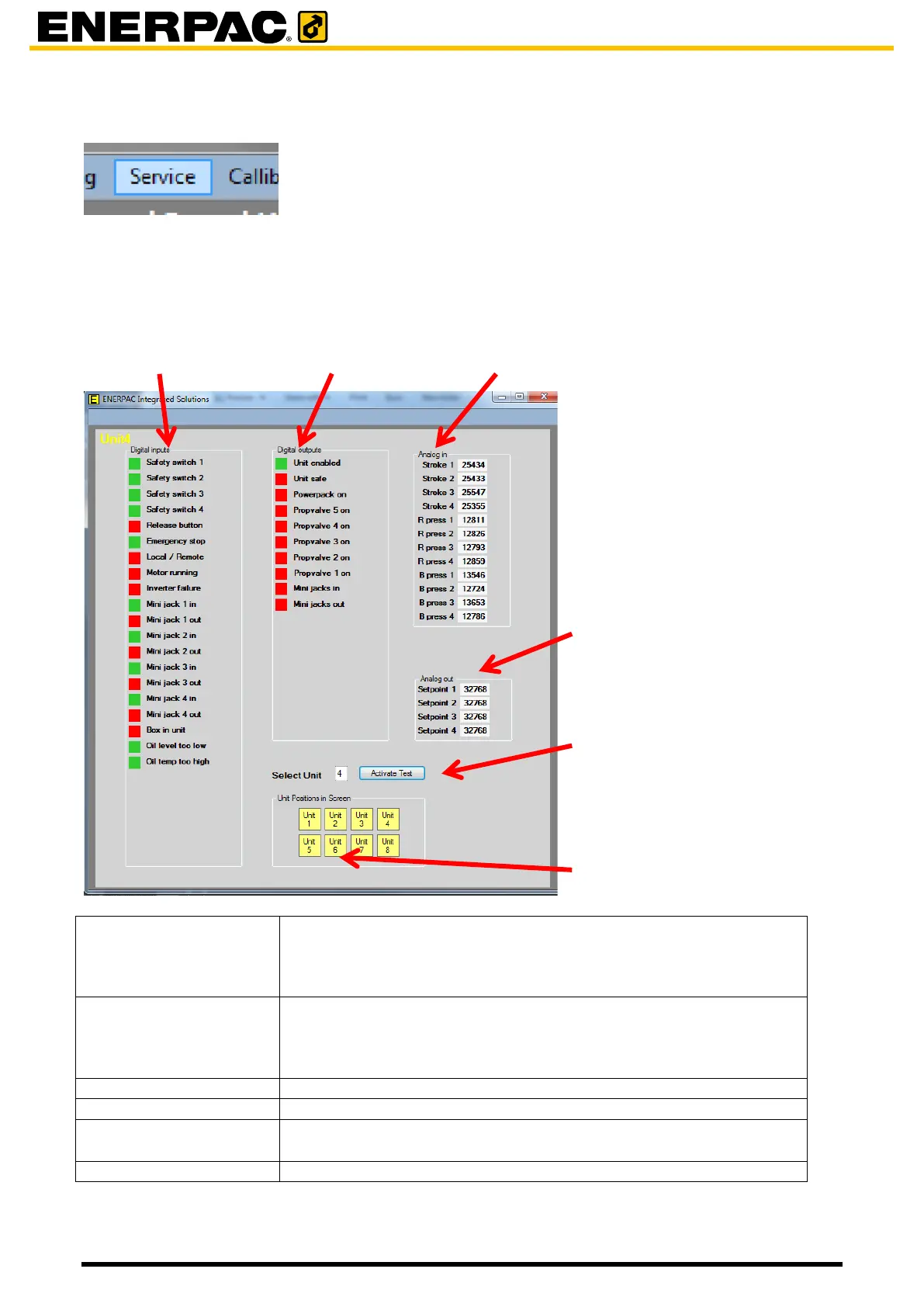
To enter the Service function, click in the menu bar on Service.
The Service window shows a number of technical values for a specific unit:
status of input discretes and output discretes
values of analog input values and output values
Digital inputs
Position of input switches:
- Green: input is high
- Red: input is low
Digital outputs
Position of output switches:
- Green: output is high
- Red: output is low
Analog in
Numeric values of analog inputs
Analog out
Numeric values of analog outputs
Selected Unit,
Activate Test
Enter the number of the unit from which you want to see the values.
Then click Activate Test
Unit Positions in Screen
No function
Digital inputs
Digital outputs
Analog in
Analog out
Activate test
Unit position in screen

Table of Contents

Related product manuals