B
A C D E F G SERVICE
28
D9 Running the Powerflue Electrical Cable
Note: The powerflue terminal is powered from the appliance and must be connected to the appliance
with the supplied electrical cable only.
Note: Ensure that the appliance power supply is disconnected before making the connection to the
terminal
The supplied electrical cable is 7m long; flue extension kits also include a powerflue electrical
cable extension.
Run the electrical cable from the cavity where the appliance will be installed to the hole in the
outside wall. Ensure it is not draped over, or in contact with, the outer shell of the appliance or
the flues. The cable must be kept clear from any other possible heat sources, sharp edges, or
moisture. Fix it appropriately and allow enough cable to be able to pull both the appliance and
the powerflue terminal out from their installed positions.
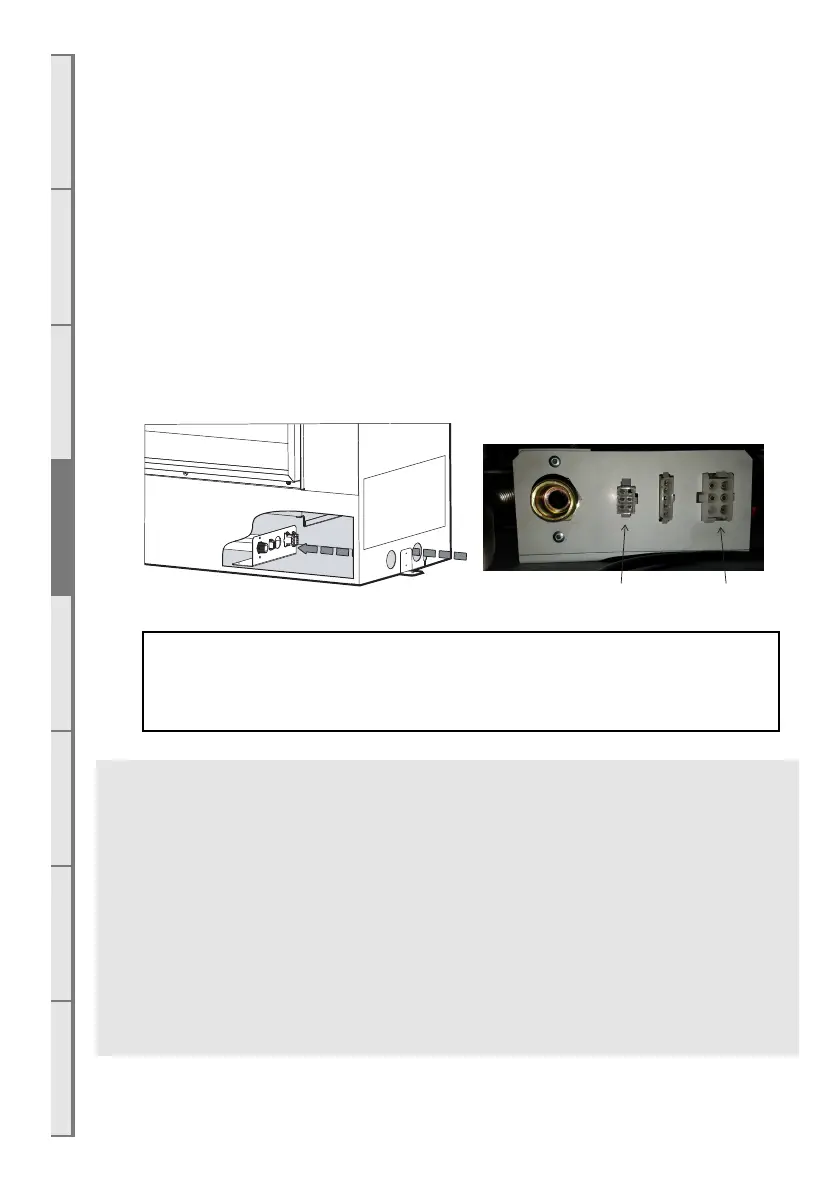
The powercable will plug in as shown below.
If you do not connect the powerflue electrical cable to both the fireplace and the
powerflue, this will result in an error when the fireplace is turned on.
Test the fan before continuing with the rest of the installation.
END OF SECTION D
By the end of this section, you should have:
□ A weather-tight Horizontal Powerflue Wall Terminal installation with clearance as specified
by AS/NZ5601.1
□ Reasonable access to the outside face for maintenance purposes.
□ Flue attached to the rear of the Horizontal Powerflue Wall Terminal leading back to the
appliance.
□ The electrical cable from the Horizontal Powerflue Wall Terminal attached to the rear of
the installation and run back to the appliance cavity in an electrically safe manner.



 To Next Page