B
A C D E F G SERVICE
34
Step 9: Adjusting the electronic controller for gas type
Ensuring the gas is still OFF, Turn the power ON.
Insert “AA” size batteries into the remote control. You should now
see the time on the display showing 0:00.
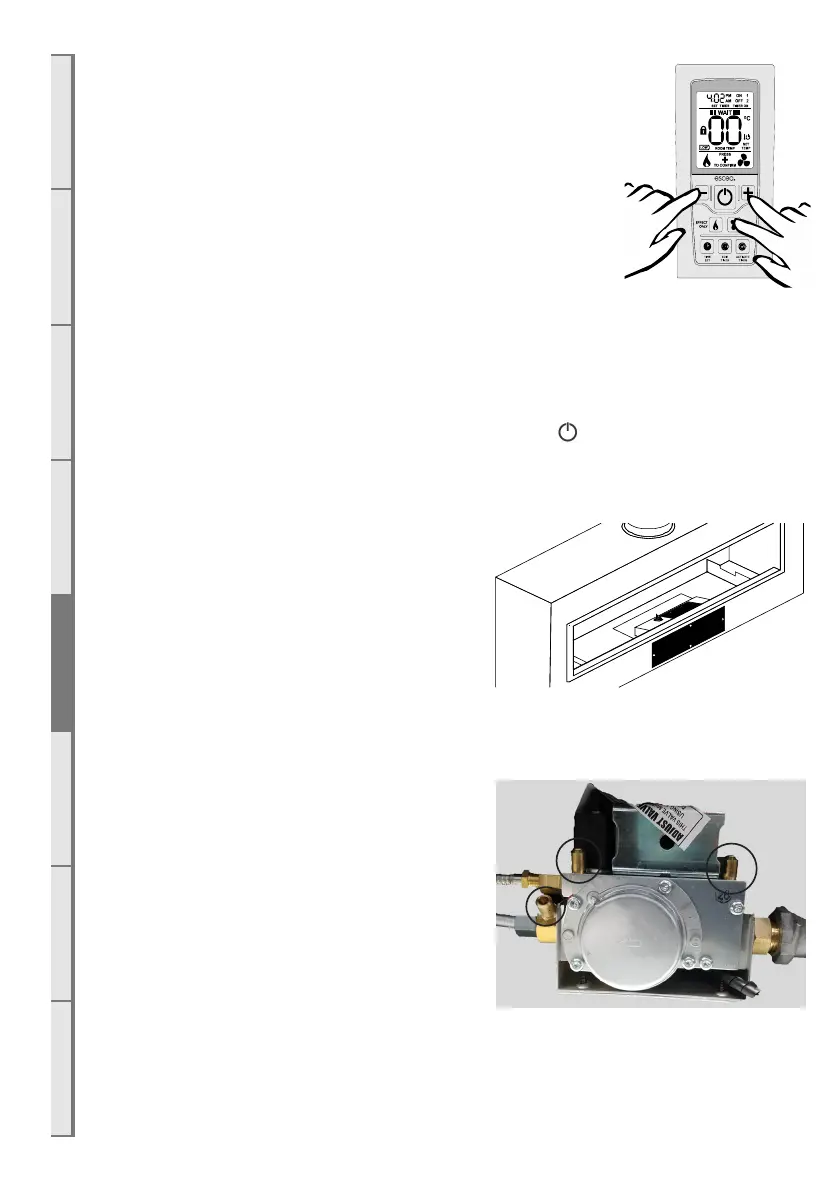
Press the MINUS, PLUS and FAN BOOST buttons simultaneously
(as shown right) until the characters “03” light up on the display.
Release the buttons and the remote will count down and display
“GO”. The screen will then display all characters. This will put the
remote into test mode and the two big temperature digits should
begin counting from 0 to 99 repeatedly.
Now hold down the ‘EDIT TIMER’ and ‘ACTIVATE TIMER’ buttons simultaneously; the
remote display will show the current configuration of either ‘NG’ for Natural Gas or ‘LP’ for
ULPG/Propane. To change this configuration, hold down the ‘EDIT TIMER’ and ‘ACTIVATE
TIMER’ buttons simultaneously for 5 seconds. This will now have toggled between gas types.
Once you are have chosen the correct gas mode, press the ‘ ’ button once to exit this
diagnostics mode.
E10 Checking the Gas Operating Pressure
NOTE: Access to the valve and control system can
be through either of the 2 hatch panels shown shaded
black in the diagram to the right.
NOTE: Ensure the thermostat control within the
remote does not cause the flame to modulate down
by increasing the set temperature and keeping the
remote in a cool environment.
Turn on the gas. Turn the power on. Check the inlet pressure
upstream of the appliance using the test point installed earlier.
NOTE: The regulator that is supplied with the
fire MUST NOT BE REMOVED. Removal of the
regulator, or replacing it with one not intended for
use with an Escea fire, will void the limited appliance
warranty and may be dangerous.
The gas valve (shown right) has manometer test
points at A, B, and C.
A
B
C



 To Next Page