Euphonix Media Application Controller Operation Manual Soft Knobs
56
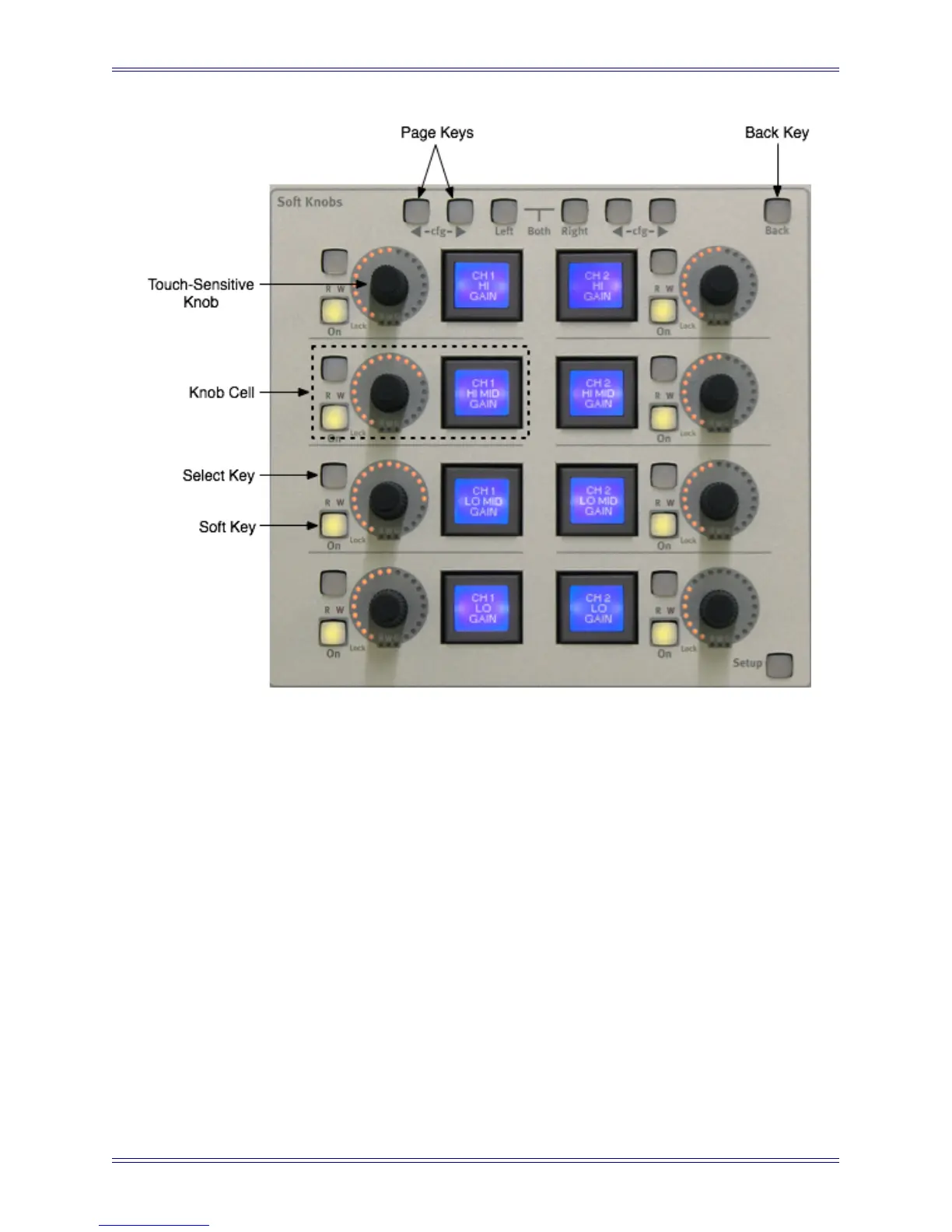
Figure 6-1 Knob cell controls in Soft Knobs area
The MC’s bank of Soft Knobs contains eight knob cells, each with a:
• Touch-sensitive knob: controls the parameter shown in the Soft Key’s LCD
• Knob top button (knob press): moves one menu level down the hierarchy
• Soft Key: Displays the current parameter assigned to that knob. Pressing the
Soft Key moves one menu level down the hierarchy (same as Knob top button).
• Select key: depends on specific knob function
• On key: activates/deactivates that parameter
• Lock LED: not currently used
• RW LEDs for On key: not yet implemented
• R and W LEDs: displays automation state of currently selected channel in Nu-
endo and Logic Pro
• G LED: not yet implemented
• Back key: moves one menu hierarchy up. Not lit if already at top of the menu
structure


 To Next Page