EXCELL PRECISION CO., LTD
PW Service Manual SME300000016
28
Press
TARE
key
to complete the setting
Using
ON/ZERO
or
UNITS
to input a parameter
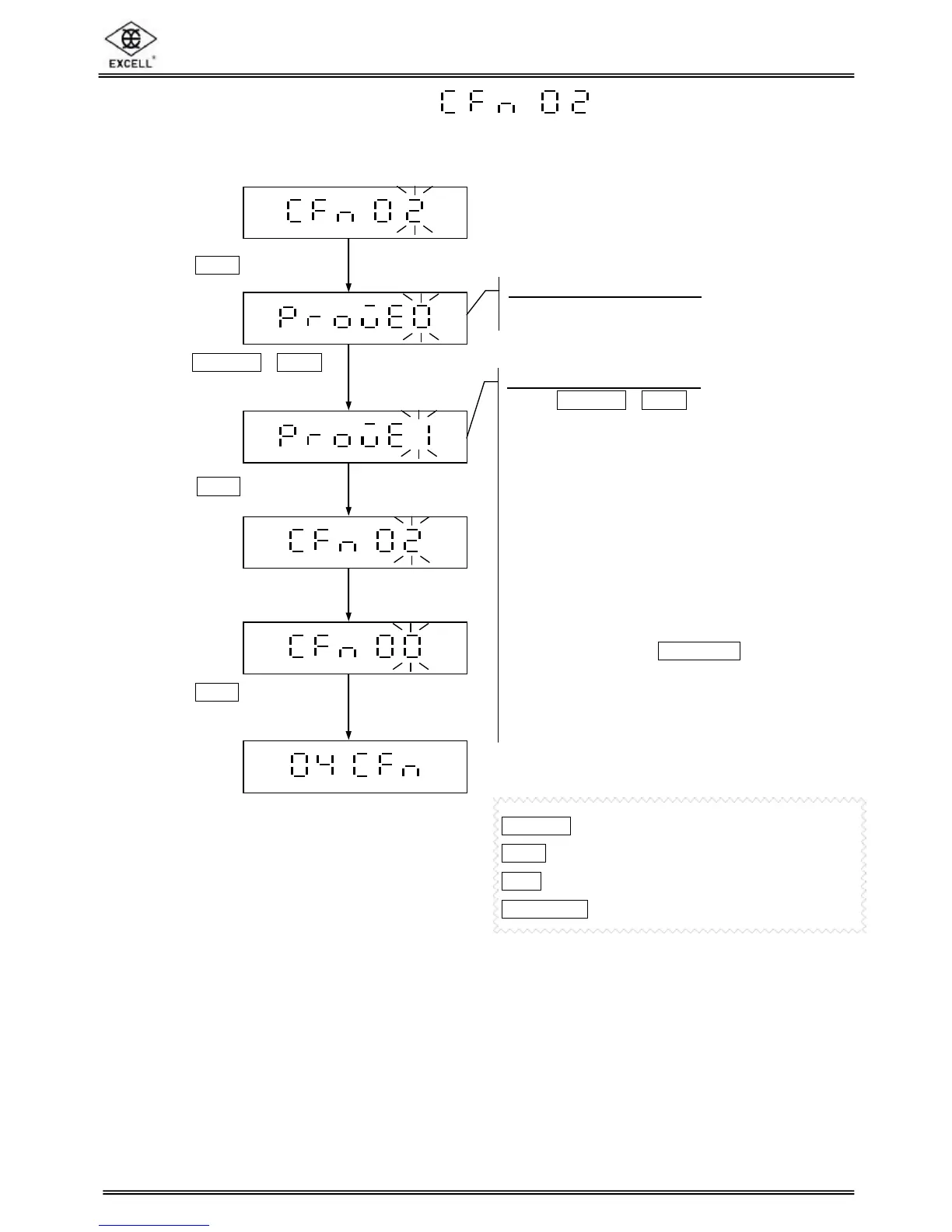
2-4-2 Approval configuration
n Brazil approved model: In the counting mode, the indicator is not able to calculate the count
value if the unit weight is less than 0.1e.
ON/ZERO
key ⇒ Increment number by 1
UNITS
key ⇒ Decrement number by 1
TARE
key ⇒ Move cursor one place to the right
NET/GROSS
key ⇒ Move cursor one place to the left
Press
TARE
key
pproval configuration
Display shows current setting
pproval configuration
Using
ON/ZERO
or
UNITS
to input the setting
0 ⇒ Non-approved model
1 ⇒ OIML or NTEP approved model,
2 ⇒ Sri Lanka approved model, zero can
be accepted within a range of the zero
calibrated point +/- 3%.
3 ⇒ Sri Lanka approved model, zero can
be accepted within a range of the zero
calibrated point +/- 4%.
4 ⇒ Brazil approved model.
5 ⇒ Approved
model. In the tare mode, the
gross weight will be displayed after
pressing the
NET/GROSS
key. After 5
seconds, the net value will be
displayed automatically.
n
External weight calibration is not available
for all approved models.
Press
TARE
key


 To Next Page