Operation
Adjusting the Slope of the Mower
Deck
Y ou can raise and lo w er the rear of the mo w er dec k
in 6.3 mm (1/4 inc h) increments , o v er a rang e of 31.8
mm (1-1/2 inc h).
1. Diseng ag e the PTO and mo v e the motion-control
lev ers outw ard to the P ark position.
2. Shut off the mac hine , remo v e the k ey , and w ait
for all mo ving par ts to stop before lea ving the
operating position.
3. Raise the height-of-cut lev er and loc k it into the
transpor t position.
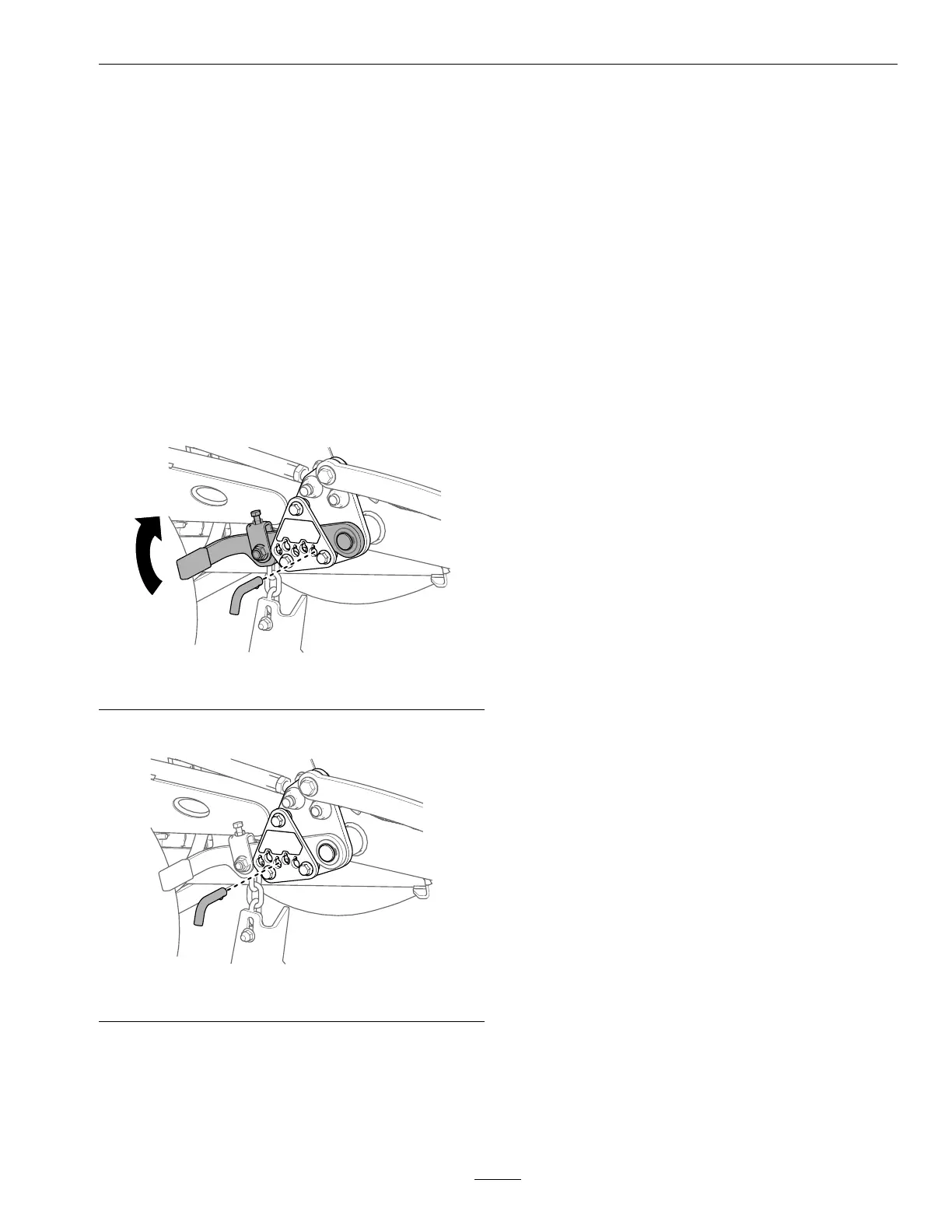
4. On the left or right side of the mac hine , raise the
lev er and remo v e the pin.
g377014
Figure 30
5. Install the pin at the desired position.
g377012
Figure 31
6. R e peat the procedure for the other side of the
mac hine .
Using W eights
• Install w eights to impro v e balance . Y ou can
add or remo v e w eights to create optimized
perfor mance under different operating conditions
and for y our preference .
• Add or remo v e w eights 1 at a time until y ou
ac hiev e the desired handling and balance .
• R efer to the Operator’ s Manual of attac hments for
recommended w eights .
Note: Contact an A uthorized Ser vice Dealer to
order a w eight kit.
Monitoring the
Battery-System Charge
Level
R efer to the main infor mation screen in the messag e
displa y to deter mine the batter y-system c harg e lev el.
• Lo w batter y: W hen the batter y lev el reac hes a
lo w percentag e , a lo w-batter y advisor y appears
on the messag e displa y .
Finish mo wing, then transpor t the mac hine to a
designated batter y-c harging area and c harg e the
batteries .
• Limp mode: If the batter y lev el drops belo w the
set limp-mode batter y percentag e , an advisor y
appears on the messag e displa y , and the mo w er
blades will diseng ag e and cannot be eng ag ed.
T ranspor t y our mac hine to a designated
batter y-c harging area and c harg e the batteries .
• Ultra-limp mode: If the batter y lev el becomes
too lo w during limp mode , an advisor y appears
on the messag e displa y and traction speed
automatically decreases .
T ranspor t y our mac hine to a designated
batter y-c harging area and c harg e the batteries .
R efer to Charging the Lithium-Ion Batteries .
27

 To Next Page
 Loading...