Installation and Operation, cont’d
VTG 400/400D • Installation and Operation2-12
If you press the Menu button while a submenu is active, the next main menu
becomes active. For example, the menu changes from an Audio Setup
submenu (see the following menu) to the Video Setup main menu.
Audio Setup menu
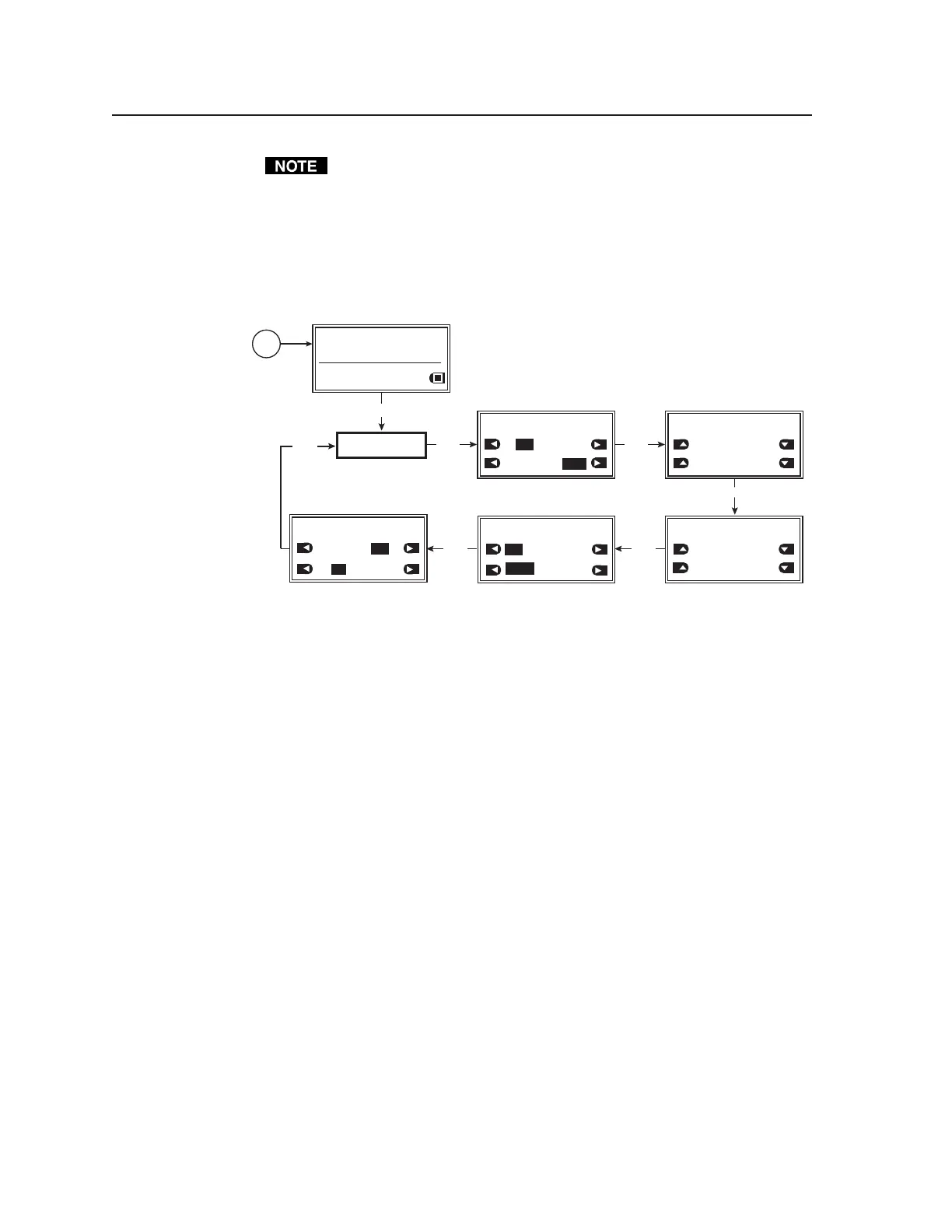
The following flowchart illustrates the Audio Setup menu system. Pressing the
Next button displays the audio setup submenus.
AUDIO
SETUP
MENU
NEXT
Power
on
RES: VGA 640x480
FRQ: 31.50kHz 60.00Hz
PAT: Fine Crosshatch
SIG: Pink noise FRQ: N/A
LEV: -10 dBu 245mV
AUDIO SETUP: <1 of 5>
Audio Level Units:
dBV
Output 2 Enable:
L+R Left
AUDIO SETUP: <2 of 5>
Burst Interval
00001 Cycle
Burst On
00001 Cycle
NEXT
NEXTNEXT
NEXT
dBu
Right
AUDIO SETUP: <3 of 5>
F. Sweep Start Freq:
20.0 Hz
F. Sweep Stop Freq:
112 Hz
AUDIO SETUP: <4 of 5>
F. Sweep Format:
Log Linear
F. Sweep Direction:
Lo->Hi Hi->Lo
AUDIO SETUP: <5 of 5>
Audio Mute:
ON
Square Wave Auto Attenuate
NEXT
ON
OFF
OFF
Audio setup menu
Audio Setup submenu (1 of 5)
Audio level units are specified from this submenu. The output channel(s) of
Audio output 2 is (are) also specified.
Audio level units
Specify the audio level unit for the VTG to display. Choose from among the
following unit types:
• dBu (default)
• dBV
Output 2 enable
Specify the audio channel(s) to be output from Audio output 2 (3.5 mm mini
stereo phone jack). Specify from among the following channels:
• L+R [left and right] (default)
• Left
• Right
Audio Setup submenu (2 of 5)
The interval of the burst cycles and the amount of cycles in each burst are
specified from this submenu.
Burst interval
Specify the number of cycles per burst interval (0 through 65,535 cycles).
Tel. 07131 911201
Fax 07131 911203



 To Next Page