3-19VTG 400/400D • Serial Communication
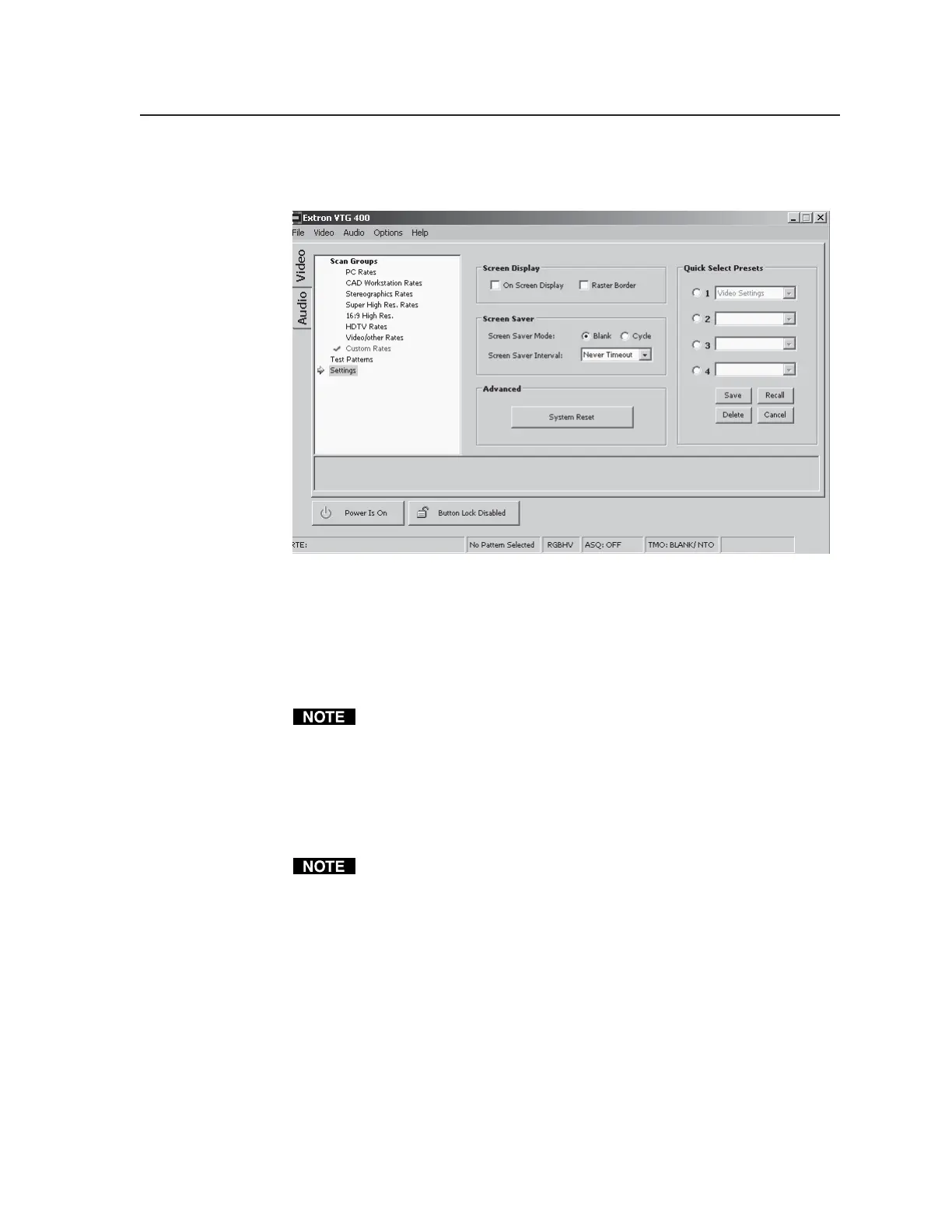
Settings screen
The Settings screen, shown below, features several options:
Screen Display check boxes — Select the On Screen Display check box to
display the rate type, rate frequency and resolution on screen for four
seconds. Select the Raster Border check box to display a black border
around the display image. The border is useful when centering and sizing
the image.
Screen Saver — Select the Blank radio button to display a black screen.
While the screen is blank, the horizontal and vertical sync are still active.
Select the Cycle radio button to cycle through valid test patterns for a specific
video output (see the Test Patterns Chart in Appendix A. Select the Screen
Saver Interval drop down box to set the screen saver timeout interval: 5
minutes, 10 minutes, 15 minutes, 30 minutes, or never time out.
Advanced — Reset the VTG to factory default settings by clicking the System
Reset button.
A system reset does not affect any stored custom rates.
Quick Select Presets — Up to four sets of configuration settings – video, audio,
or all (video and audio) – can be saved (Save Preset) and later recalled
(Recall Preset). Before the save process is completed, the process may be
cancelled (Cancel Preset).
Tel. 07131 911201
Fax 07131 911203



 To Next Page