3-21VTG 400/400D • Serial Communication
Level Scale slider bar — Adjust the audio level range for each signal type by
moving the slider bar up or down or by selecting the left (
) or right ( )
arrow buttons to make incremental adjustments to the audio level.
Audio Mute check box — Select this box if audio is to be muted.
Square Wave Auto-Attenuation Mode check box — Select this box when a
square wave signal should be automatically attenuated to -40 dBu
(-42 dBV) when toggling through the audio signals.
Scale Mode radio buttons — Select dBu or dBV.
Output Channel drop down box — Select the audio output channel(s): left, right,
or both channels.
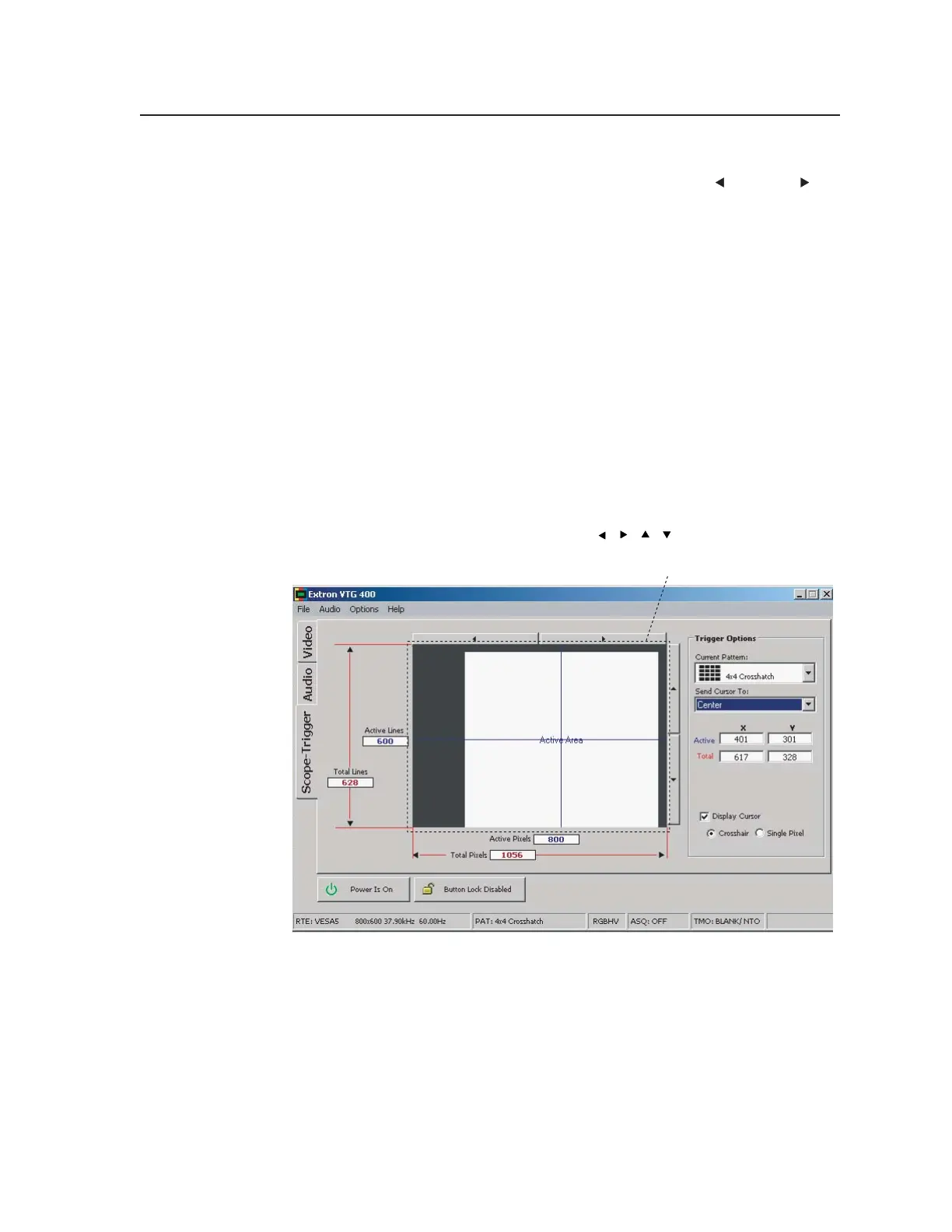
Scope-Trigger tab
The Scope Trigger tab screen, shown below, features the Current Pattern test
pattern drop-down box from which an available test pattern for the current video
rate may be selected. The trigger point’s display cursor can then be activated as
either a crosshair or single pixel, and the cursor can be placed using the Send
Cursor To drop-down box. A specific trigger point can be reached by typing into
the appropriate text boxes its X and Y coordinates relative to the active area or
total area. The cursor can also be placed by clicking in the Scope Trigger Window
display or by clicking the directional arrows (
, , , ) that are located above
and to the right of the Scope Trigger Window display.
Tel. 07131 911201
Fax 07131 911203



 To Next Page