Serial Communication, cont’d
VTG 400/400D • Serial Communication3-18
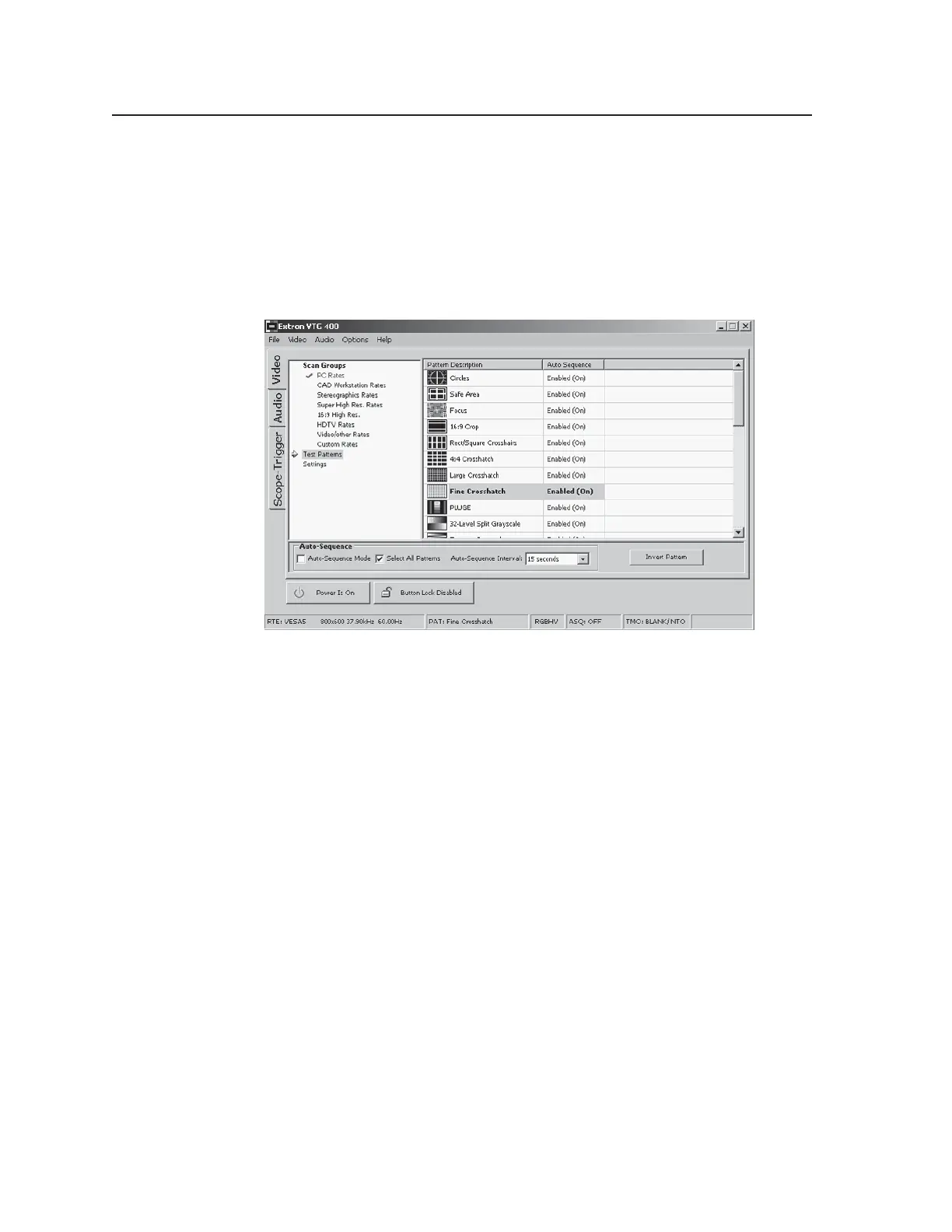
Test Patterns screen
The Test Patterns screen, shown in the following illustration, allows you to select
and activate a test pattern. A test pattern can also be inverted (black becomes
white and vice versa) from this screen.
Test patterns can also be automatically displayed sequentially at set intervals by
selecting the Auto-Sequence mode. A test pattern may be removed from
(disabled) or added to (enabled) the auto sequence list by right-clicking on the
test pattern and choosing the desired option.
Auto-Sequence Mode check box — Enables/disables the Auto-sequence mode.
Select All Patterns check box — Enables/disables all available test patterns for
use in display or Auto-sequence mode.
Auto-Sequence Interval drop-down box — Sets the Auto-sequence interval to 15
seconds, 30 seconds, or 1 minute.
Invert Pattern button — Inverts (black-to-white/white-to-black) the selected test
pattern, if the invert pattern is supported for that pattern.
Tel. 07131 911201
Fax 07131 911203



 To Next Page