Installation and Operation, cont’d
VTG 400/400D • Installation and Operation2-16
Blue
Black
Green
Cyan
Red
Magenta
Yellow
White
off
off
off
off
on
on
on
on
off
off
on
on
off
off
on
on
on
off
off
on
off
on
off
on
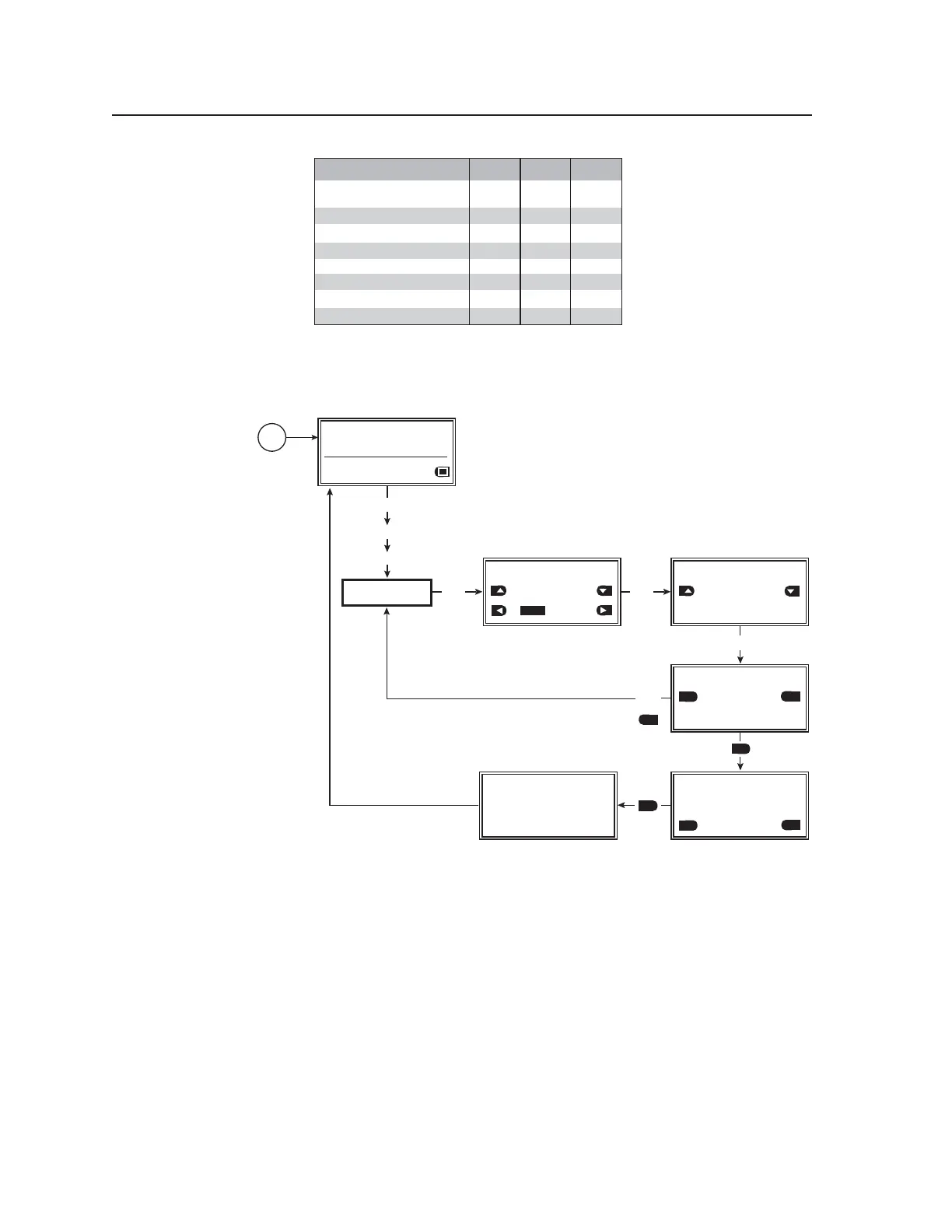
Color Combinations R G B
Advanced Setup menu
The following flowchart describes the Advanced Setup menu.
ADVANCED
SETUP
MENU
MENU
MENU
NEXT
Power
on
RES: VGA 640x480
FRQ: 31.50kHz 60.00Hz
PAT: Fine Crosshatch
SIG: Pink noise FRQ: N/A
LEV: -10 dBu 245mV
ADVANCED SETUP: <1 of 3>
Time-out Interval:
Never timeout
Screensaver Mode:
Cycle
ADVANCED SETUP: <2 of 3>
LCD Display Contrast:
038
Internal Temperature:
-32.0F -00C
NEXT
NEXT
or
NEXT
Blank
YES
ADVANCED SETUP: <3 of 3>
SYSTEM RESET
NO
YES
YES
ADVANCED SETUP: <3 of 3>
SYSTEM RESET
NO
YES
NO
YES
YES
CONFIRM!
YES
Unit Reset to
Factory Default
Advanced Setup menu
Advanced Setup submenu (1 of 3)
The screensaver timeout interval can be specified and the screensaver mode can
be set to either a blank (black)/muted screen or a cycle of test patterns from this
submenu.
Time-out Interval
Specify the screensaver timeout interval:
• 5 minutes
• 10 minutes
• 15 minutes
• 30 minutes
• Never time out (default — screensaver is not activated)
Tel. 07131 911201
Fax 07131 911203



 To Next Page