Maintenance, 3000h
4812164601_C.pdf 2023-01-05
Air cleaner
Check - Replacement of main filter
Replace the air cleaner's main filter when the
indicator shows red. The indicator is located on
the filter, or in its immediate vicinity.
Replace the air cleaner's main filter when the
indicator shows red. The indicator is located on
the filter, or in its immediate vicinity.
3
6
4 5
2
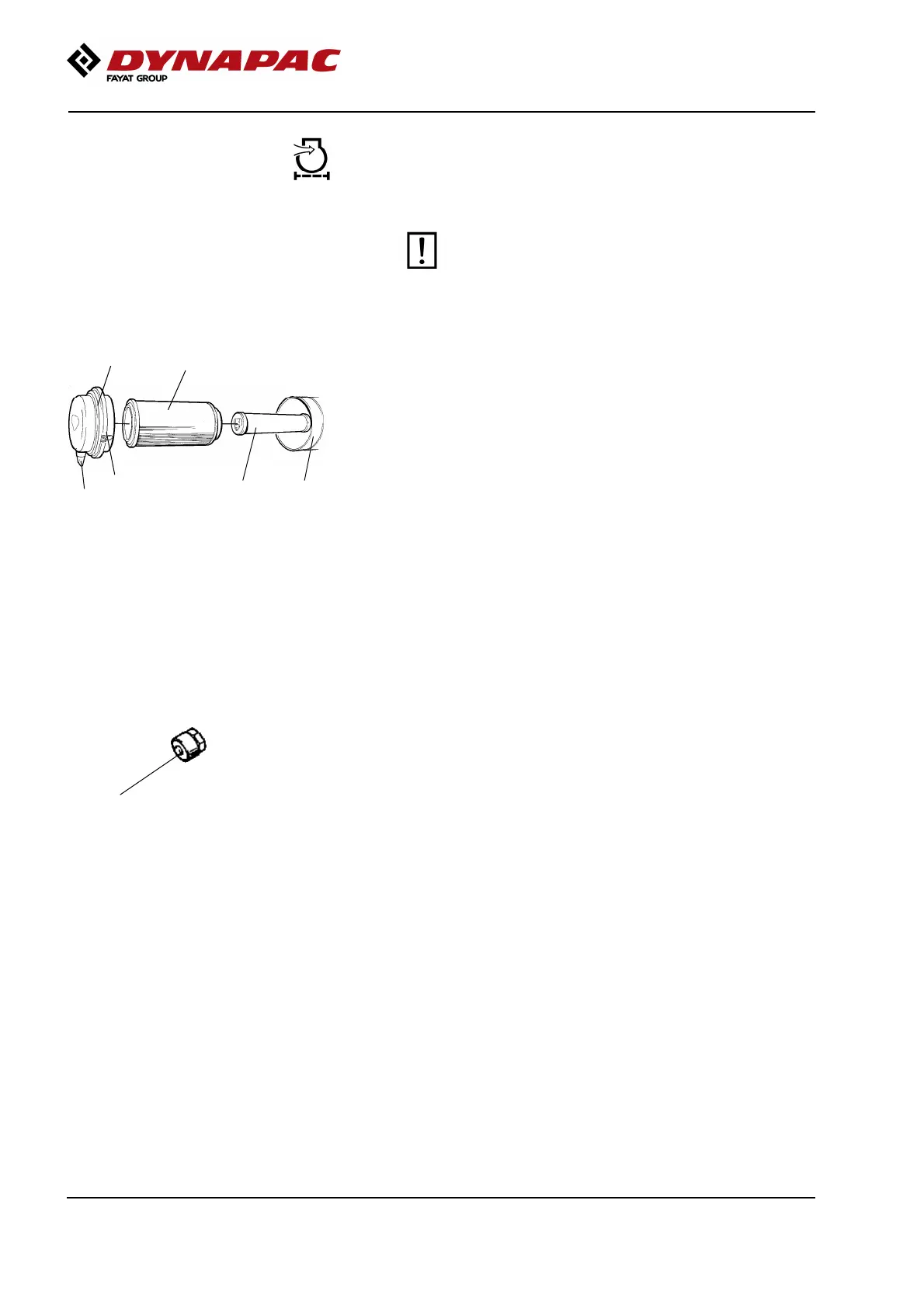
Fig. Air cleaner
1. Clips
2. Cover
3. Main filter
4. Backup filter
5. Filter housing
6. Dust valve
1
Release the clips (1), pull off the cover (2),
and pull out the main filter (3).
Do not remove the backup filter (4).
Clean the air cleaner if necessary.
See section Air cleaner - Cleaning.
When replacing the main filter (3), insert a new filter
and refit the air cleaner in the reverse order.
Check the condition of the dust valve (6).
Replace if necessary.
When refitting the cover, make sure that the dust valve
is positioned downwards.
Air filter indicator - Resetting
1
Fig. Indicator
1. Button
The air filter indicator is located on the filter,
or in its immediate vicinity.
The air filter indicator must be reset after replacing
the air filter.
Press the "button" (1) on the top of the indicator
to reset.
206



 To Next Page