1
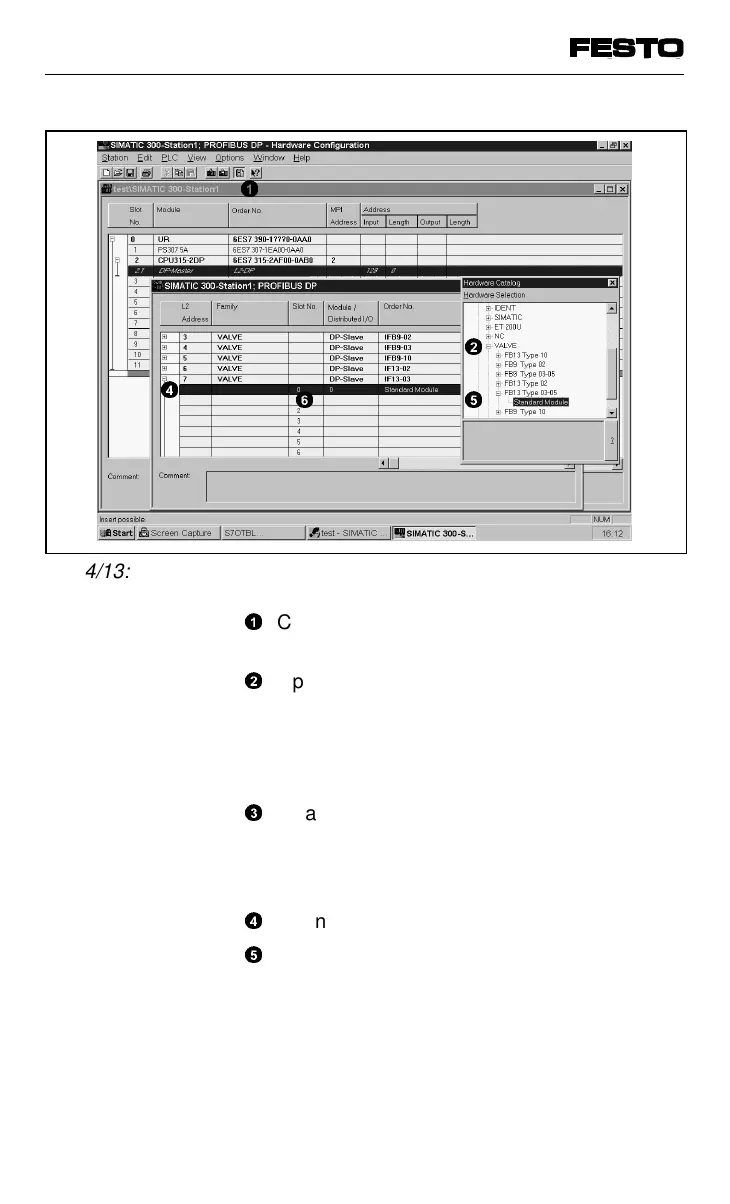
Click the catalogue symbol. You thereby
open the hardware catalogue.
2
Open the directory ”PROFIBUS-DP” -
”Standard slave” - ”Valves”.
Shift the directory ””FB13 type 03-05” to
the next free L2 address in your L2-DP
network.
3
<Mask not shown>
Mask ”Characteristics - SINEC L2 node”:
Enter the station number set on the valve
terminal as ”L2 address”.
4
Open the inserted L2 node.
5
Open the directory ”FB13 type 03-05” in the
menu ”Hardware catalogue”.
1
2
5
4
6
Fig. 4/13: Adding valve terminals
VIFB13 - 03/05 4. Commissioning
4-40
9701 NH



 To Next Page