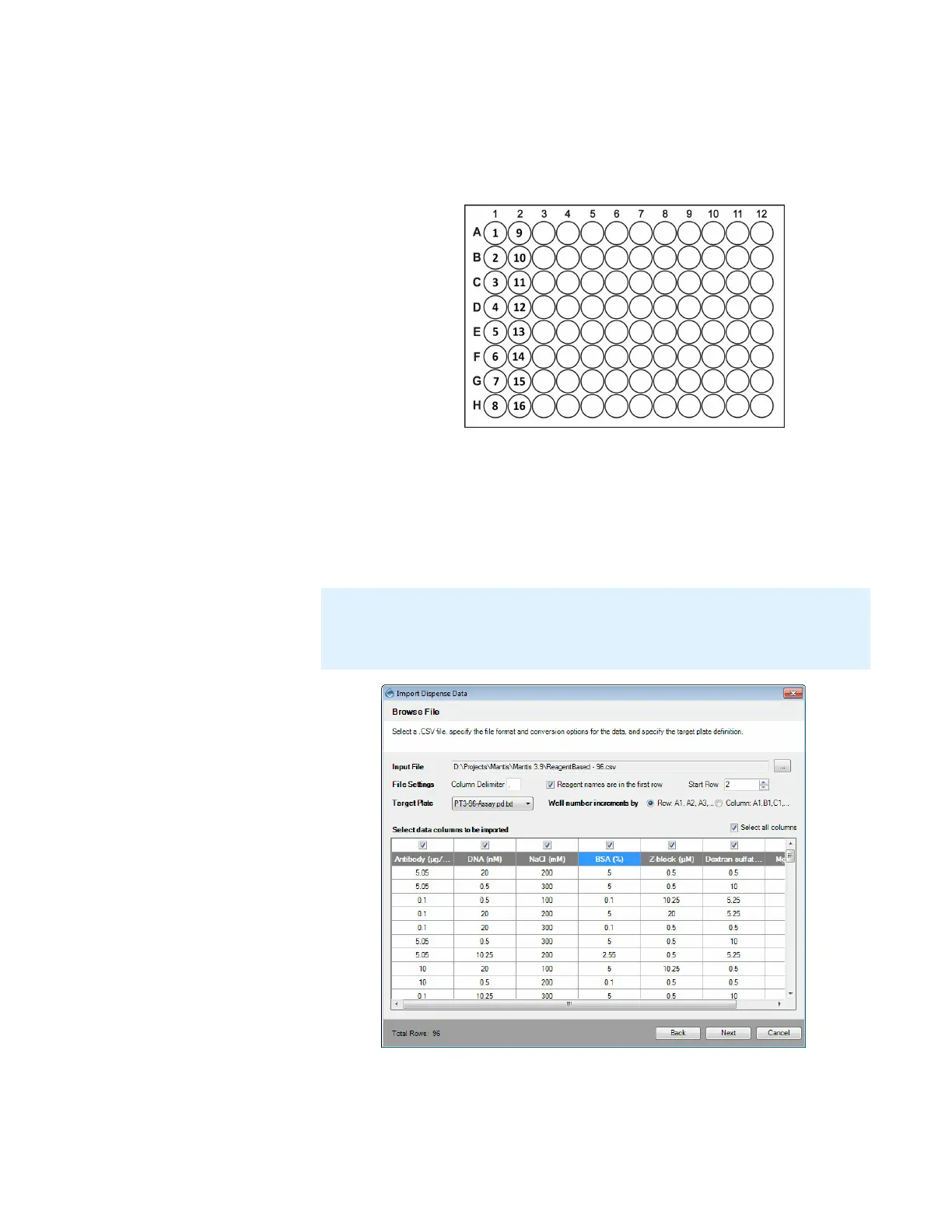
q Well increments by Column: A1, B1, C1 means the wells in your plate
design are numbered top-to-bottom in columns. For example, wells A1
through H1 are numbered 1 to 8 and are represented by the first 8 data
rows of your .CSV file. Wells the next column A2 through H2 are
numbered 9 to 16 well, and so on.
6. OPTIONAL: To change your reagent's name, click on the reagent box and type a
new reagent name.
7. You can select one or several reagent data columns to be imported from the
.CSV by checking the boxes above the columns in the table. To select all
reagents at once, check the Select all columns box at the upper-right corner of
the table. Click Next to proceed.
8. Select from one of the options below:
● Concentration Data: If your current data is a list of concentration values,
select this option to convert it to volume, and then proceed to step 9.
MANTIS User's Guide | Chapter 9: Dispensing With the MANTIS
Note: You cannot proceed to the next step until you have selected one or several
reagents in the Select data columns to be imported table. You can always go back
to this table to modify your reagent selection if you haven’t closed the Import
Dispense Data wizard.
Well number incrementing by Column
Selecting all reagents at once



 To Next Page