Section 2: Activating the security option
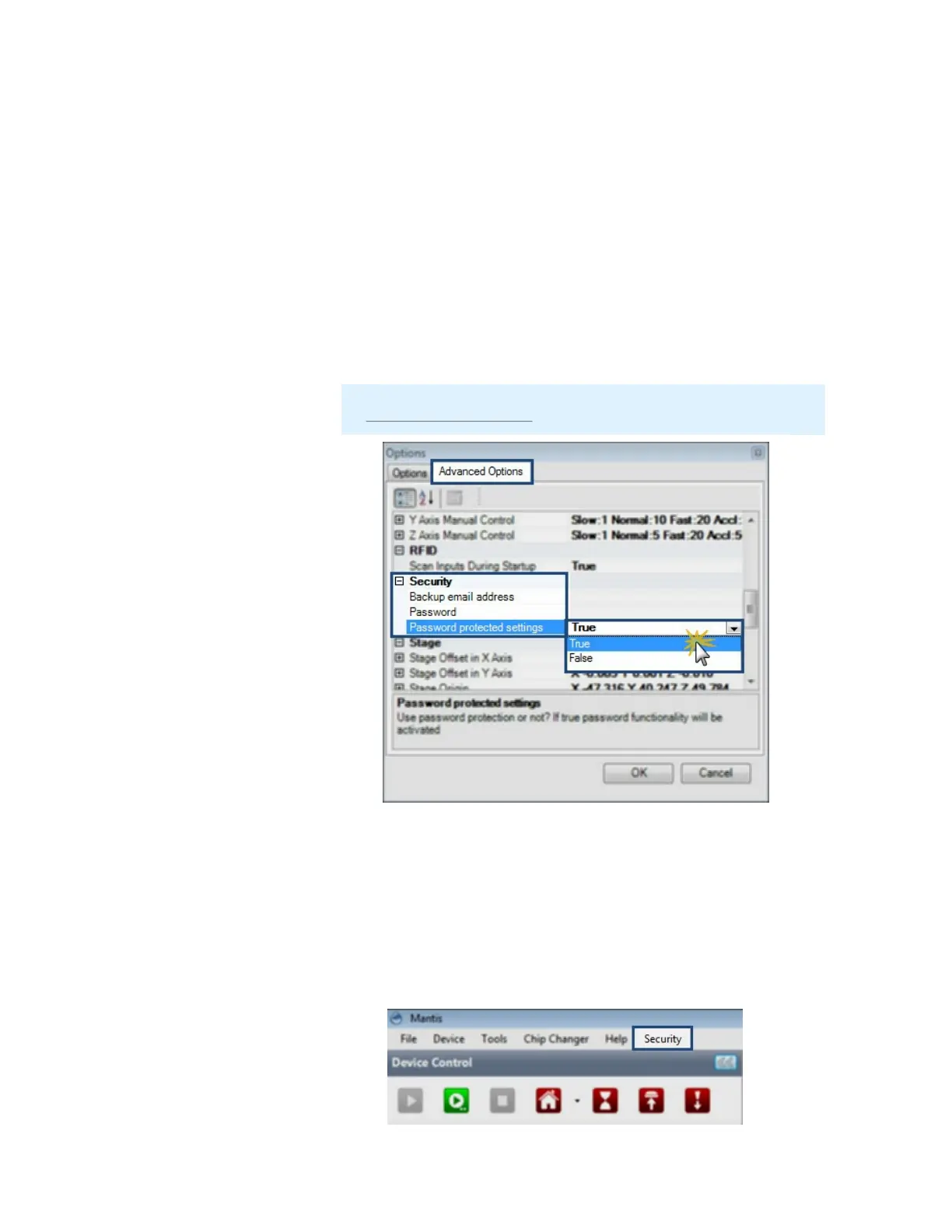
This section explains how administrators can activate and deactivate the security option to
manage the access modes. Activating the security option will enable the Security menu,
where you can switch between the administrator and general user modes. You have to
configure the access settings before activating the security option.
To activate the security option:
1. Go to the Tools menu and select Options.
2. Click the Advanced Options tab.
3. Locate and select the Security option.
4. To activate the security option, select True on the Password protected settings.
5. Click OK to save your changes.
Section 3: Locking and unlocking the dispense settings
This section explains how an administrator can lock and unlock the dispense settings for
switching the access modes. You are required to activate the security option in the
Advanced Options tab. If you activate the security option, the Security menu will appear
after you save the settings.
Note
: At this point, you have only activated the security option. Proceed
to
Lock the Security Settngs
to lock the dispense settings.
MANTIS User's Guide | Chapter 9: Dispensing With the MANTIS
Activating the security option
Security Settings Menu



 To Next Page