Using the Date Book
52 Wrist PDA User Guide
Using the alarm in watch mode
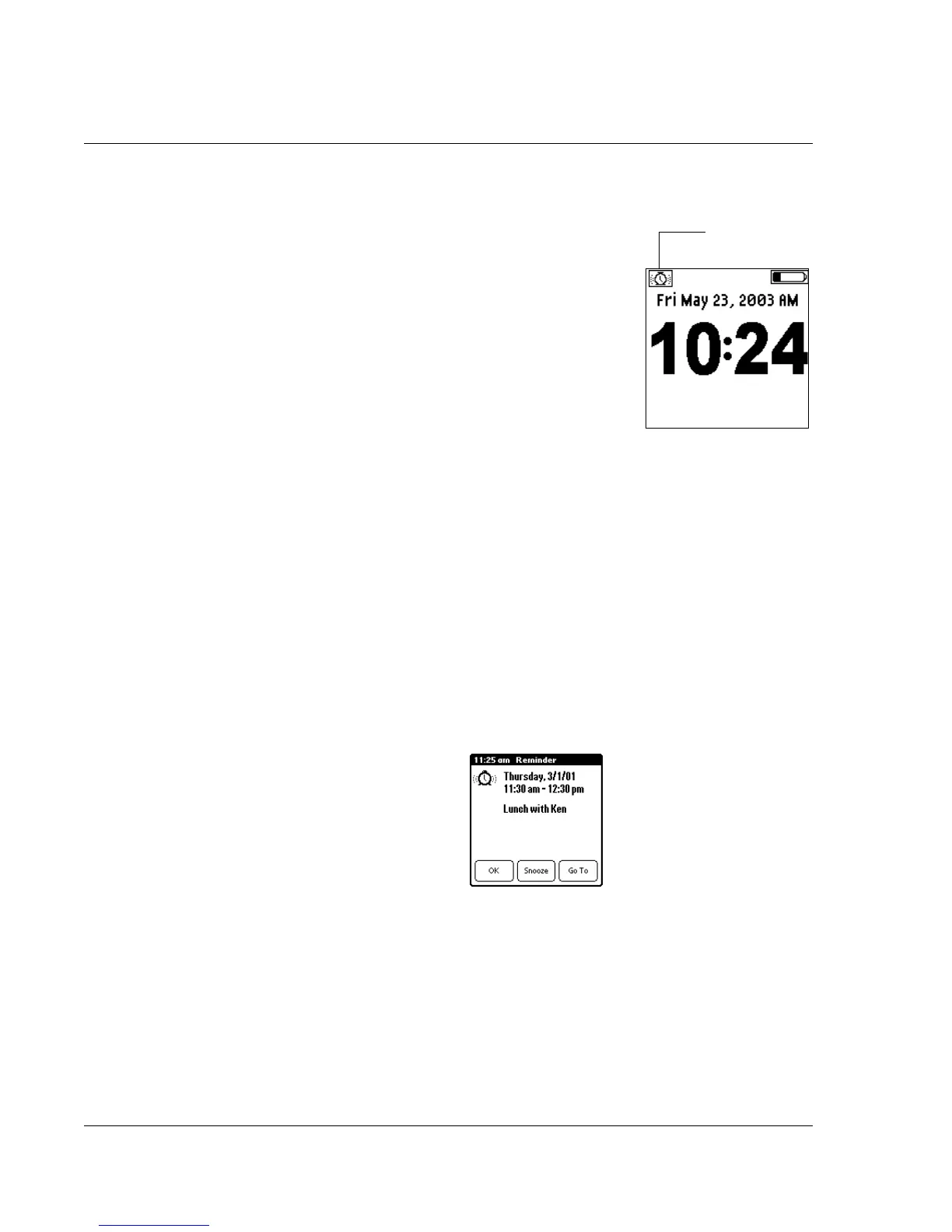
When your Wrist PDA is in watch mode, the
alarm will still run. An alarm icon will
appear on the watch face in the upper-left
corner of the screen to let you know that the
alarm is active. When the alarm sounds, the
watch will beep if you have the Alarm sound
turned on.
To answer the alarm while in watch mode,
wake your Wrist PDA by pressing Rocker
Enter. This switches the watch to PDA mode
and lets you dismiss the alarm or use the
Reminders list screen, as described below.
Dismissing the alarm
Audible alarms sound for about two seconds, but you can interrupt
the sound by tapping anywhere on the screen or by pushing any
button.
For a silent alarm (for untimed events), the blinking indicator
remains onscreen until you tap it to view the Reminders list screen,
then clear any events on the screen (see “Using the Reminders list
screen” below).
When an audible alarm sounds, you see the Reminder screen:
This screen has three buttons for responding to an alarm:
OK: Makes the reminder go away, with no further notification.
Snooze: Switches to the application that was running when the
alarm went off, and returns to the Reminder screen after five
minutes. You cannot change this time interval, but you can go back
to the Reminder screen right away by tapping the blinking indicator
Alarm icon













 To Next Page