Using the Date Book
Wrist PDA User Guide 53
in the upper-left corner of the screen (see “Understanding the
blinking alarm indicator” below).
Go To: Lets you see details of the event in the Date Book. This
cancels the alarm, and there is no further notification.
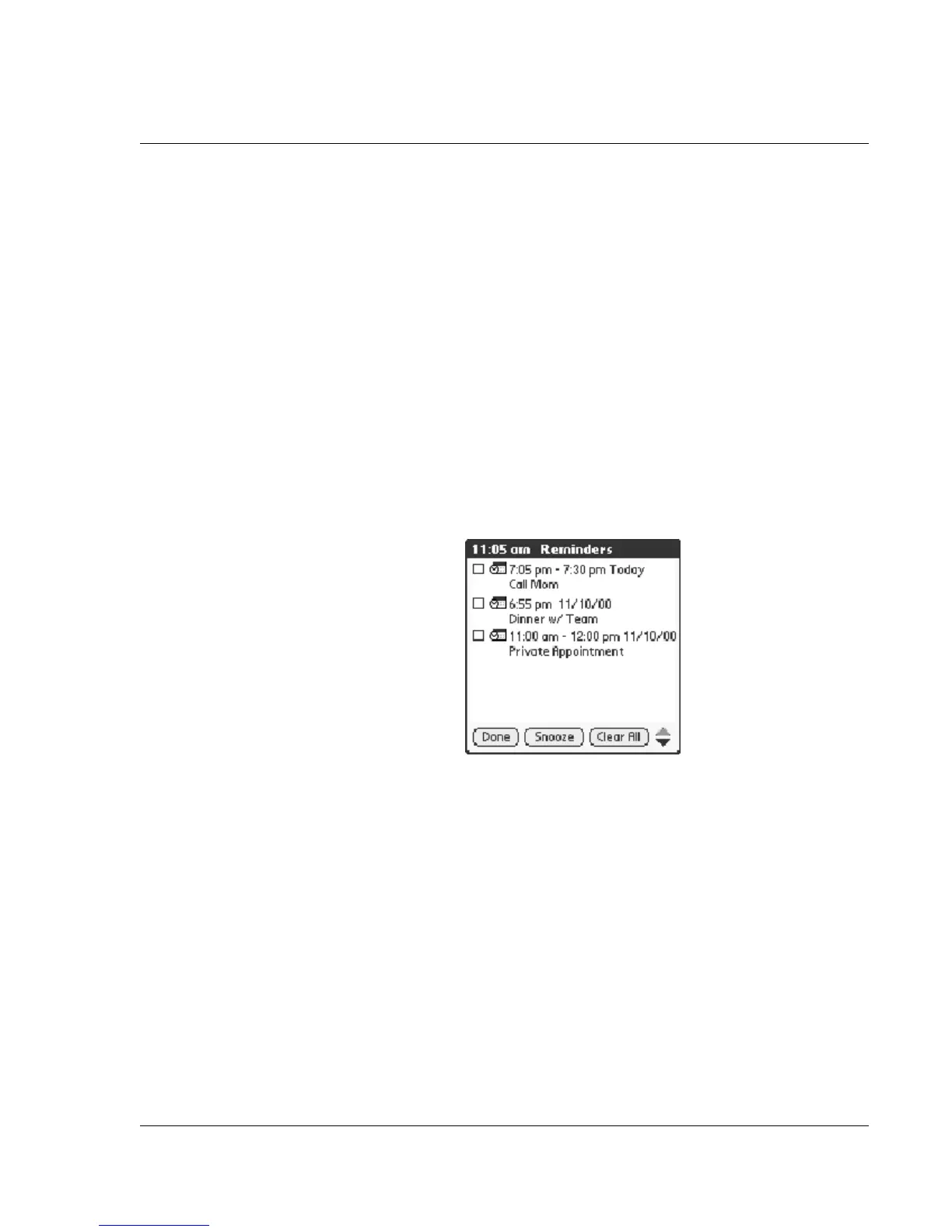
Using the Reminders list screen
The Reminder screen changes to a Reminders list of items that
require your attention if you did not dismiss or snooze an alarm for
one event, and another alarm sounds for a second event. If there is a
blinking indicator in the upper-left corner of the screen, tapping it
also displays the Reminders list (see “Understanding the blinking
alarm indicator” below).
Each listed reminder contains the date and time of the event, with a
description beneath it.
Tapping on the text or icon goes to that item in the Date Book and
deletes the event from the Reminders list screen.
Tapping the check box clears that item, similar to a To Do list item.
The watch will draw a line through the text, pause for a moment,
and them remove the item from the list, although the original data
remains in the Date Book.
The Reminders list screen has three buttons:
Snooze: Puts the Reminders list screen to sleep for five minutes.
After this time interval, the Reminders list screen is displayed again.
You can go directly to the Reminders list screen without waiting, by
tapping on the blinking alarm indicator. See “Understanding the
blinking alarm indicator” below.













 To Next Page