System expansio ns
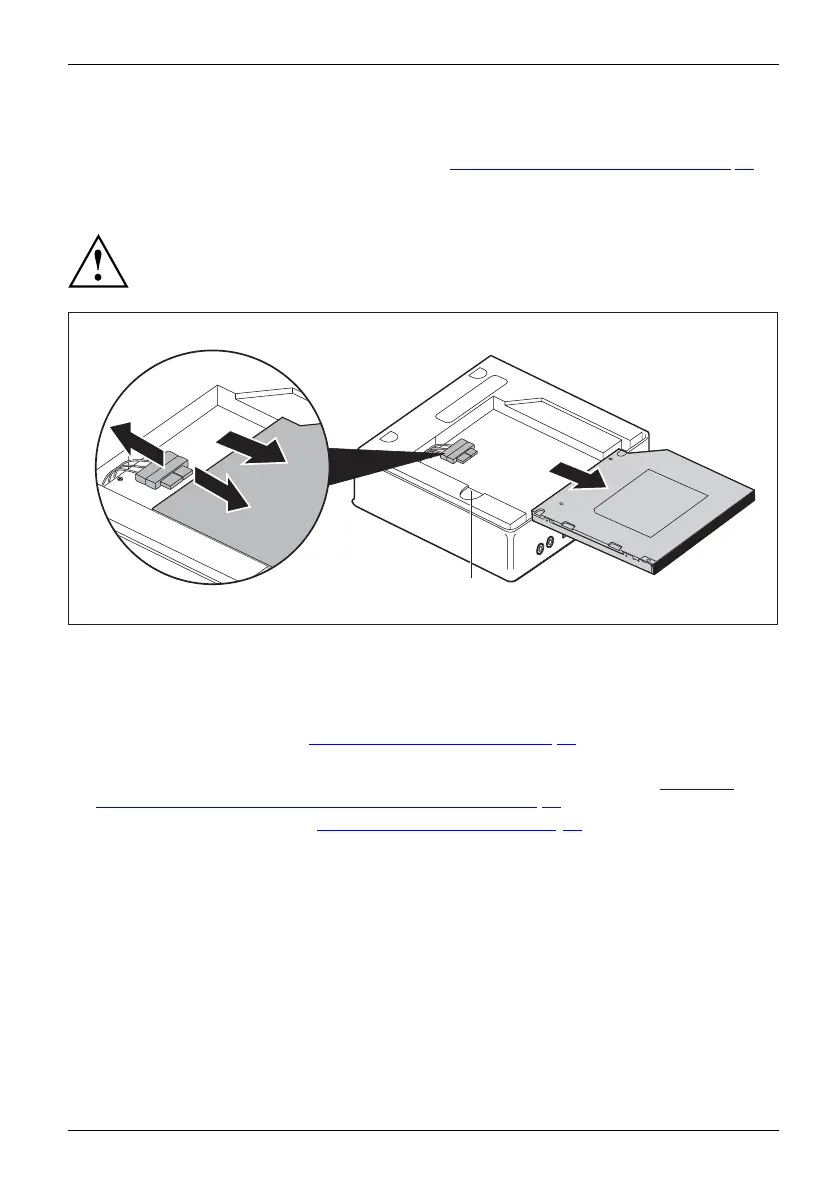
Removing the optical drive
• The top casing cover has been removed (refer to "Removing t he casing top cover", Page 66).
Removing the drive
Ensure tha t you do not pull strongly on attached leads.
3
2
2
1
a
► Press and hold the release button (a) and carefully slide the optical drive slightly in the direction
of the arrow (1) until th e drive and casing contacts and cables are accessible.
► Detach the cables from the drive (2).
► Lift the drive out of the drive bay (3).
► Remo ve the drive cage (see "
Removing the drive ca ge", Pa ge 68).
► Detach the plug for the drive cables from the drive cage by pulling it through the opening.
► Detach the drive leads from the moth erboard ( see graphic on slots in S ection "
Overvie w
of the installation openings and drives in your device", Page 62).
► Rei nstall the drive cage (see "
Installing the drive cage", Page 69). Take
care that no cables get jammed.
Fujitsu 73



 To Next Page
 Loading...






