Working with the Tab let PC
SIM card
A SIM Card (Subscriber Identity Module) is a chip card w hich is inse rted in a cellular phone o r Tablet
PC and, together with an integrated 4G module, enables a ccess to a ce llular radio network.
Follow the instructions supplied by the provider of the SIM card. If you do not feel the
the S IM card engage as you insert it, use a pointed object to insert the SIM card.
Please note that the SIM card format must be micro-SIM (3FF). Other SIM
card formats, such as full-size (1FF), mini-SIM (2FF) or nano-SIM (4FF) do
not fit in the SIM card slot of y our Tablet PC.
Please do not insert any other fo rmat of SIM card as they may become
twisted, they could even damage the system.
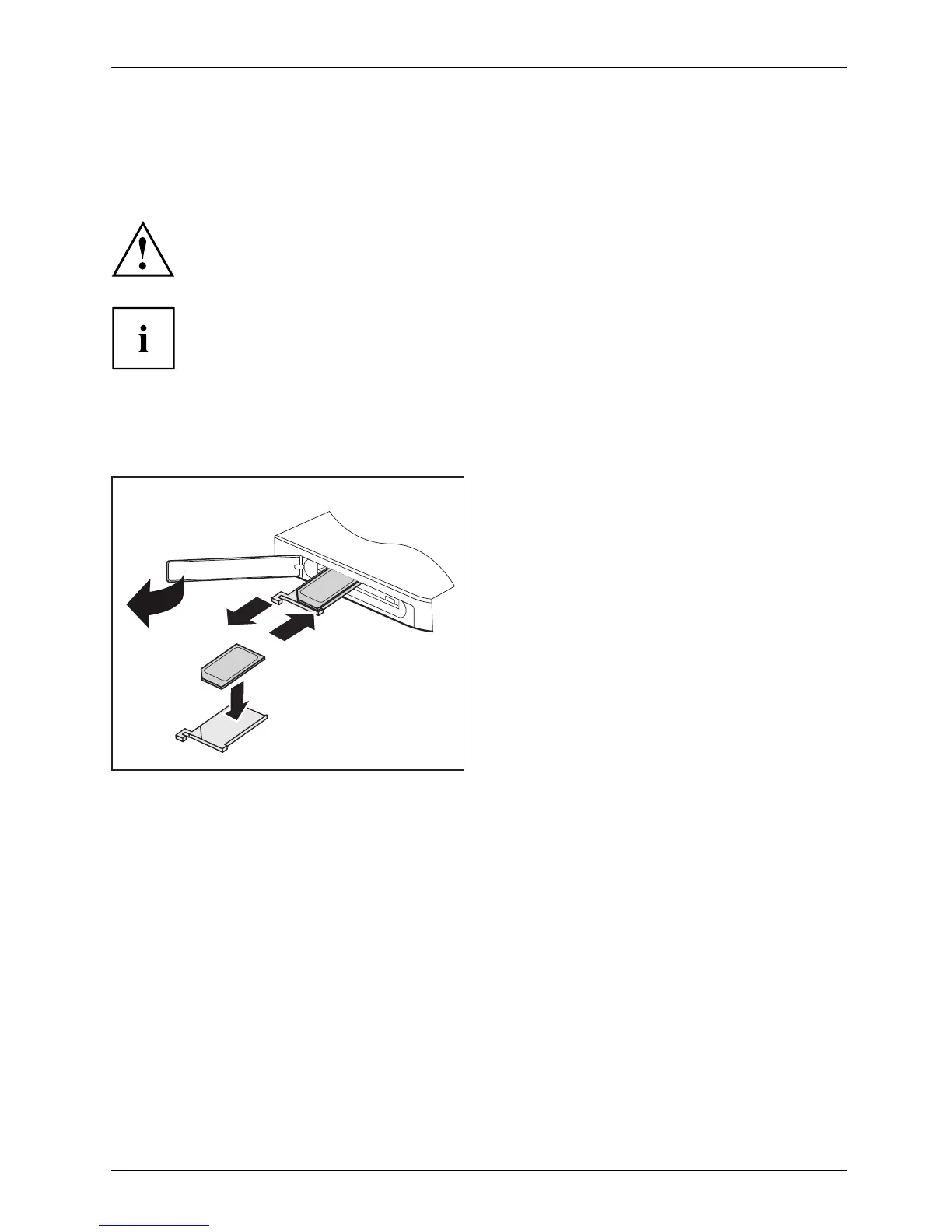
Inserting a SIM card
1
2
4
3
► Open the slot cover
(1).
► Remove the SIM card carrier from
its location (2).
► Insert the SIM ca
rd (3) as shown on
the SIM card carr
ier.
► Push the SIM card carrier back into
its location (4).
► Close the slot
cover.
Fujitsu 39



 To Next Page
 Loading...











