5. INPUT/OUTPUT SETUP
5-2
5.2 CAN bus Devices Status
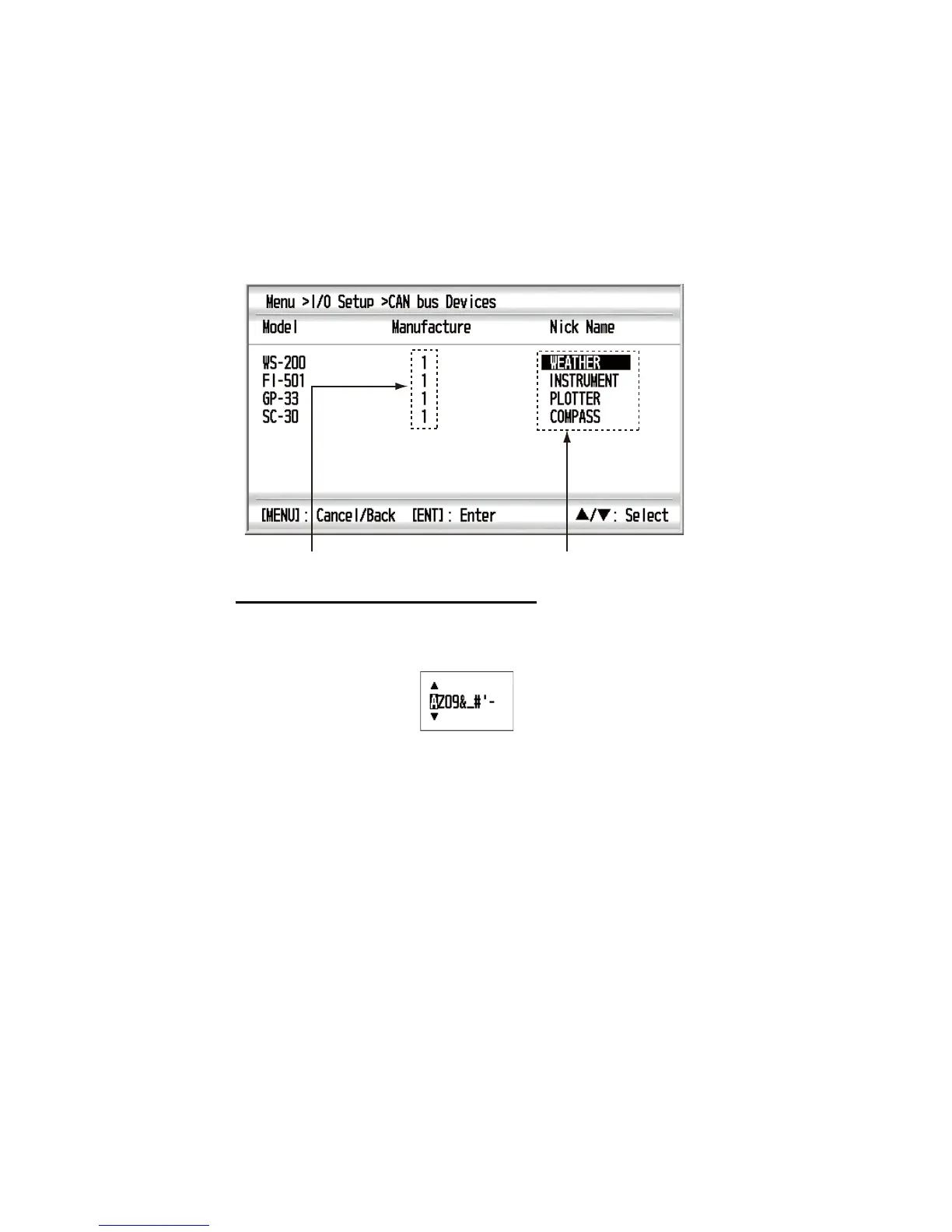
You can display the status for up to 30 CAN bus devices connected. You can nick-
name each device and these nicknames are used on the [Data Source] screen (see
section 5.3).
1. Press the MENU key to open the menu.
2. Use the Cursorpad (S or T) to select [I/O Setup] and press the ENT key.
3. Use the Cursorpad (S or T) to select [CAN bus Devices] and press the ENT key.
How to nickname the CAN bus device
1) Use the Cursorpad (S or T) to select the nickname desired and press the
ENT key.
2) Use the Cursorpad to change the nickname. The available characters are "A
to Z", "0 to 9", "&", "_", "#", " ’ ", "-", ">" and " (space)". Set the nickname within
10 letters.
S, T: Change the figure.
W, X: Move the cursor for digit.
3) Press the ENT key.
4. Press the DISP key to close the menu and display the data screen.
Maker’s code of CAN bus device Can be nicknamed.


 To Next Page