6. POSITION/TD SETUP, LAYLINES
6-2
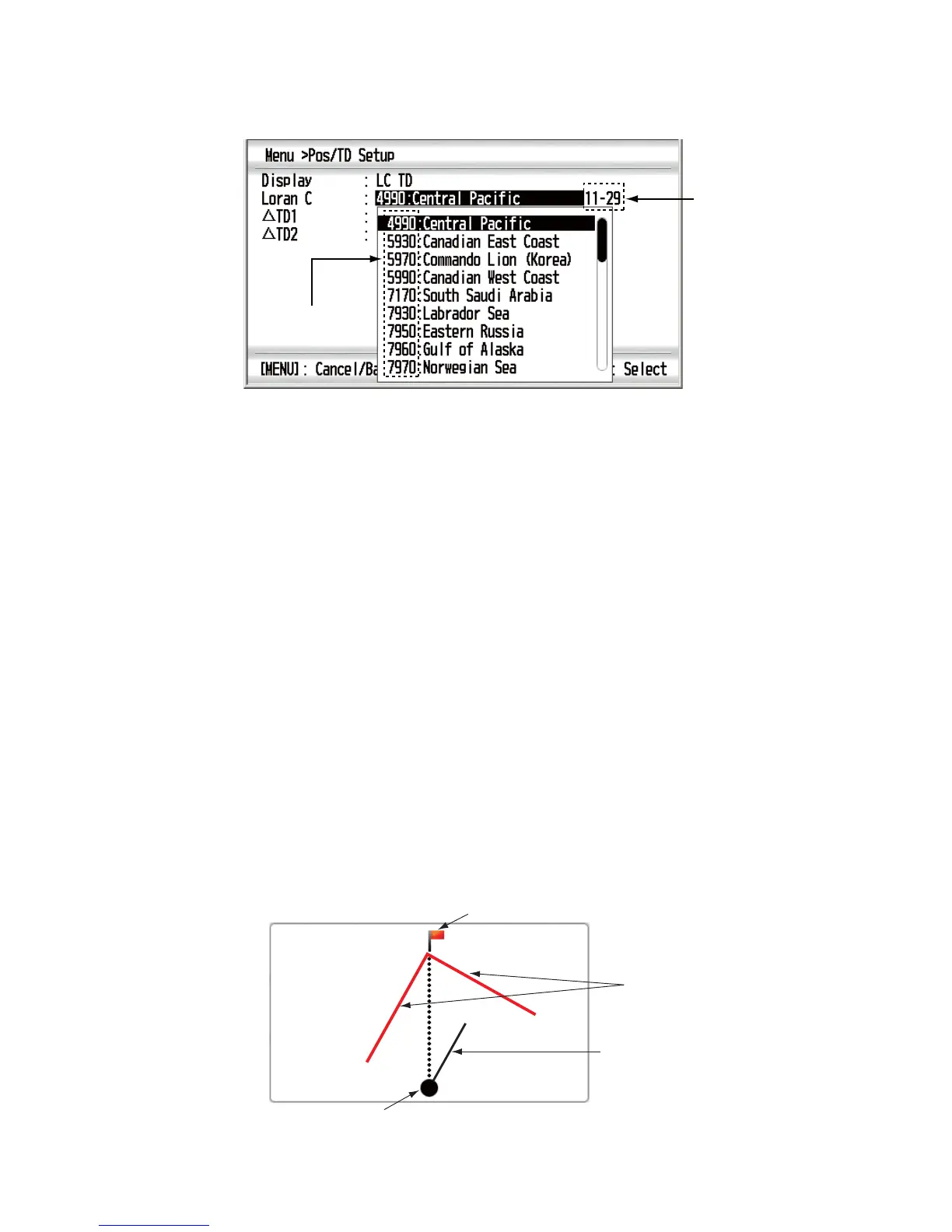
5. If you selected [LC TD], do the following steps.
1) Use the Cursorpad (S or T) to select [Loran C] and press the ENT key.
2) Use the Cursorpad (S or T) to select the GRI (Group Repetition Interval)
code desired and press the ENT key.
3) Use the Cursorpad (X) to move the cursor to the slave station pair field then
press the ENT key.
4) Use the Cursorpad (S or T) to select a slave station pair then press the ENT
key. If you know the offset, do steps 5 to 7 to display the more detailed position
data.
5) Use the Cursorpad (S or T) to select [UTD1] and press the ENT key.
6) Use the Cursorpad to set the offset and press the ENT key.
7) Repeat steps 5 and 6 to set the offset for [UTD2].
6. Press the DISP key to close the menu and display the data screen.
6.2 Laylines
Laylines are the two lines toward the right and left with reference to the ground wind
around the destination waypoint. You can display the past lines depending on the
changing laylines.
If you selected [Laylines] as the data screen, the data for VMG, SOG, RNG, BRG,
TWS, AWS and Timer1 are displayed with the analog laylines data.
Note: Laylines data is not available for split screen
GRI code
Slave station
pair
Destination waypoint
Laylines
Your ship
’
s position
COG line
WP0001



 To Next Page