Guntermann & Drunck GmbH Operating Instructions
CATVision (MC)
Then connect the other end of the CPU-x cable (MDR 20 = Mini
Delta Ribbon 20pole) with the interface VGA Keyb. Mouse CPU of
CATVision.
Connection of the transmission cable
Connect the K-C7-x extension cable to the TRANSMISSION (jack)
interface of the transmitting unit.
Connection of the local console
Connect the connector of the local keyboard
and the local mouse to
the keyboard interface or rather MOUSE PS/2 at the transmitting unit
CATVision-CPU.
Connect the local monitor to the MONITOR jack.
3.1.1 Videoconnection at CATVision-MC-CPU
Connect the 15 pole Sub HD connector of the VGA-M/M-2-cabel to
the additional VGA interface of the computer.
Then connect the other end of the VGA-M/M-2-cabel with the
interfaces VGA CPU 2 – 4.
3.1.2 Optional Connections
Keyb PS/2.
Mouse PS/2
Monitor
CPU
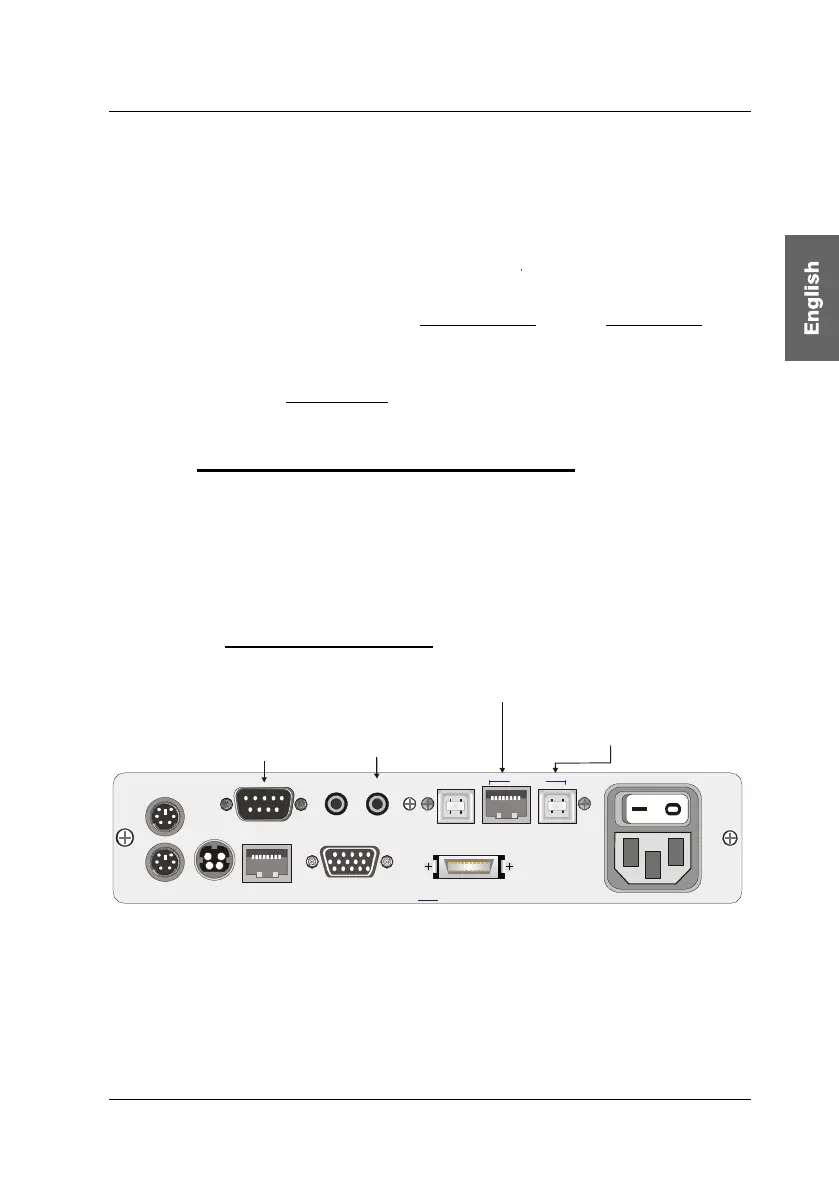
Line In Line OutRS 232
VGA Keyb. Mouse CPU
Tra ns
USB K/M
CPU
USB 1.1
Transmission12V DC/0,6A
Red. Power
100-240V/60-50Hz
140-82mA
Connection to the USB-Port
of the local PC
Port for the
RS232-M/F-2 to the serial
port of the local PC
Audio connection
via Audio-M/M-2
Connection for the CAT-x cable
K-C7-x for USB 1.1
Connection of RS232
Connect the RS232-M/F-x connecting cable (x=2, 4, 6 or 9 m) with a
COM interface of the computer and the RS232 interface (optional) of
the CATVision-CPU (seizure 1:1).
page 9



 To Next Page