Guntermann & Drunck GmbH Operating Instructions
CATVision (MC)
4 Power Supply
4.1 In general
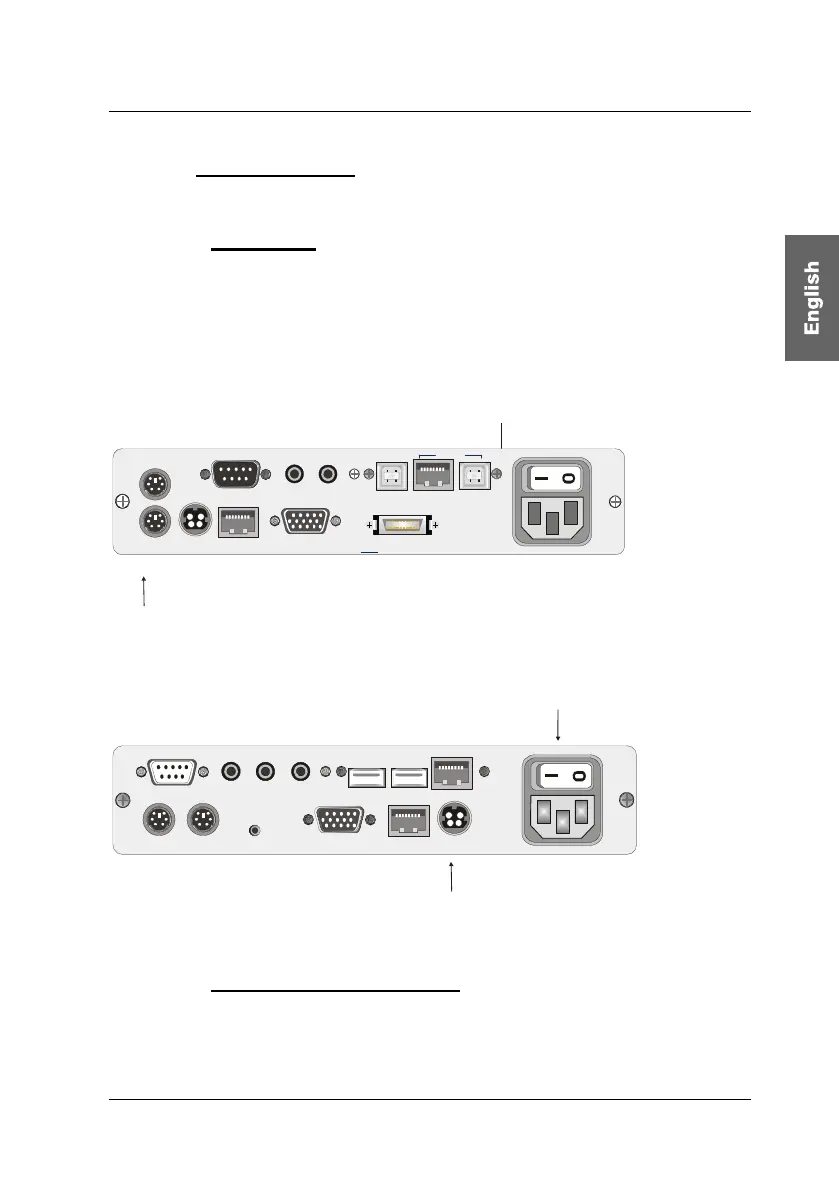
Connect the delivered power cables to the Main POWER jack of the devices
(CATVision-CPU and CATVision-CON).
As an option you can connect a redundant power via Optional Red. Power
jack. For this use the power set Power-Set 12/Typ 2 (available as option).
Connection for the
main power supply
Connection for the optional
redundant power supply
Keyb PS/2.
Mouse PS/2
Monitor
CPU
Line In Line OutRS 232
VGA Keyb. Mouse CPU
Trans
USB K/M
CPU
USB 1.1
Transmission12V DC/0,6A
Red. Power
100-240V/60-50Hz
140-82mA
Rear view of CATVision-CPU
Connection for the optional
redundant power supply
Connection for the
main power supply
Line In Micro InRS 232 Speaker
Keyb. MousePS/2
12V DC/0,9A
Monitor Transmission
Red. Power
Service
Keyb. Mouse USB
USB Trans
100-240V/60-50Hz
0,24-0,1A
Rear view of CATVision-CON
4.2 Note for USB-operation
Only high-Power USB devices (up to 500 mA) are supported by the
CATVision-System.
page 13



 To Next Page