Guntermann & Drunck GmbH Operating Instructions
CATVision (MC)
Connection of Audio
Connect the Audio-M/M-2 connecting cable with the line-out interface
of the computer (or another audio device) and the Line IN interface
(optional) of the CATVision-CPU.
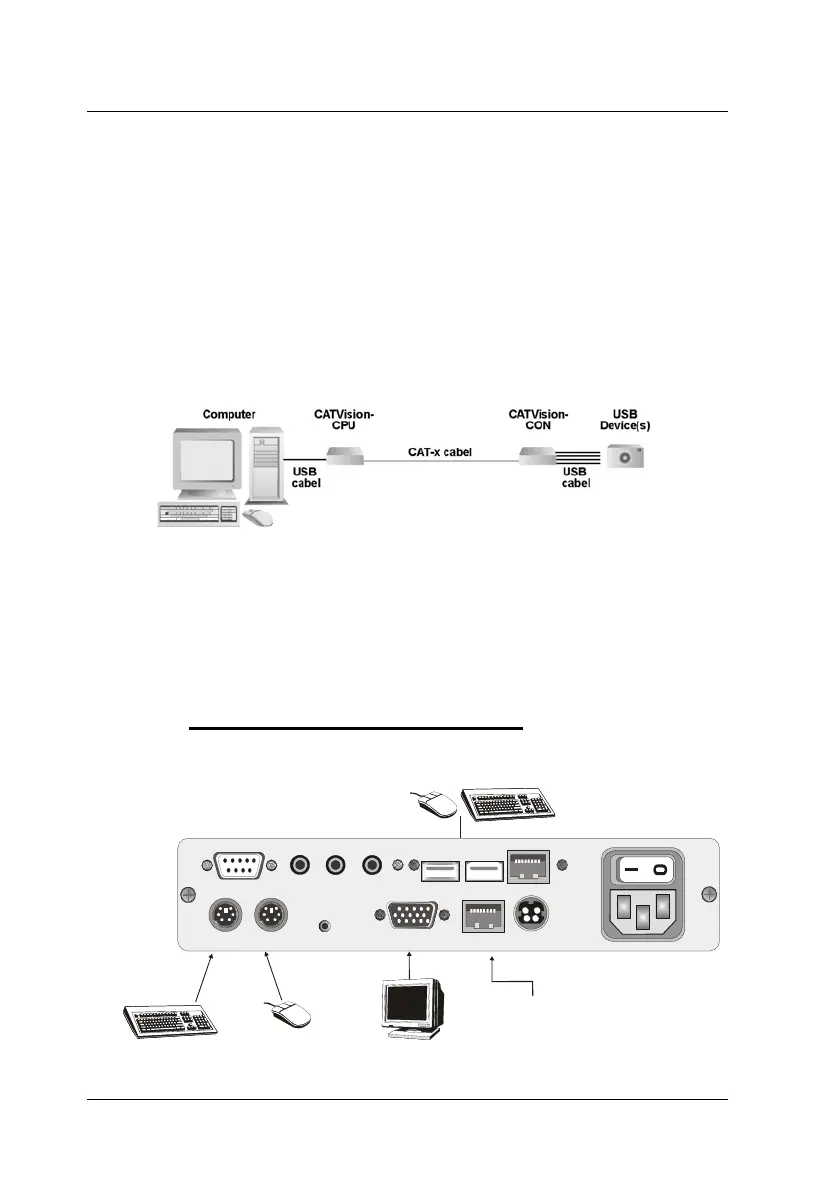
Connection of USB1.1
Connect the jack USB - Typ B of the delivered USB-cabel to the
interface CPU of the CPU unit. Connect the TYP A jack of the USB-
cabel with the appropriate USB-Port of the local PC.
Connection of the transmission cable
Connect the K-C7-x extension cable within the USB 1.1 section to the
TRANS (jack) interface of the transmitting unit.
Special note to the compatiblity of the transparent USB 1.1
connection:
The USB-conncection complies with the specification of the USB 1.1
standard, which defines the design of USB full-speed devices.
However, we do not gurantee, that all USB full-speed devices are
compatibel to the CATVision.
3.2 Installation of the receiving unit
Port of the keyboard
for the remote console
Connection for the
CAT-x cable to the
CATVision-CPU
Mouse port
for remote console
Port for the monitor
of the remote console
Connection for keyboard/mouse
of the remote console
Line In Micro InRS 232 Speaker
Keyb. MousePS/2
12V DC/0,9A
Monitor Transmission
Red. Power
Service
Keyb. Mouse USB
USB Trans
100-240V/60-50Hz
0,24-0,1A
page 10



 To Next Page