Guntermann & Drunck GmbH Operating Instructions
CATVision (MC)
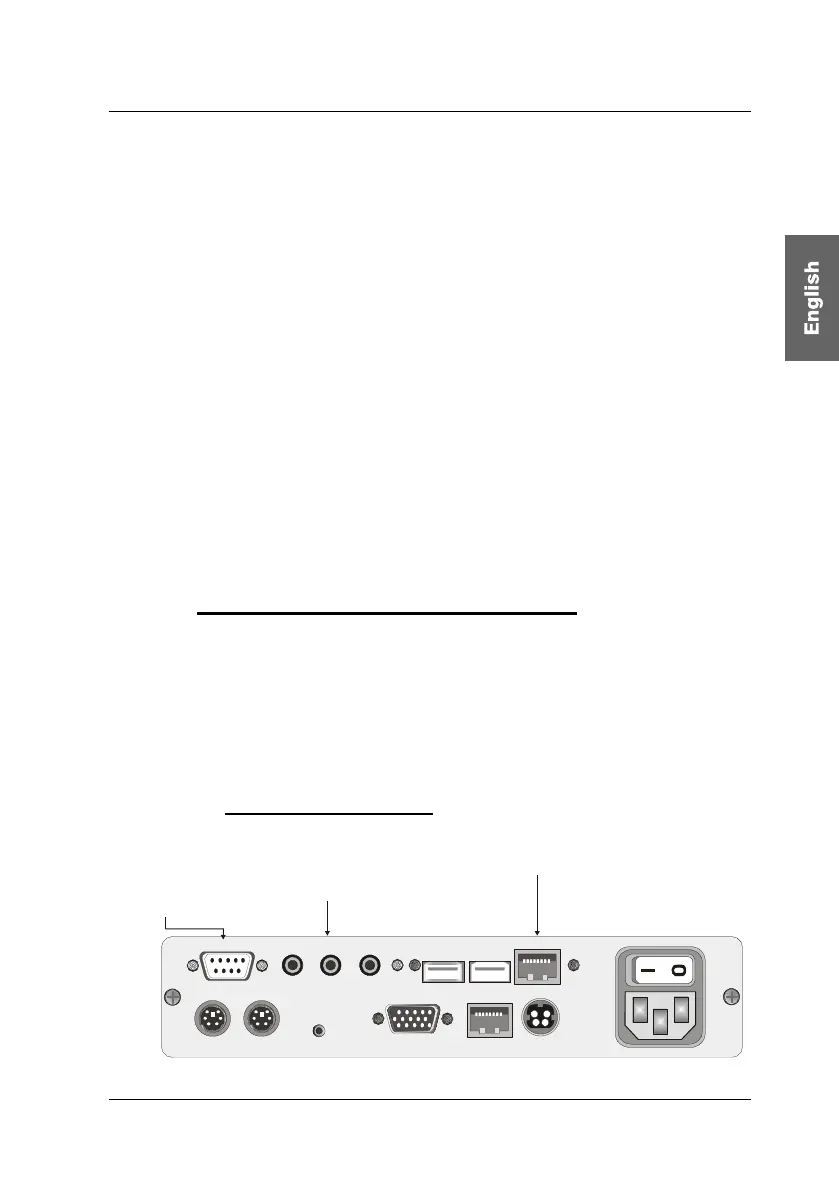
Set up the receiving unit.
Connect the K-C7-x extension cable to the TRANSMISSION interface
of the receiving unit CATVision-CON.
Connect the monitor to the MONITOR jack.
Connect the keyboard to the Keyb. interface at CATVision-CON.
Connect the mouse to the MOUSE PS/2 jack.
As an option you have the possibility to connect keyboard and mouse
(also SUN-USB-keyboards) via USB. For this connect keyboard and/or
mouse with the USB-interfaces Keyb. USB Mouse at the backside of
CATVision-CON.
Don´t use the USB-interfaces at the frontside of CATVision-CON for
keyboard- mouse connection. The usage of these USB-interfaces is
restricted to a usage as a transparent USB-transmission to the local
PC.
3.2.1 Videoconnection at CATVision-MC-CON
Connect the K-C7-x extension cable to the TRANSMISSION interface
TRANSMISSION 1 – 4 of the receiving unit CATVision-MC-CON.
Consider the correct assignment of the videochannels!
Connect the monitors to the monitor jacks MONITOR 1 - 4.
3.2.2 Optional Connections
Line In Micro InRS 232 Speaker
Keyb. MousePS/2
12V DC/0,9A
Monitor Transmission
Red. Power
Service
Keyb. Mouse USB
USB Trans
100-240V/60-50Hz
0,24-0,1A
Connection for microphone,
speakers and another
audio device
Connection for another
serial device
Connection for the CAT-x cable
K-C7-x for USB 1.1
page 11



 To Next Page